
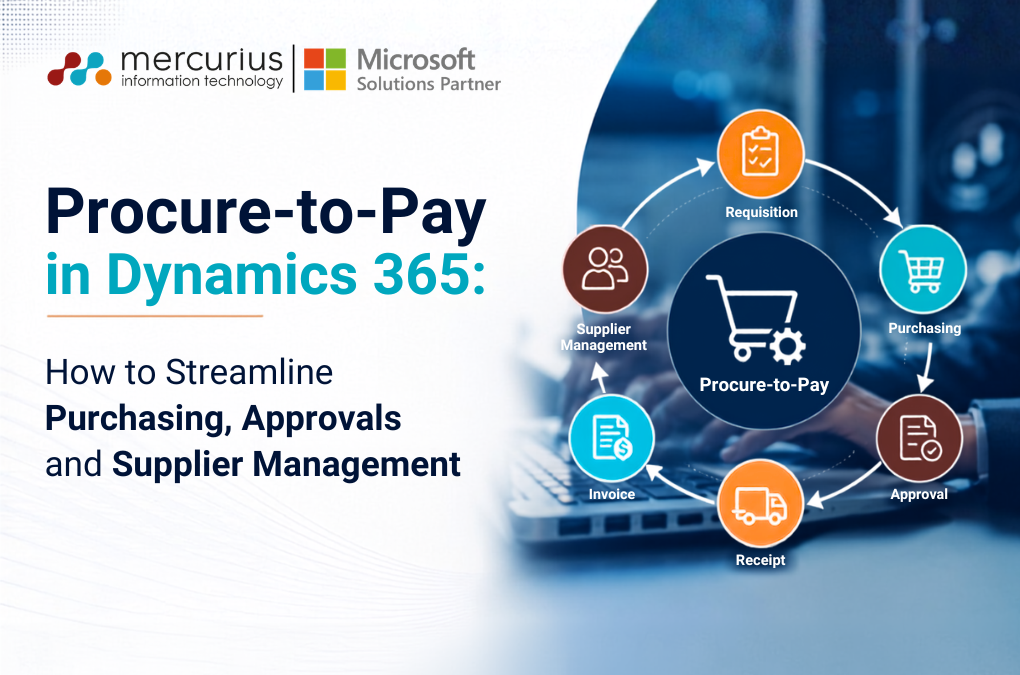
Quick Summary
P2P is broken in most organisations, not because of bad tools, but because of email chains, no budget visibility, and manual invoice matching. Business Central fixes the process. AI agents remove the manual work. This is how we implemented it for a live client: requisition to payment, with three AI agents doing the heavy lifting.
Key Takeaways
- The procure-to-pay process begins before the purchase order is issued and concludes once the supplier has been paid.
- Do not automate an inefficient procurement process. First, ensure you understand and address any underlying issues.
- Implementing three-way matching transforms Accounts Payable from basic transaction processing to a function of financial control.
- AI should automate repetitive P2P tasks while maintaining essential business controls and approvals.
- Success is not determined by the speed of purchase order creation, but by effective spend control from requisition through to payment.
Most organisations don’t struggle with purchasing itself. The real issue is a lack of visibility.
If you ask a finance leader what’s been committed this quarter but hasn’t been invoiced yet, most will have to scramble to find the answer.
This is what happens when there’s no system to enforce P2P:
- Requests come in through email and Excel files
- Commitments are often unknown until the invoice arrives
- Approvals are managed through personal inboxes rather than within the system
- Unapproved spending often goes unnoticed
- Invoices are paid before verifying actual delivery
These aren’t people problems. They’re process problems, and they get worse with every purchase cycle.
P2P isn’t just about purchasing. It’s really a financial control process.
When you treat it that way, Dynamics 365 Business Central becomes the system that enforces your process, not just the one that records it.
What is Procure-to-Pay in Dynamics 365 Business Central?
P2P starts before the Purchase Order and ends after the supplier is paid.
That single sentence trips up more implementations than any technical gap.
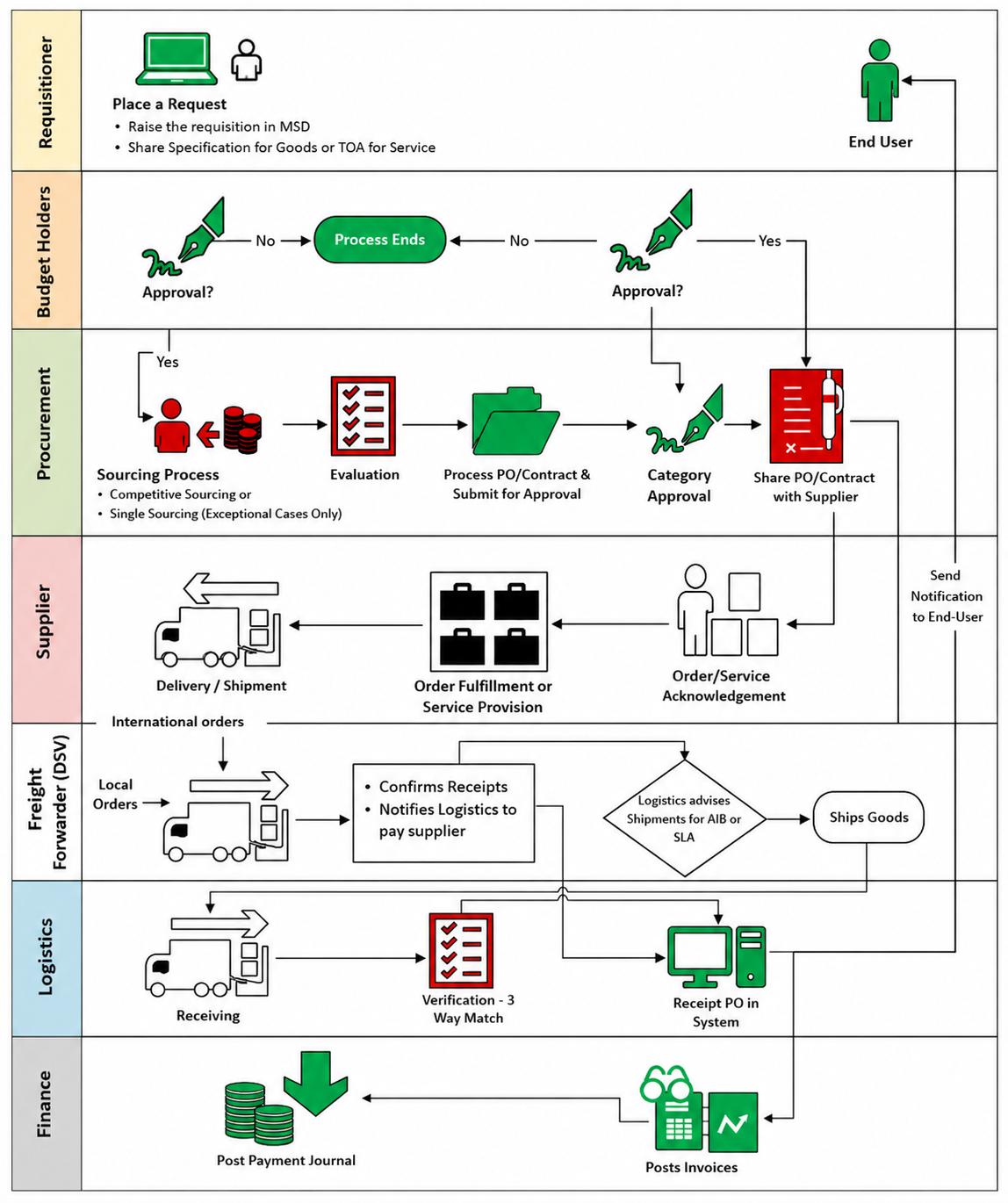
Most organisations treat purchasing and accounts payable as two separate teams running two separate processes. They’re not. They are one process, split across two departments, and every handoff between them is where control leaks out.
Think of it like booking business travel through HR. You raise a request, HR gets quotes from a few providers, someone approves the spend, and only then does anyone book tickets, stay or anything. P2P works the same way where D365 Business Central just makes sure every step actually happens, in order, with a record behind it.
The 8 Stages of P2P in Business Central
P2P in Business Central follow a stage wise process. Here is what happens at each stage; what the employee does, what Business Central does, and where AI takes the manual work off someone’s desk.
Step 1: Purchase Requisition
An employee needs something. Books, travel tickets, laptops, a service contract doesn’t matter. Purchase requisition stage handles that all.
- The request generates a document inside Business Central, not an email thread
- Employee code, budget code, currency, and line-item details get captured
- With the Requisition Agent switched on, the employee doesn’t fill a form at all, they describe what they need in plain language
An employee types “I need 10 laptops for the new project team.” The agent captures the item, quantity, required date, budget code, and requester and drafts the requisition automatically.
That draft still needs human review. The agent removes the form-filling, not the accountability.
Step 2: Budget & Policy Validation
This is the step most organisations skip. It’s also the one that actually prevents overspend.
Before a requisition reaches anyone’s approval queue, the system checks:
- Is there budget available against this code?
- Does the request sit inside procurement policy?
- Is anything mandatory missing?
Budgets in Business Central are defined based on the global dimension system. The system checks the available budget, identifies which requests need extra scrutiny, and prompts for an insufficient budget before it is sent for approval.
Step 3: Approval
Once budget and policy checks pass, Business Central’s approval workflow triggers on its own.
Thresholds, department rules, project-based routing all configurable, not hardcoded. Every approval comment gets captured against the record, so six months later, nobody’s asking “who approved this and why.”
Step 4: Sourcing
This stage is all about the HR-getting-quotes moment. Business Central creates a purchase quotation and sends it to vendors with standard functionality.
A custom agent can help like bud scoring to compare the quotes based on price, lead time, quality, and supplier history and recommend the best value option.
The agent recommends. Procurement still decides. That distinction matters more on it below.
Step 5: Purchase Order
Best quote wins. It converts into a Purchase Order, and Business Central sends the PO and quote attachment straight to the vendor by email.
At this point, the commercial commitment is locked in the system not sitting in someone’s sent folder where finance can’t see it.
Step 6: Goods / Service Receipt
The vendor delivers. Someone on the receiving team confirms it – a shipment, a completed service, a booked ticket.
Receipt gets logged in Business Central, either manually or through an automated workflow depending on the setup. This step matters more than it looks, because it’s the number that gets checked against everything else at invoice stage.
Step 7: Invoice & 3-Way Matching
Here’s where most manual P2P processes actually fail and where Business Central earns its keep.
The Payable Agent reads the invoice using OCR, extracts the data, and identifies the matching PO. Then it checks one thing:
| Does PO = Receipt = Invoice? |
If they match, the invoice posts. If they don’t, it gets flagged as an exception before anyone pays a cent.
Don’t ask “did we get an invoice?”
Ask “did we order it, did we receive it, and are we being charged correctly?”
That’s the entire point of 3-way matching, and it’s the single control that turns Accounts Payable from a transaction desk into a financial control function. It also helps to control the duplicate invoice posting.
How it works:
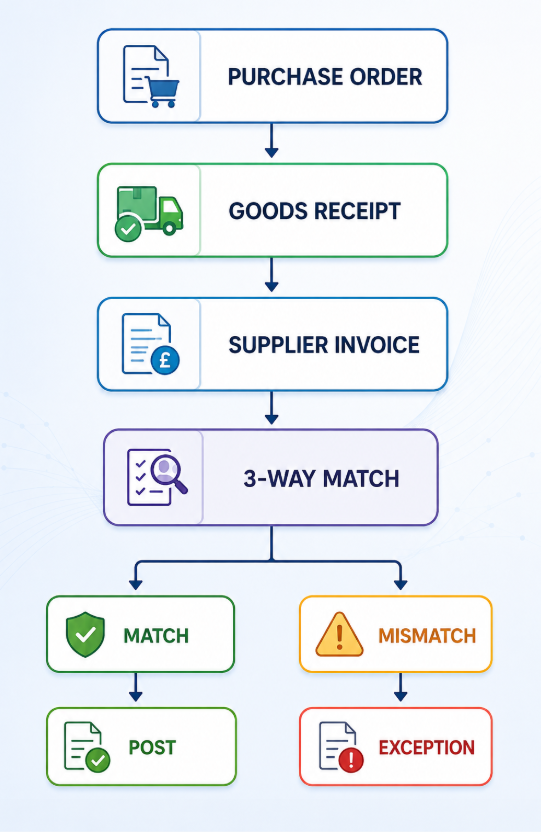
The system won’t create an invoice for what was never received. No manual cross-checking, no relying on someone catching the discrepancy at month-end.
A 30% shortfall missed by manual checking means real money is lost on every PO, every month. With 3-way matching, you can close that gap automatically.
Step 8: Payment Processing
In payment processing stage, Payment Journal suggests vendor lines and due dates. Payment runs happen on whatever cycle the business sets. It could be weekly, every 15 days, monthly.
This whole stage can run fully automated or stay manual at any checkpoint. That’s a client decision, not a system limitation.
Your Business Central Could Do More Than Process Purchase Orders
Build a P2P workflow around your approval rules, budgets, suppliers and invoice controls.
Where AI Actually Fits in P2P Process
AI doesn’t replace the P2P process. It removes the manual grind sitting inside it.
That distinction matters, because “AI automates procurement” is a lazy sentence that tells a reader nothing. Here’s specifically where AI adds value and where it doesn’t touch the controls.
- Requisition Agent – Employee describes the need in plain language. Agent extracts item, quantity, required date, budget code, requester. Drafts the requisition. Human still reviews it.
- Bid Scoring Agent – Compares supplier quotes on price, lead time, quality, commercial terms, and history. Recommends the best option. Procurement still signs off.
- Payable Agent – Reads invoices via OCR. Extracts the data. Matches against the PO and receipt. Flags exceptions. Posts clean matches automatically.
AI should assist decision-making and eliminate repetitive work not replace business controls. Every AI agent here drafts, recommends, or flags. None of them approves spend or authorises a payment on its own.
Standard vs Configuration vs AI: Get This Order Wrong and You’ll Overbuild
Successful P2P implementations follow one sequence:
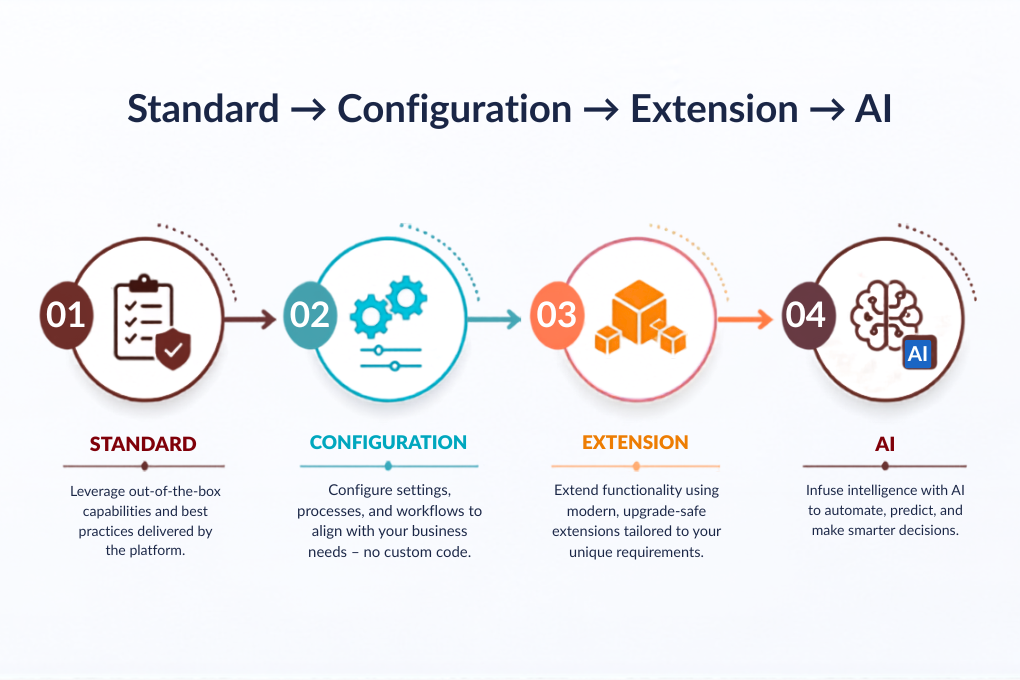
Not “let’s customise everything from day one.”
| Layer | What lives here |
|---|---|
| Standard Business Central | Purchase orders, purchase invoices, vendor management, receipts, payment journals, approval workflows |
| Configuration / Extension | Customer-specific approval matrix, budget rules, procurement policy, exception handling, supplier evaluation |
| AI / Agents | Natural language requisition, invoice OCR and matching, supplier recommendation, exception identification |
The mistake most implementations make: customising before configuring and configuring before understanding.
Most of what a business needs already exists in standard Business Central. Configuration handles the client-specific rules. AI comes last, layered on top of a process that already works.
How Mercurius IT Implemented P2P for a Live Client
This isn’t theoretical. We built exactly this, from requisition to payment for a client running procurement across multiple departments and international suppliers.
Before: requests came in over email, budget visibility was close to zero until invoices landed, and invoice matching was entirely manual. Someone cross-checking PO numbers against delivery notes by hand.
What we built:
- A Requisition Agent that captures employee code, budget code, currency, and line details in natural language, and drafts the requisition for review
- A Budget Validation layer that checks the exemption list, policy, and available budget before anything reaches an approver
- A Bid Scoring Agent that analyses vendor quotes on price, quality, and lead time, and recommends the best-value option
- 3-way matching built into the receipt and invoice workflow, so partial deliveries get invoiced correctly and automatically
- A Payable Agent using OCR to read invoices, match them against POs and receipts, and post clean matches without manual intervention
The result: fewer manual touchpoints from requisition through to payment, a full audit trail on every approval, and invoice exceptions caught before payment not after.
Client work like this is exactly where Mercurius IT’s Business Central and Copilot/ AI Agents expertise comes in. If your P2P process still runs on email and spreadsheets, that’s the gap we close.
Your P2P Process Is Unique. Your Implementation Should Be Too.
See how Mercurius IT can tailor Business Central around your procurement, finance and approval requirements.
Functional Workshop Checklist
If you’re planning a P2P implementation, whether with us or internally these are the questions that actually surface the gaps.
Ask these before beginning with configuration. The answers determine everything that follows.
| Workshop | Key Questions |
|---|---|
| Procurement workshop |
|
| Approval workshop |
|
| Receiving workshop |
|
| Accounts Payable workshop |
|
| Payment workshop |
|
Business Benefits of Using Procure to Pay Process
Saying “automation saves time” is too vague. Here’s what the Procure to Pay process in Business Central really improves.
Financial Control: You get clearer insight into spending, enforce budgets right when requests are made, reduce overpayments, and prevent duplicate invoices.
Operational Efficiency: There’s less manual data entry, quicker turnaround from requisition to purchase order, faster invoice processing, and much less need to rely on emails or spreadsheets to track purchases.
Governance & Compliance: Every request has a complete approval audit trail. Procurement policies are enforced automatically, supplier selection is controlled, and you have full traceability from requisition to payment.
Management Visibility: Leaders can finally get answers to the questions that matter most:
- How much are we spending, and where is it going?
- Which suppliers are we really working with?
- What have we committed to, but haven’t been invoiced for yet?
- How much is currently tied up in invoice exceptions?
- Which invoices are due soon, and when do we need to pay them?
KPIs to Measure Actual P2P Improvement
A P2P implementation should be evaluated by its impact on purchasing speed, spend control, and payment accuracy, not just system functionality.
Monitor the following KPIs to assess real improvements:
- Requisition-to-PO cycle time
- PO processing time
- Percentage of PO-backed invoices
- Touchless invoice percentage
- Invoice exception rate
- 3-way match success rate
- Maverick spend
- Duplicate invoice rate
- On-time payment percentage
- Average invoice processing cost
Essential to Note – If these metrics do not improve after go-live, the implementation addressed only the system, not the underlying process.
Conclusion
Procure-to-pay extends beyond processing purchase requisitions and supplier payments. It is an integrated financial control process that governs how your business manages spending, approvals, suppliers, invoices, and cash flow.
Dynamics 365 Business Central consolidates these activities into a single, controlled process. Configuration, extensions, and AI can be added where they provide real value. Each stage, from requisition and budget validation to supplier sourcing, purchase orders, goods receipt, three-way matching, and payment, can be tailored to your business operations.
That is where Mercurius IT brings value beyond a standard Business Central implementation. We start by understanding your existing procurement and finance processes, identifying gaps and defining the controls that matter to your business.
Mercurius IT can transform Business Central into a controlled, connected, and intelligent procure-to-pay platform tailored to your specific requirements, rather than relying on a generic template.
Frequently Asked Questions
How does Business Central improve the procure-to-pay process?
Business Central integrates purchasing and accounts payable into a unified workflow. It increases visibility into commitments, enforces approval controls, tracks receipts, and enables invoice matching prior to payment.
What is 3-way matching in Business Central?
3-way matching compares the purchase order, receipt of goods or services, and supplier invoice to ensure consistency among them. This process identifies exceptions before payment.
What should businesses assess before implementing P2P in Business Central?
Business leaders should assess purchase initiation, approval processes, budget checks, supplier selection, receipt recording, invoice matching, and payment authorisation. These insights inform the appropriate configuration and automation strategy.