

Overview
AI agents in Dynamics 365 Business Central automate workflows, enhance decision-making, and turn ERP systems into intelligent platforms for scalable, data-driven business operations.
Key Takeaways
- AI agents in Business Central automate workflows with built-in governance and control.
- Autonomous intelligence enables faster, data-driven decisions across ERP functions.
- Copilot and AI agents work together to balance automation with human oversight.
- Business Central AI agents improve efficiency without disrupting existing processes.
Every minute, a new business takes a decisive step toward adopting artificial intelligence. Organisations are consistently experimenting with AI because insight alone isn’t enough.
Dashboards can inform decisions, but they don’t execute them.
Chatbots can answer questions, but they don’t move work forward.
This is where the AI agents fill in the gap! AI agents are specialised and fully autonomous agents that can expedite specific workflows for businesses. In fact, recent industry research suggests that 51% of companies are already using AI agents, with another 35% planning to integrate them by 2027. The trend of using AI agents is more pronounced in the UK, with 66% of businesses already deploying AI agents, while the US trails at 48% only.
This shift is especially visible in enterprise systems like Microsoft Dynamics 365 Business Central. What was once a transactional ERP is evolving into an intelligent operational platform, even one where AI agents don’t just analyse data, but actively participate in business workflows.
In this article, we’ll explore how AI agents in Business Central are changing workflows, improving productivity, and creating measurable business value across various business functions.
What are AI Agents in Business Central?

AI agents in Dynamics 365 Business Central are autonomous, intelligent, and task-specific digital workers that use AI and act independently to perform business processes, automate complex business processes, understand natural language, and perform tasks.
Unlike traditional automation or rule-based workflows, AI agents:
- Operate continuously in the background
- Adapt to changing conditions using AI models
- Act across multiple systems and data sources
- Escalate decisions only when human judgment is required
Practically, these AI agents in Dynamics 365 efficiently handle high-volume operational tasks across finance, sales, procurement, inventory, and customer service while maintaining auditability and control.
How AI Agents Work in Microsoft Business Central?
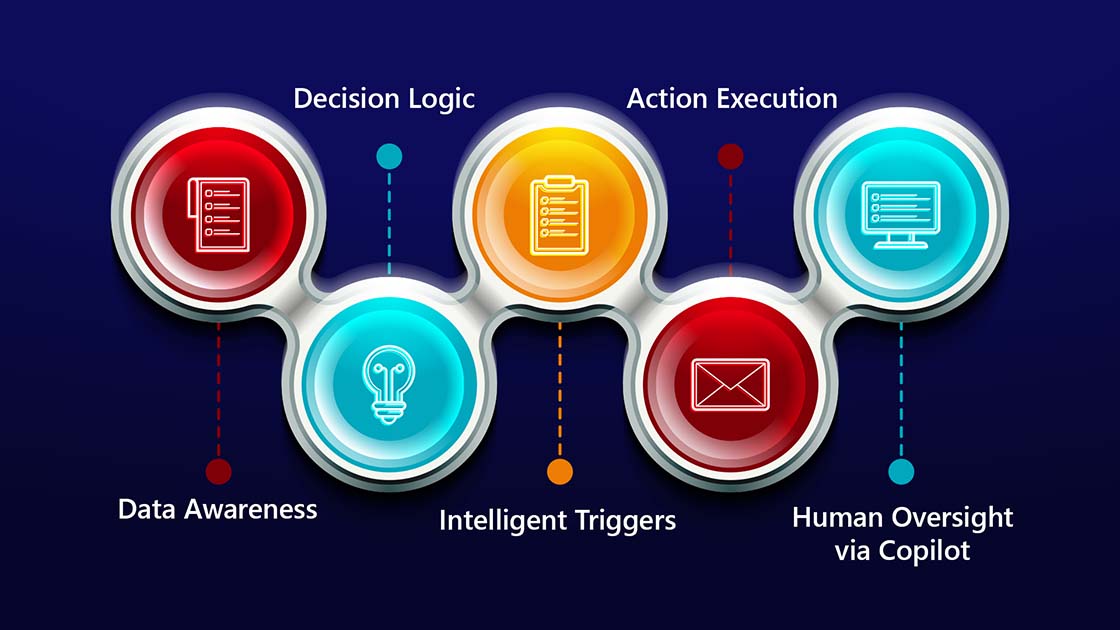
Autonomous agents in Microsoft Dynamics 365 Business Central combine Artificial Intelligence with real-time business data to move work forward without constant user input.
At a high level, they operate through five interconnected layers:
1. Data Awareness: Agents continuously analyse structured data from Business Central, like sales orders, purchase invoices, ledger entries, inventory movements, and master records, alongside contextual data from Microsoft 365, Power Platform, and Dataverse.
2. Intelligent Triggers: Instead of waiting for manual input, agents respond to:
- New transactions
- Time-based schedules
- Exceptions and threshold breaches
- Pattern deviations and anomalies
3. Decision Logic: Rather than following static rules, AI models assess probability, confidence levels, historical patterns, and business context to determine the most appropriate next action.
4. Action Execution: Depending on the configuration, AI agents can:
- Create draft transactions
- Flag risks or exceptions
- Trigger workflows
- Recommend or automatically execute actions with approvals where required
5. Human Oversight via Copilot: Microsoft Copilot surfaces insights, explanations, and recommended actions in natural language, allowing users to review, adjust, or intervene when necessary. This architecture allows Business Central to scale operational volume without sacrificing AI governance, compliance, or control.
This entire process allows AI agents in Business Central to scale across higher transactional volumes while maintaining auditability, authority, and alignment with the existing business processes.
What is the Role of AI Agents in Business Central?
Though AI agents perform varied key business processes for many industries, but when it comes to how they operate in Microsoft Business Central, the list of tasks is a little different.
Within Business Central, they are designed to support specific operational and financial workflows where speed, accuracy, and consistency matter most.
Automating Repetitive Tasks
Artificial Intelligence agents like Payables agents and sales order agents automate repetitive tasks like invoice processing, cash flow management, and order intake. They autonomously interpret the unstructured data from emails and files to generate accurate documents with minimal manual intervention.
Natural Language Interaction
Through Copilot, users can interact with the system conversationally. Using natural language processing, the interaction with AI agents becomes simpler. They can ask questions, generate reports, or initiate tasks without navigating to complex menus or screens.
Streamlined Business Process Automation
AI agents perform time-consuming administrative tasks like purchase order approvals and invoice processing. The automated workflows performed by AI agents enable organisations to remove human errors and shift their focus to high-value tasks. This allows the experienced officials to focus on the core business functions.
Intelligent Financial Management
AI-driven analytics identify financial trends that allow the CFOs and accountants to monitor and forecast cash flow, perform risk management, and streamline financial workflows. AI-based fraud detection identifies anomalies in transactions while reducing the compliance risk.
Improved Customer Support through AI Chatbots
AI chatbots are no longer only concepts. AI-powered assistants now communicate, handle, and act accordingly. The integration of AI chatbots in Business Central allows organisations to automate their customer inquiries, provide instant resolutions, and track order statuses, all while improving customer satisfaction. In fact, AI interactions in Business Central have already surpassed expectations.
Enhancing Productivity
Intelligent agents reduce the need for handling repetitive tasks manually and switching between applications. They assist with varied tasks like report generation, data analysis, and bank account reconciliation.
Integration with Microsoft Copilot
Microsoft Copilot acts as a conversational AI assistant while the intelligent agents perform autonomous actions.
Built-In Governance
Crucially, AI agents operate within approval frameworks and audit trails, ensuring automation does not compromise accountability.
Is Your Business Central Environment Ready for AI Agents?
Discover where AI can automate workflows today, and what foundations you need to scale autonomous intelligence safely and effectively.
Best AI Agents in Dynamics 365 Business Central
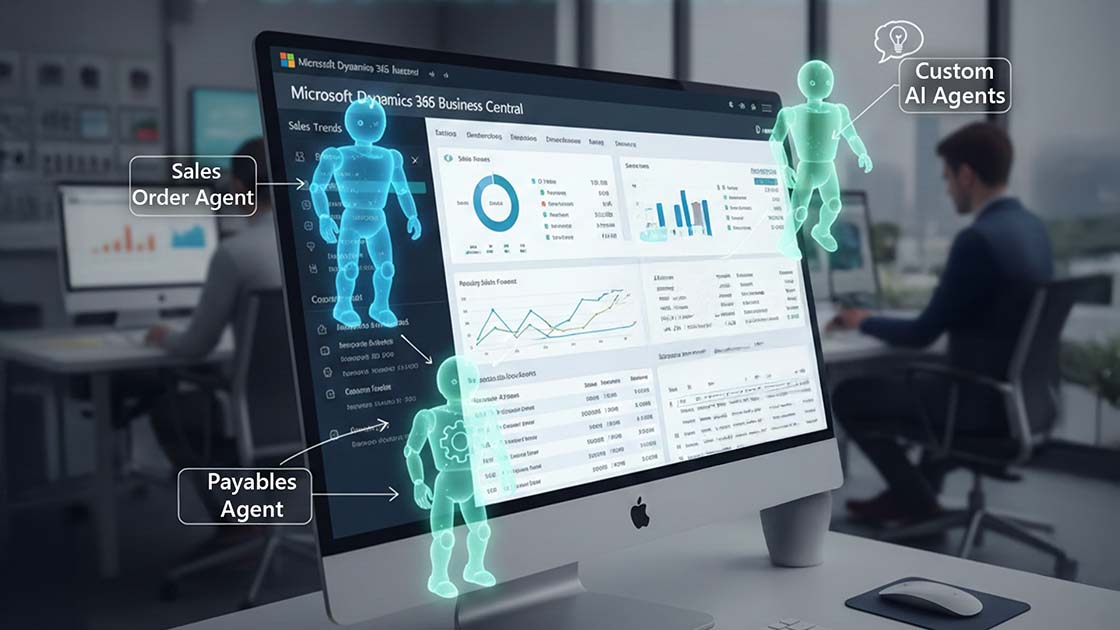
Microsoft Dynamics 365 Business Central offers various built-in AI agents that operate independently to handle high-volume routine tasks. These intelligent agents use generative AI to interpret unstructured data and adapt to changing conditions in real-time. Below are some of the top AI Agents transforming D365 Business Central operations:
1. Sales Order Agent
Intelligent agents automate the intake and processing of sales orders. They monitor the shared mailboxes for customer item requests, identify the customer record, and create sales documents. They also include “Capable-to-Promise” (CTP) logic to calculate the earliest delivery dates for items out of stock.
2. Payables Agent
Payable AI agents streamline accounts payable (AP) workflows by handling vendor invoices. They extract data from invoice attachments, whether in PDFs or images, and then automatically create draft purchase invoices in Business Central.
3. Custom AI Agents
Businesses can use Microsoft Copilot Studio in Business Central to build agents for specific industry roles. These can be triggered by internal data breaches, threshold breaches, or external events.
Common Use Cases for AI agents in Business Central
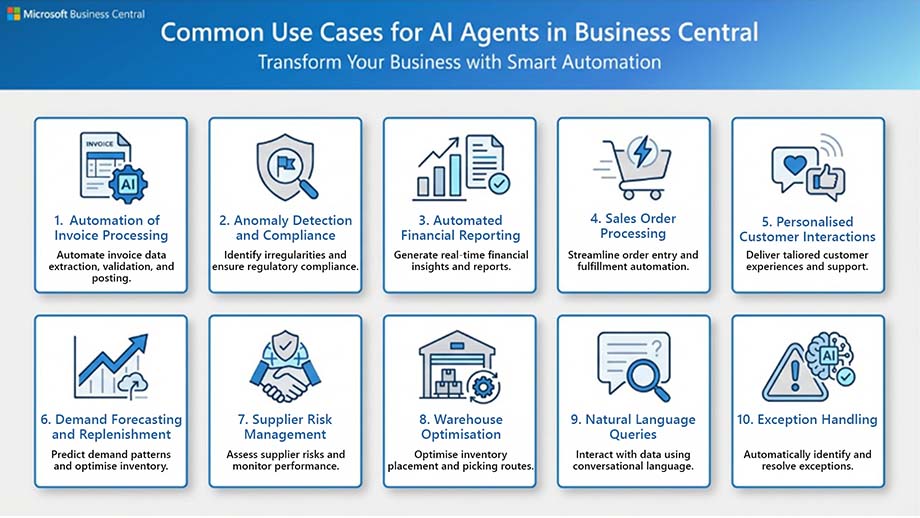
1. Automation of Invoice Processing: AI agents scan email inboxes for vendor invoices, use AI-based document analysis to extract information from PDFs, and produce purchase invoices for approval. This lowers errors and manual data entry.
2. Anomaly Detection & Compliance: To stop fraud and guarantee regulatory compliance, AI agents can instantly identify odd transactions or missing paperwork.
3. Automated Financial Reporting: They can reduce month-end close times by continuously collecting data from various systems and producing summaries and reports for auditing and management review.
4. Sales Order Processing: When a customer requests a quote or order, a dedicated agent can keep an eye on a shared inbox, interpret the requests, check inventory, and write entire quotes or orders for a user’s final approval.
5. Personalised Customer Interactions: Using integrated chatbots, agents leverage customer history to make personalised product suggestions and deliver prompt answers to frequently asked questions. This collaboratively leads to delivering an improved customer service with Copilot AI.
6. Demand Forecasting & Replenishment: To forecast demand and recommend the best reorder quantities, AI agents examine past sales data, seasonal patterns, and promotions. This helps to avoid stockouts and overstocking.
7. Supplier Risk Management: By identifying possible supplier instability or regional disruptions through external data sources like news feeds and financial reports, agents can notify procurement teams to create backup plans.
8. Warehouse Optimisation: By using sensor data to enable predictive maintenance for warehouse equipment, multi-agent systems can reduce downtime by coordinating sorting, packing, and restocking processes.
9. Natural Language Queries: To discover records, create reports, or comprehend field definitions, users can communicate with the system using natural language (via Copilot), which reduces the time it takes for new employees to be onboarded.
10. Exception Handling: Agents automatically identify exceptions, such as project budget overruns or production bottlenecks, before they become serious issues.
How Much Does Dynamics 365 Business Central Really Cost in 2026?
Get a realistic pricing breakdown covering licenses, AI agents, implementation, and support, based on your business needs.
Potential Challenges of Implementing AI Agents in Business Central
Though AI agents in Business Central bring a wide range of benefits, but integrating them in BC poses various challenges. Here are some of the challenges associated with AI agents’ integration in Business Central:
- System Compatibility: Integrating AI agents with other systems might get complicated due to system incompatibility. Therefore, appropriate planning with a streamlined execution is necessary for a seamless interfacing between legacy systems and AI agents.
- Sensitive Data Handling: AI agents often handle sensitive data from varied sources. Therefore, they also raise concerns about data security and privacy.
- Data Quality: AI agents rely on the data they are trained on. So, without guaranteeing that the raw data is of high quality and accurate, AI won’t be able to offer reliable operations.
- Ongoing Maintenance: Artificial Intelligence systems require consistent monitoring and maintenance to function properly. So, it is essential to engage resources for continuous support and correction to keep the AI operations running.
- AI Consumption & Licensing Complexity: AI agents and Copilot capabilities in Business Central may involve usage-based billing depending on how AI services, integrations, and extensions are configured. Without proper visibility into licensing models and consumption metrics, organisations may face unexpected costs, budget overruns, or underutilised licenses. That is why understanding AI usage, monitoring consumption, and aligning licenses with actual business needs is essential for cost-effective adoption.
- Data Integration- Collecting data from several sources to provide AI agents with relevant data sets can be challenging.
Collaborating with a reliable Microsoft Business Central Partner can help mitigate risks effectively by ensuring the right AI architecture, governance, licensing strategy, and consumption monitoring are in place from day one.
The Future of AI Agents in Dynamics 365 Business Central
As AI agents move from experimental tools to mainstream business technology, the next few years will play a crucial role in changing how companies operate and compete. In fact, autonomous agents are rapidly becoming a core part of enterprise software and workflow automation.
1. Rapid Growth in Enterprise Adoption: Analysts at Gartner forecast that by 2026, up to 40% of enterprise applications will include task-specific AI agents, up from less than 5% today. These agents will go beyond simple automation to execute complex, multi-step business tasks on behalf of users.
2. Autonomous Decision-Making and Workflow Execution: Looking ahead, AI agents will move past rule-based automation into autonomous decision support and execution. By 2028, Gartner predicts AI agents could be responsible for 15% of day-to-day business decisions and be embedded in a third of all enterprise applications. This marks a meaningful departure from traditional automation. So, instead of simply executing predefined tasks, AI agents will interpret data, adapt to changing contexts, and trigger actions without direct human input.
3. Multi-Agent Collaboration Ecosystems: Another major trend is the rise of multi-agent systems. These are the groups of specialised AI agents that work together to handle complex processes. Instead of acting in isolation, these coordinated agents will share context and responsibilities, orchestrating workflows that span multiple business functions.
4. Market Expansion and Strategic Investment: The AI agent market is projected to grow into a $50B+ industry by 2030, driven by demand for real-time execution and intelligent automation (SOURCE).
While the future looks promising, but not all initiatives will succeed. Many early AI agent projects will be discontinued due to unclear value, weak governance, or poor data readiness, reinforcing the need for strategy-first adoption. This is where partnering with a reliable Microsoft Dynamics 365 Business Central provider can help mitigate the risk.
Bottom Line
AI agents are already changing how organisations using Dynamics 365 Business Central operate, decide, and scale. From automating high-volume transactions to enabling intelligent, end-to-end workflows, agentic AI is transforming Business Central into an active operational platform rather than a passive system of record.
However, real value doesn’t come from technology alone. Successful adoption depends on data readiness, governance, integration, and a clear alignment between AI capabilities and business outcomes. Partnering with an experienced and reliable Microsoft Dynamics 365 implementation partners help organisations move beyond experimentation, ensuring AI agents are implemented strategically, securely, and with measurable impact across finance, operations, and customer-facing processes.
Frequently Asked Questions
Are AI agents the same as Copilot in Business Central?
Copilot focuses on conversational assistance and user interaction. AI agents operate autonomously in the background, monitoring data and executing or recommending actions based on events and conditions.
How can AI agents improve financial management in Dynamics 365 Business Central?
AI agents in financial management automate transaction processing, detect anomalies, accelerate reporting, improve operational efficiency, and support proactive cash flow and risk management.
How do organisations integrate AI agents into existing Business Central environments?
Through built-in AI capabilities, Power Platform integration, and custom agent development using Copilot Studio, ideally with guidance from a Microsoft partner.
How do AI agents enhance customer relationship management in Dynamics 365 Business Central?
AI agents enhance customer relationship management by automating routine customer interactions, providing real-time order and account insights, and enabling faster, more personalised responses. The AI agent functionality helps resolve queries proactively, tracks customer activity across systems, and allows service teams to focus on high-value customer engagement rather than manual tasks. rates with Power Automate and Power Apps for automation.
What are the benefits of AI agents in Dynamics 365 Business Central?
AI agents in Dynamics 365 Business Central automate routine processes, improve accuracy, and enable faster, data-driven decision-making. They reduce manual effort across finance and operations, help identify risks and exceptions in real time, enhance user productivity through intelligent automation, and operate within built-in governance and approval controls, allowing organisations to scale efficiently without losing visibility or control.
Plan Your AI Agents Strategy in Business Central