
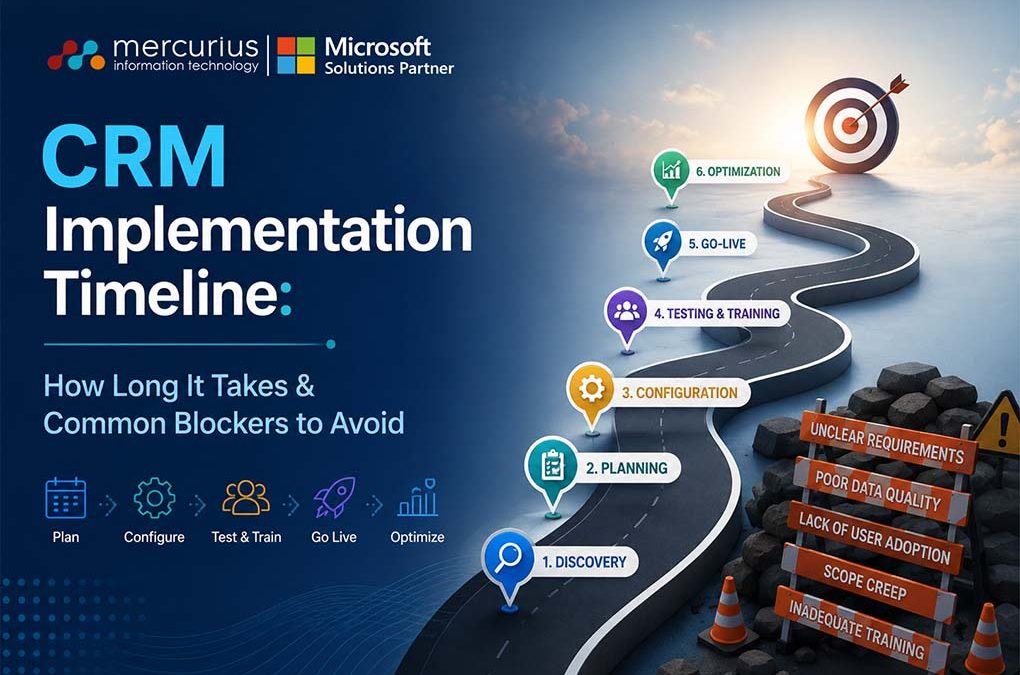
Quick Summary
A CRM implementation timeline depends on business size, system complexity, integrations, and data readiness – but proper planning can significantly reduce delays and risks.
Key Takeaways
- CRM implementation typically takes 1–3 months for small businesses and 6–12+ months for larger or complex organisations.
- The core phases include requirements gathering, system configuration, data migration, integration, testing, training, and go-live support.
- Common delays are caused by unclear objectives, poor data quality, over-customisation, and lack of stakeholder alignment.
- Strong executive sponsorship and structured change management improve user adoption and reduce resistance.
- AI is compressing parts of the implementation timeline, particularly data cleansing, configuration, and Copilot-assisted setup without removing the need for good planning and change management.
- Partnering with experienced CRM consultants can accelerate deployment and minimise implementation risks.
Implementing a CRM (Customer Relationship Management) system is a strategic step for businesses aiming to enhance customer engagement, streamline processes, and improve decision-making.
Do you know? Businesses that implement CRM see an average 29% increase in sales revenue and a 34% boost in sales productivity.
However, the CRM system implementation process can vary significantly in terms of complexity and time.
For many organisations, the pressing question remains: How long does CRM implementation take?
The answer depends on multiple factors, including the organisation’s size, the chosen CRM solution, and the level of preparation.
To stay on track, it’s essential to understand the CRM implementation timeline, the potential challenges, and how to overcome them.
Typical CRM Implementation Timeline
The time required for CRM implementation can range from weeks to several months, depending on the organisation’s needs:
| Business Size | Typical Timeline | Key Phases |
|---|---|---|
| Small business with straightforward requirements | 1–3 months | Requirements, config, migration, training |
| Mid-sized organisation with moderate complexity | 3–6 months | Integrations, pilot rollout, change management |
| Large enterprise with advanced needs | 6–12+ months | Multi-system integration, phased go-live, governance |
One this is essential to note here is that AI is beginning to compress parts of this timeline rather than replace the process itself. Tasks that used to consume weeks like data cleansing, field mapping, and initial configuration can now be partly automated or Copilot-assisted, which is one reason pre-built accelerators can get smaller businesses live in days rather than months. The planning, stakeholder alignment, and change management stages, however, still take the time they have always taken.
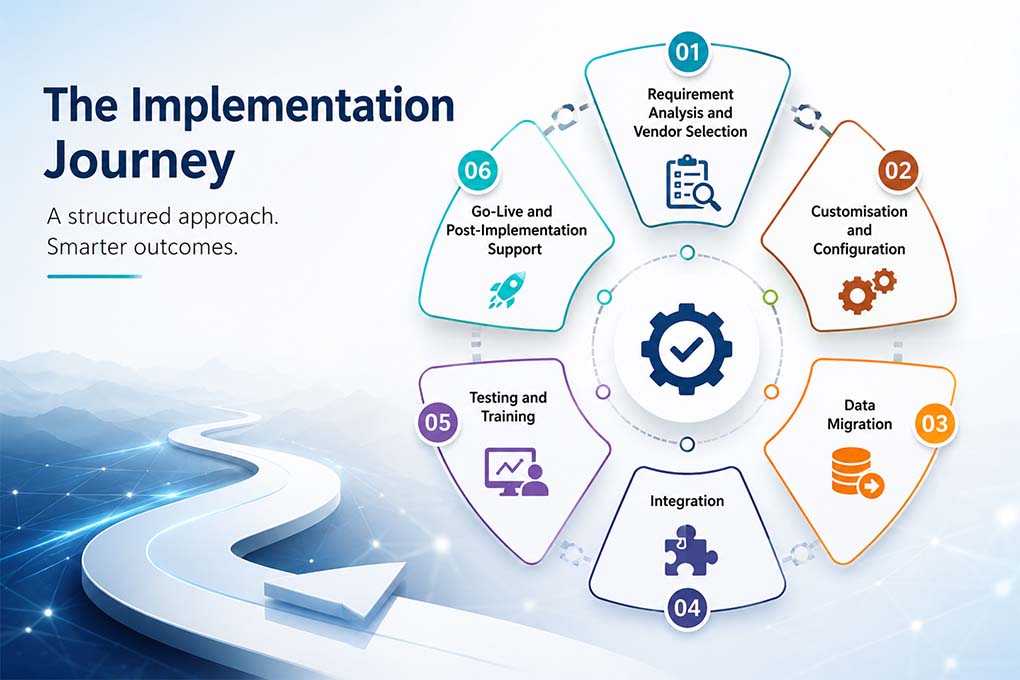
The implementation process typically involves the following phases:
- Requirement Analysis and Vendor Selection: Define your business requirements and evaluate CRM systems that align with them. Requirement analysis phase usually take –2 weeks for SMB and 4–6 weeks for enterprises.
- Customisation and Configuration: Tailor the system to meet your organisation’s specific workflows and processes.
- Data Migration: Migrate existing data into the new system, ensuring accuracy and consistency.
- Integration: Link the CRM with other business systems, such as ERP or marketing tools.
- Testing and Training: Validate the system and prepare employees to use it effectively.
- Go-Live and Post-Implementation Support: Launch the CRM and address any initial challenges as they arise.
Streamline Your CRM Journey
Discover the typical CRM implementation timeline, avoid common blockers, and achieve success faster.
Challenges in CRM Implementation
Even with careful planning, delays and roadblocks can occur. Understanding common challenges in CRM implementation can help you avoid them.
Unclear Objectives
Without clear goals, implementation efforts can become unfocused. Define measurable outcomes for your CRM deployment, such as improving lead tracking or shortening sales cycles.
Data Quality Issues
Data migration often uncovers inconsistencies, duplicates, or missing information. Preparing your data before migration can save valuable time.
Resistance to Change
Employees may hesitate to adopt a new system, especially if they’re accustomed to legacy tools. Engaging stakeholders early and providing thorough training can help ease the transition.
Over-Customisation
While it’s tempting to customise everything, too much modification can increase complexity and risk. Focus on leveraging out-of-the-box features initially and consider additional customisations later. Heavy customisation is also the most common reason CRM upgrades break or stall.
Lack of Expertise
Without adequate technical knowledge, critical steps can be overlooked. Partnering with CRM experts can streamline the process and reduce risks.
Fragmented or Unstructured Data for AI Readiness
Modern CRM platforms like Dynamics 365 build AI features including lead scoring, forecasting, Copilot directly on top of your CRM data. If that data isn’t consistently entered and maintained, those AI features end up working from unreliable inputs, undermining the very efficiency gains the CRM was meant to deliver. Data readiness today means clean enough for AI to trust, not just clean enough to migrate.
Best Practices for CRM Implementation
A successful CRM setup timeline relies on adhering to proven practices that help businesses avoid delays:
- Plan Realistically: Allow adequate time for each phase to ensure a smooth rollout.
- Secure Executive Buy-In: Leadership support ensures the project gets the resources and attention it needs.
- Communicate Effectively: Keep stakeholders informed about progress, challenges, and milestones.
- Start Small: Begin with a pilot launch before rolling out the system company-wide.
- Monitor and Refine: Use post-implementation feedback to optimise the CRM for long-term success.
- Prepare Your Data for AI, Not Just for Migration: Clean, complete, consistently-entered data is now what makes Copilot and other AI features useful from day one, rather than an afterthought to tidy up later.
Struggling with CRM Delays?
Overcome blockers and streamline your CRM implementation. See how it works in action.
Why Choose Dynamics 365 Sales?
Among the many CRM solutions available, Microsoft Dynamics 365 Sales is a standout choice for businesses of all sizes. It provides:
- Streamlined Sales Processes: Dynamics 365 Sales automates lead tracking, opportunity management, and sales forecasting, giving teams a clear path to success.
- Enhanced Collaboration: Seamless integration with Microsoft 365 tools, such as Outlook, Teams, and Excel, makes cross-departmental communication effortless.
- Scalability: Whether you’re a growing SME or an established enterprise, Dynamics 365 Sales can scale with your business needs.
- Customisable Dashboards and Reports: Gain actionable insights with real-time data tailored to your business priorities.
- AI-Powered Insights: Leverage predictive analytics to understand customer behaviours and close deals faster.
What’s new in 2026
- Copilot Chat on Every Record: Sellers can get instant summaries of opportunity and lead records, catch up on account updates, and prepare for meetings directly inside a chat interface, without digging through activity history.
- Unified Insights Across CRM and Microsoft 365: Copilot AI now draws on signals from both Dynamics 365 and Microsoft 365, including email and meeting recaps to surface recommendations that reflect the full customer relationship.
- Opportunity Acceleration: AI prioritises the specific actions most likely to move a deal forward, helping sellers focus effort where it will actually close business.
- Transparent & Multi-Source AI Research: Sellers can research across CRM data, connected systems, and local files like Excel or PDFs, with visibility into the reasoning behind each recommendation.
If you’re looking for a robust, flexible, and intuitive CRM solution, Microsoft Dynamics 365 Sales offers everything you need to transform your sales operations.
Accelerate Implementation with Our Quick Start CRM Package
At Mercurius IT, we understand that time is critical when implementing a CRM. That’s why we’ve introduced our Quick Start CRM Package with a workable CRM implementation roadmap. Designed to get your business up and running with Dynamics 365 Sales in just 10 days, this package ensures a fast, efficient, and cost-effective deployment.
As AI-assisted setup and data mapping continue to shorten configuration time industry-wide, pre-built packages like this are able to get teams live in days rather than weeks. The 10-day timeline reflects that shift, backed by our own delivery process.
For a fixed cost of £6,999, you’ll receive:
- Expert-led implementation tailored to your business needs.
- Seamless integration with your existing Microsoft 365 environment.
- Training and support to help your team make the most of Dynamics 365 Sales.
Don’t let delays hold your business back. Learn more about our Quick Start CRM Package here, or call us today to discuss your requirements. Together, we can transform your CRM journey.
Build the Right CRM Implementation Roadmap
Frequently Asked Questions
How long does CRM implementation typically take?
CRM implementation timelines differ by business size and requirements – small businesses can complete core implementation in 1 – 3 months, while larger organisations may take 6 – 12+ months depending on complexity.
What are the main phases of a CRM implementation project?
Typical stages include requirements gathering, vendor selection, customisation & configuration, data migration, systems integration, testing & training, and finally launch & support.
What challenges can delay a CRM implementation?
Delays often occur due to unclear goals, poor data quality, employee resistance, too much customisation, and lack of internal expertise. This is more common than it might seem as an industry report found that 63% of CRM implementations run over their planned timeline, with overruns typically in the 30–50% range. That’s precisely why a structured process, rather than an ad-hoc rollout matters a lot.
Can CRM implementation be completed faster with expert help?
Yes, dedicated CRM partners and pre-built deployment packages can significantly accelerate timelines, in some cases bringing live CRM systems online in weeks rather than months. Our own Quick Start CRM Package, for example, gets qualifying small businesses live on Dynamics 365 Sales in 10 days for a fixed £6,999; see the section above for what’s included.
Is AI changing how long CRM implementation takes?
Yes, but selectively. AI is speeding up specific, mechanical parts of implementation like data cleansing, field mapping, initial configuration, and Copilot-assisted setup. This is why pre-built, AI-assisted packages can now go live in days for straightforward deployments. What AI hasn’t shortened is the human side: defining clear objectives, aligning stakeholders, and managing change still take the time they’ve always taken, and rushing those steps remains the most common reason implementations run over schedule.
Last Updated: 04-08-2026