

Because spreadsheets create hidden risk and slow decisions, while Business Central centralises data, automates controls, and gives real-time reporting with Power BI and Copilot built-in.
CFOs today are under pressure to deliver accurate financial reporting, ensure compliance, and provide real time insights that guide strategic planning.
Yet many still rely on spreadsheets that slow down processes, create errors in cash flow forecasting, and limit visibility across financial operations.
The rise of the data-driven CFO highlights a shift toward leveraging data analytics, real-time insights, and advanced reporting tools like Business Central to enhance decision-making and operational efficiency.
To overcome these challenges, finance leaders are turning to Microsoft Dynamics 365 Business Central, which unifies financial management, automates workflows, and integrates seamlessly with tools like Power BI and Microsoft Copilot to deliver actionable insights, better control, and data driven decisions that strengthen business performance.
Microsoft Learn confirms Business Central workflows pair a “trigger” with a “response” and can include system steps (e.g., auto-posting), which standardises approvals and reduces manual handling.
What problems do spreadsheets create for finance teams?
How much time do manual finance processes waste each month?
Business Central offers pre-built trial balance reports in Excel, significantly reducing the time spent on manual reconciliation.
Financial professionals spend hours reconciling trial balances, preparing internal reports, and fixing broken formulas.
Cash flow forecasting in Excel requires multiple data sources, often leading to delays. This inefficiency is amplified in growing businesses with global operations.
Want dashboards that update themselves? Ask for our BC + Power BI starter pack.
Why do spreadsheets break collaboration for finance?

Spreadsheets were never designed for real-time collaboration. Finance teams juggling ad hoc data analysis often duplicate work, wasting time that could be used for data-driven decision making.
Why do spreadsheets break collaboration for finance?
- Balance sheets and financial statements rely on manual inputs, increasing error risk.
- Spreadsheets are limited to standard reports, which provide only predefined, routine insights and lack the customisation and real-time data analysis available in Business Central.
- Cost management decisions are delayed due to inconsistent financial data across departments.
- Forecasting tools in Excel lack integration, making it harder for strategic leaders to model new markets or business patterns.
- Board meetings are delayed when financial reporting depends on consolidating multiple spreadsheet versions.
Business Central solves this by unifying financial operations, presenting data from the same data source, and allowing finance KPIs to be monitored instantly.
Independent bodies warn that spreadsheet error risk is systemic: ICAEW notes “as many as 90% contain a mistake,” echoing decades of field audits; high-profile incidents (e.g., JP Morgan “London Whale”, UK COVID reporting) underline the stakes.
Still on spreadsheet-driven finance? See how a single source of truth changes month-end. CLICK HERE
How does Business Central improve day-to-day finance and decision-making?
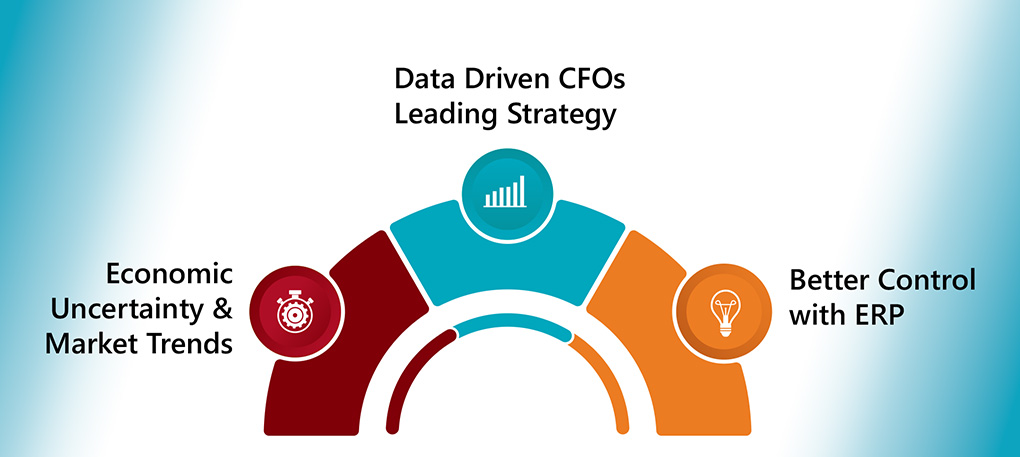
Economic Uncertainty and Market Trends
CFOs must navigate market changes and economic uncertainty. Real time financial insights from Business Central allow them to model scenarios and apply cost saving measures quickly.
Embedded Power BI delivers curated KPIs and drill-downs inside Business Central, removing the need to export static reports.
See our Business Central implementation approach
Data Driven CFOs Leading Strategy
The role of the modern CFO is data driven. With Microsoft Dynamics and Microsoft Power Platform integration, CFOs build custom dashboards, monitor metrics across various aspects of the business, and provide actionable insights for strategic planning.
Better Control with ERP
From automated bank reconciliations to advanced reporting and cash flow forecasting, Business Central offers better control than spreadsheets. Finance leaders can rely on detailed financial reports, forecast cash flow, and integrate seamlessly with third party tools.
See it in your numbers – Get a tailored KPI demo.
How does Business Central support compliance and data security?
Keeping up with regulations feels like chasing your own tail sometimes. Business Central makes compliance straightforward. The platform comes GDPR-ready straight out of the box.
Whether you’re dealing with UK-specific rules or international requirements, it adapts. No manual headaches required. Your financial data gets encrypted both coming and going. That’s protection you can bank on.
Evolving regulations won’t catch you off guard anymore. The system keeps pace automatically.
Transform compliance from your biggest headache into your strongest advantage.
Free Up Your Time for What Actually Matters
Here’s the real win for you as a finance leader. These built-in security features mean you can focus on strategic planning instead of firefighting. Data-driven decisions become your new normal.
Your organisation’s reputation stays protected. Stakeholders trust you more when they know their data is safe. This builds the foundation for long-term business success.
You’ll spend less time worrying about security breaches. More time driving growth and profitability.
How does Business Central support compliance and data security?
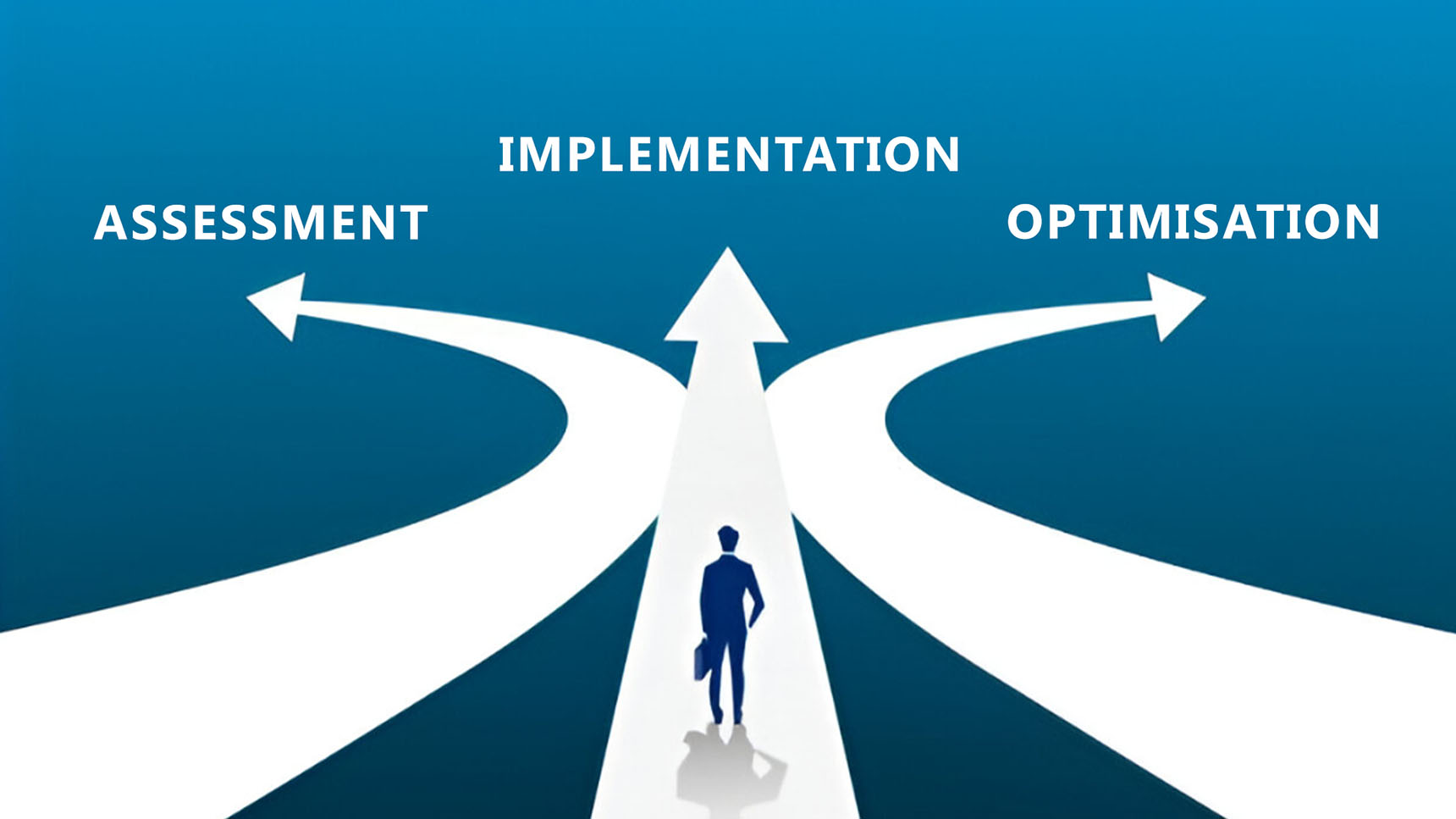
- Assess current processes: Identify where spreadsheets manage cash flow, trial balances, and internal reports.
- Plan a smooth transition: Select Business Central modules for financial management, project management, and supply chain first.
- Integrate seamlessly: Use Microsoft Power Platform and Microsoft Teams to connect financial data and workflows.
- Enable adoption: Train finance professionals on no code financial reporting, custom dashboards, and automated workflows.
- Measure success: Track reductions in time to produce balance sheets, improved accuracy in cash flow statements, and faster board meeting readiness.
What do finance teams gain when they switch to Business Central?
Business Central is more than just an ERP. It gives finance leaders and professionals the tools to:
- Harness data from various aspects of the business.
- Build custom dashboards with Power BI metrics.
- Automate financial operations with audit trails and automated workflows.
- Use Microsoft Copilot for natural language financial reporting.
- Support global operations with multi-currency and compliance-ready features.
This flexibility makes it ideal for mid-market and growing businesses expanding into new markets.
What do finance teams gain when they switch to Business Central?
Capability |
Spreadsheets |
Dynamics 365 Business Central |
|
Financial data integrity |
Prone to errors |
Same data source with audit trails |
|
Reporting |
Static excel finance reports |
Real time insights with custom dashboards |
|
Forecasting tools |
Manual, ad hoc data analysis |
Cash flow forecasting and advanced reporting |
|
Collaboration |
Limited, error-prone |
Integrate seamlessly with Microsoft Teams and Power Platform |
|
Data security |
Weak |
Enterprise-grade with role-based access |
|
Strategic planning |
Slow and reactive |
Actionable insights, informed decisions, better control |
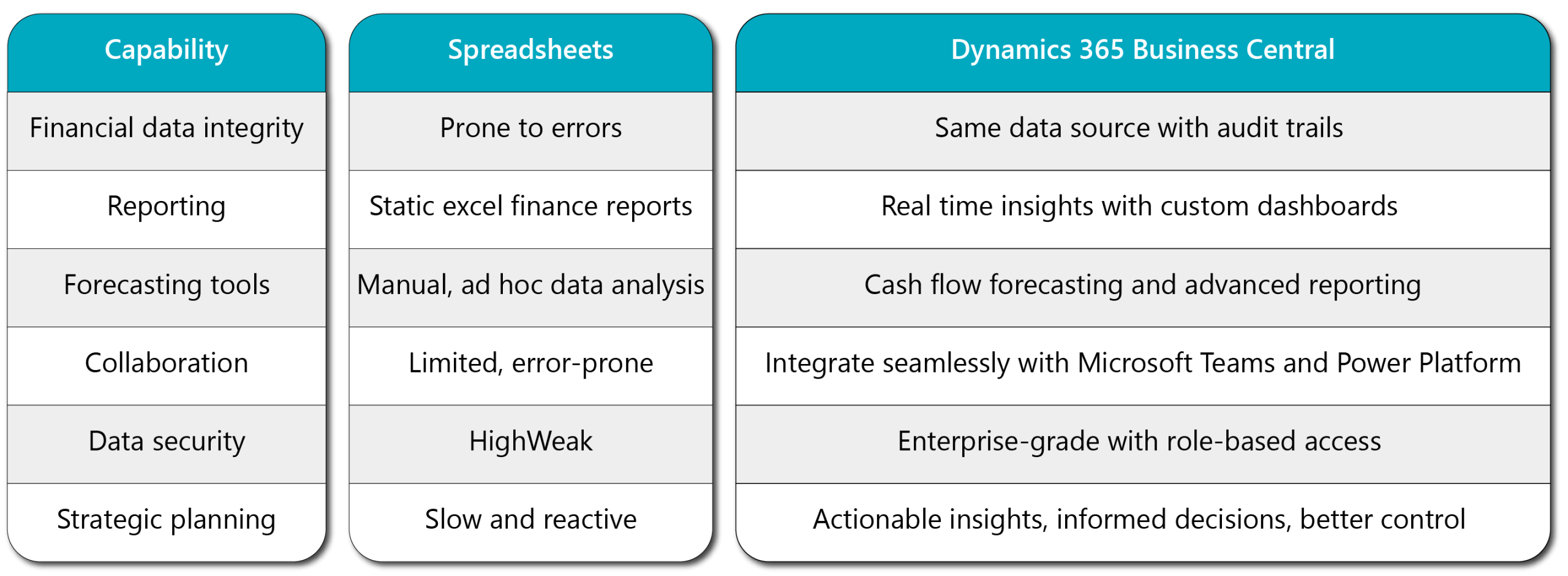
How does Business Central compare with spreadsheets for finance?
Right, let’s get straight to it. We track finance KPIs and measure business performance in real time. It’s a proper game changer for us finance leaders. Dynamics 365 Business Central gives us the tools we need. No more waiting around for month-end reports.
We get Power BI metrics built right in. Our financial reports? We can customise them however we want. Cash flow, net income, cost management – we see it all instantly.
According to recent UK research from Forrester, 73% of finance teams using integrated BI tools report 40% faster decision-making.
Ready to see your financial data come alive? Start tracking what matters most to your bottom line.
What does real-time finance monitoring look like in Business Central?
We respond quickly when business performance shifts. That’s what real-time financial insights do for us. Our finance teams optimise operations on the spot. We make informed decisions faster than ever.
Custom dashboards let us present data properly. Stakeholders get it straight away. We communicate financial performance clearly. Strategic initiatives move forward without delays. Microsoft’s 2023 UK productivity study shows finance teams save 25 hours per month with automated reporting.
- Real-time alerts keep us ahead of issues
- Custom views show exactly what each stakeholder needs
- Performance tracking happens automatically
How do real-time insights speed up financial decisions?
We integrate seamlessly with Microsoft Teams and third-party tools. Finance professionals share insights easily. We work together efficiently. No more email chains or lost spreadsheets.
Our organisations gain proper control over financial management. Profitability improves. Business growth accelerates. We turn static finance KPIs into actionable intelligence. Data-driven decisions shape our business future. Recent ONS data indicates UK businesses using collaborative finance platforms see 18% improvement in profit margins.
The platform connects everything we use daily. Teams chat becomes finance strategy. Third-party tools work together perfectly.
Independent TEI analysis reports strong returns from Business Central, with payback in months when manual reporting and approvals are automated.
Stop juggling multiple systems and start making finance collaboration effortless.
A UK Case Study: The Pharo Foundation
The Pharo Foundation initially managed its financial operations using Excel, which led to inefficiencies, manual errors, and limited visibility across departments. By moving to Microsoft Dynamics 365 Business Central, they achieved:
-
Automated Workflows – Replaced manual Excel processes with streamlined approvals and budget checks.
-
Unified Financial System – Consolidated operations across all entities into one platform.
-
Real-Time Reporting – Gained instant insights through Power BI integration.
-
Improved Accuracy & Efficiency – Reduced errors and saved time with automated intercompany transactions and expense management.
FAQs
Why are spreadsheets risky for finance professionals?
Spreadsheets create errors in cash flow statements, balance sheets, and internal reports. They lack audit trails, data security, and automation, leaving financial operations exposed to compliance risk.
Can we still use Excel with Business Central?
Yes, use Excel for ad-hoc analysis while Business Central remains the single source of truth with audit trails.
How quickly do we see ROI?
Independent TEI models show payback in months when manual reporting/approvals are automated.
Does Business Central help with approvals and SoD?
Yes, workflows pair triggers and responses, including system steps (e.g., auto-posting).
Is it GDPR-friendly?
Microsoft provides features and guidance (roles, encryption, logs); compliance depends on your configuration and process.
Will it integrate with our stack?
Yes, APIs, Power Platform and connectors support common finance/ops tools.
How hard is user adoption?
Most finance users adapt quickly; targeted training (1–2 days) accelerates adoption.
Can non-finance roles see dashboards?
Yes, use role-based permissions for secure access.
Does it support global entities?
Yes, multi-currency, localisation and consolidated reporting are supported.
Conclusion
Finance leaders face complex demands: real time insights, compliance, and cost management amid economic uncertainty. Spreadsheets can no longer deliver.
Microsoft Dynamics 365 Business Central empowers finance professionals to harness data, automate financial operations, and build data driven insights that support informed decisions.
For growing businesses entering new markets, Business Central is not just an ERP – it is the foundation for data driven CFOs and strategic leaders to achieve better control, cost saving measures, and sustainable growth.