
Quick Summary
Agentic AI quickly accesses enterprise data. Microsoft uses tenant boundaries, permissions, DLP, regional processing, and governance controls to help businesses deploy agents securely.
Key Takeaways
- Tenant boundaries separate organisational data, while permissions determine what an agent can access.
- AI agents can expose existing SharePoint and Teams oversharing rather than creating the underlying permission problem.
- Agent identities require least-privilege access, controlled authentication and appropriate Microsoft Entra governance.
- Microsoft Copilot and Azure AI Foundry provide enterprise AI controls, but processing location depends on the service, configuration and deployment type.
- Review permissions, DLP, connectors, data residency and cross-tenant access before deploying agents.
Introduction
AI agents don’t ask permission. They act.
Unlike a traditional chatbot, an AI agent can read authorised files, call APIs, retrieve business information and execute tasks with limited human intervention.
That changes the data privacy question for business leaders.
When an agent accesses customer records, pricing information, financial data or confidential contracts, where is that information processed, what can the agent access, and which controls govern its actions?
The answer depends on your Microsoft environment, permissions, AI service and configuration.
For organisations building an agentic AI strategy around Microsoft technologies, the focus should therefore be broader than the AI model itself. Tenant boundaries, identity, permissions, DLP, data residency and AI processing geography all need to be considered together. Let’s start with it.
What Does Tenant Boundary Mean in Microsoft 365?
Your Microsoft tenant sets the boundary for your Microsoft 365 data and services. Microsoft Copilot AI works within this service boundary and follows the identity and permissions of the user who is signed in.
This means Copilot does not have automatic access to all your tenant’s data. What it can access depends on the user’s existing permissions and your organization’s security settings.
Microsoft says that prompts and responses in Copilot are protected by enterprise data protection policies, including keeping data separate between tenants. Microsoft does not use this data to train its foundation models.
There are two key ideas to understand:
- Tenant boundary: This keeps your organization’s data separate from other Microsoft customers.
- Service and processing boundary: This sets where and how Microsoft processes or stores your data, based on the service and its settings.
This difference is important because tenant isolation does not always mean that every AI operation happens in the same physical place as your business data.
| The tenant boundary secures your data, while your permissions model controls internal access. Agentic AI evaluates both, and most breaches happen when permissions are not properly managed. |
What Does a Shadow AI Data Leak Actually Cost?
Let’s look at the actual numbers because just saying something is risky usually isn’t enough to secure more budget.
According to IBM’s Cost of a Data Breach research:
- 20% of breached organisations had shadow AI as a contributing factor.
- These breaches increased the average cost by $670,000.
- The global average cost of a data breach is $4.44 million, while breaches involving shadow AI average approximately $5.1 million.
- Incidents involving shadow AI also took longer to detect and led to more exposure of customer personal information and intellectual property.
The key takeaway is not that every AI incident will cause a huge financial loss. Instead, the real risk is that uncontrolled AI use creates more ways for sensitive information to be exposed.
Before your first AI agent acts, know exactly what it can access
Get a practical review of permissions, agent identities, connectors and tenant boundaries before autonomous AI reaches your business data.
Where Does Enterprise Data Actually Leak in an Agentic AI Setup?
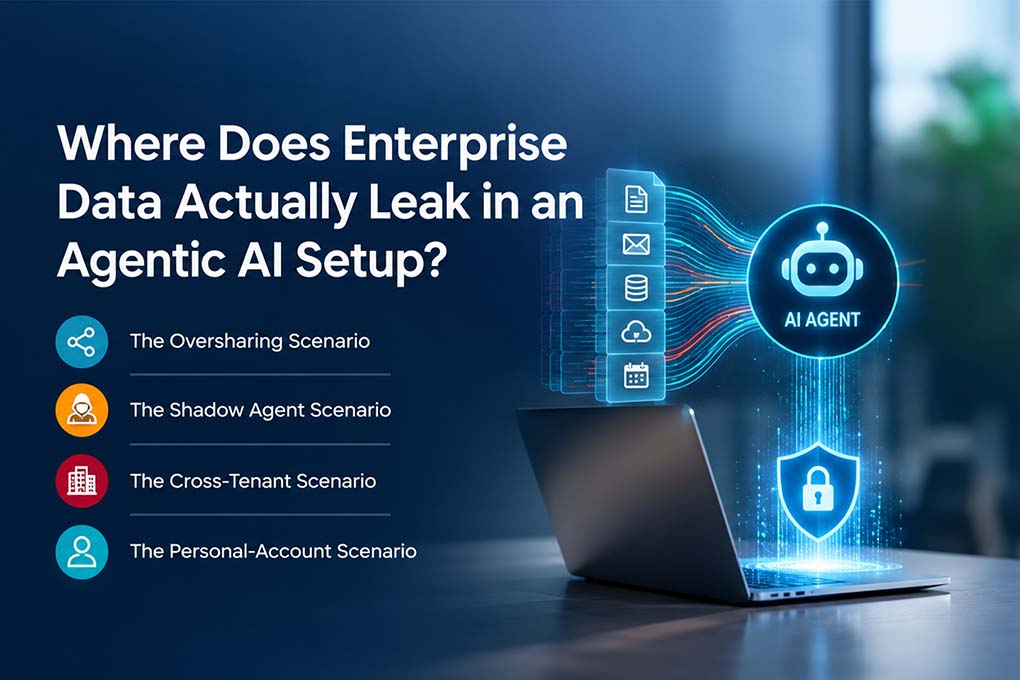
The AI tool is only one part of the risk. In many environments, the underlying issue is how data, permissions and connections have already been configured.
The Oversharing Scenario
SharePoint and Teams permissions may already be broader than intended.
Copilot and agents can make this problem more visible because they can retrieve information that the user is already authorised to access.
The risk is not necessarily that AI bypasses permissions. It is that existing permissions may be too broad.
The Shadow Agent Scenario
Business teams can create agents using Microsoft Copilot Studio agent to automate tasks.
Without clear ownership, approval, monitoring and lifecycle controls, organisations can end up with agents that remain active without a defined business or IT owner.
The Cross-Tenant Scenario
Mergers, acquisitions, subsidiaries and external collaboration can introduce cross-tenant access requirements.
Guest accounts and cross-tenant configurations should therefore be explicitly reviewed rather than treated as secure simply because they operate within the Microsoft ecosystem.
The Personal-Account Scenario
Employees may also use consumer AI services outside the organisation’s Microsoft environment.
Because these interactions sit outside the corporate tenant, the organisation may have limited visibility or control over the information being submitted.
How Does Microsoft Protect Enterprise Data in Agentic AI?
Microsoft Copilot provides enterprise data protection designed around the same Microsoft 365 security and compliance framework organisations already use for services such as Exchange and SharePoint.
Microsoft states that Copilot:
- protects prompts and responses under Microsoft enterprise terms;
- applies organisational identity and access controls;
- respects permissions and sensitivity labels;
- supports retention and auditing controls; and
- does not use customer prompts and responses to train Microsoft’s foundation models.
For organisations building more customised AI solutions, Azure AI Foundry provides additional control over model deployment, data, applications and AI workloads.
The key point is that security does not stop at selecting Microsoft as the platform. The service, deployment type and configuration still matter.
For an enterprise agentic AI deployment, focus on four areas.
1. Identity Governance & Least Privilege
Autonomous agents should have only the permissions required to complete their assigned tasks.
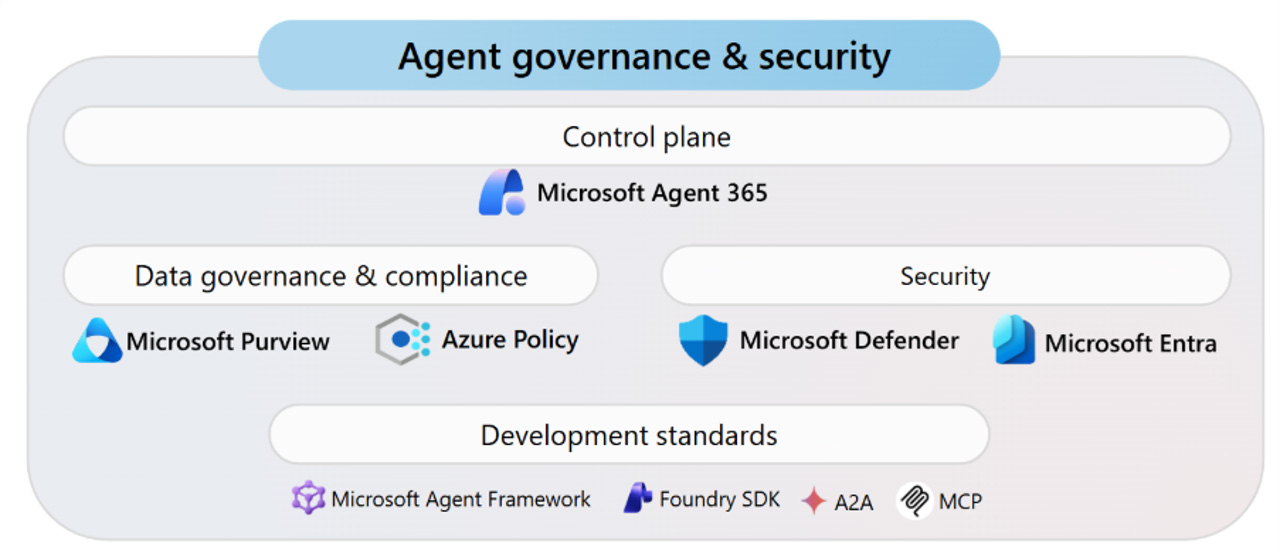
- Enforce Microsoft Entra Agent ID: Assign dedicated Microsoft Entra Agent IDs to custom agents instead of granting global access. Treat agent identities as distinct principal types.
- Apply Task-Scoped RBAC: Grant agents read-only, task-based permissions limited to specific workspaces.
- Deploy Conditional Access Policies: Configure Entra ID Conditional Access policies specifically for your agent identities. Enforce “block-unless-approved” boundaries so an agent cannot request tokens or access unauthorised backend infrastructure.
- Review agent permissions regularly: Treat agent identities as part of your organisation’s identity governance framework.
2. Eliminating Hardcoded Secrets
Agents may need to interact with APIs, databases and business applications. Credentials must therefore be managed as securely as human identities.
- Use Federated Identity Credentials (FIC): For chatbot registrations in Entra ID, use Federated Identity Credentials (FIC) to eliminate persisted client secrets and certificates.
- Externalise Runtime Secrets: Agents in Microsoft Copilot Studio should not store secrets in configuration code or variables. Use managed environment variables backed by Azure Key Vault for all connections.
- Enforce User-Delegated Authentication: Configure tools to dynamically inherit end-user credentials, ensuring agents access only data authorised for that user.
3. Data Control Planes & Leakage Prevention
Data classification and DLP controls should be established before agents begin processing sensitive information.
- Microsoft Purview DLP: Apply DLP policies to help identify and control sensitive information.
- Sensitivity labels: Protect classified content and maintain the organisation’s existing information-protection policies.
- Control AI interaction data: Review transcript, logging and retention settings according to the sensitivity of the workload.
- Audit AI activity: Ensure security teams can investigate relevant prompts, responses and agent actions where supported by the service.
4. Tool & Infrastructure Isolation
Agents become more powerful as they gain access to tools. That also increases the potential impact of a misconfiguration.
- For higher-risk workloads:
- Use Azure AI Foundry resources and supporting Azure services within the organisation’s approved architecture.
- Restrict which connectors and tools an agent can invoke.
- Require human validation for high-risk actions such as financial changes, database modifications or external communications.
- Review cross-tenant connections through Microsoft administrative controls.
| The principle is controlled autonomy: give agents enough access to complete useful work, but not enough to create unnecessary exposure. |
5. Data Residency, Microsoft Copilot and Azure AI Foundry
Data residency is critical when AI processes sensitive information such as customer, employee, or financial data. Organisations should assess the entire data flow, not only the location of Business Central or an MCP server.
For example, the data flow may follow this sequence:
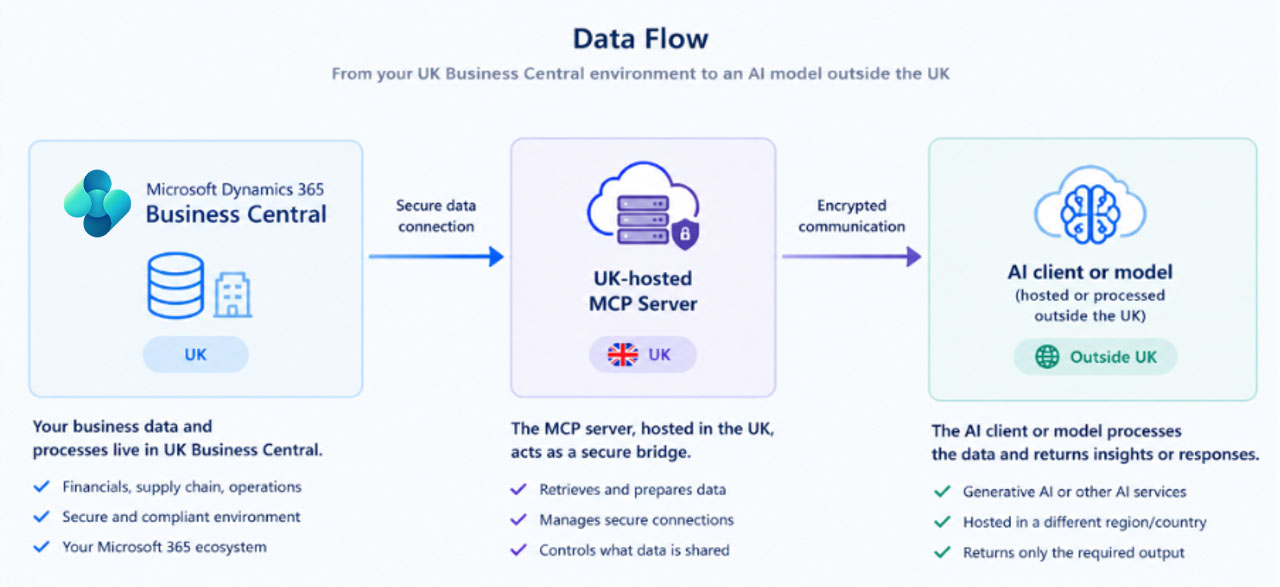
For Microsoft Copilot, data residency depends on the specific service, tenant location, and configuration. In Business Central, Microsoft outlines how Copilot and agent features handle data, including scenarios where data may move between regions. Administrators can often control this with the Allow data movement setting.
Azure AI Foundry provides multiple deployment options, each with specific processing boundaries. Standard deployments restrict processing to a selected region, while Global and Data Zone deployments permit data processing across broader, predefined areas.
What should organisations check?
Before deploying an AI workload, confirm:
- Where prompts, responses and business data are processed and stored
- Whether data can move outside the required geography
- Which Copilot capability or Azure AI Foundry deployment type is being used
- Whether administrator consent is required for cross-geography processing
- What retention, encryption, DLP and access controls apply
Hosting Business Central or an MCP server in the UK does not ensure all AI processing remains within the UK. Organisations should review the Microsoft service, its configuration, and applicable data residency rules before enabling these features.
How can you Secure Agentic AI within your Tenant?
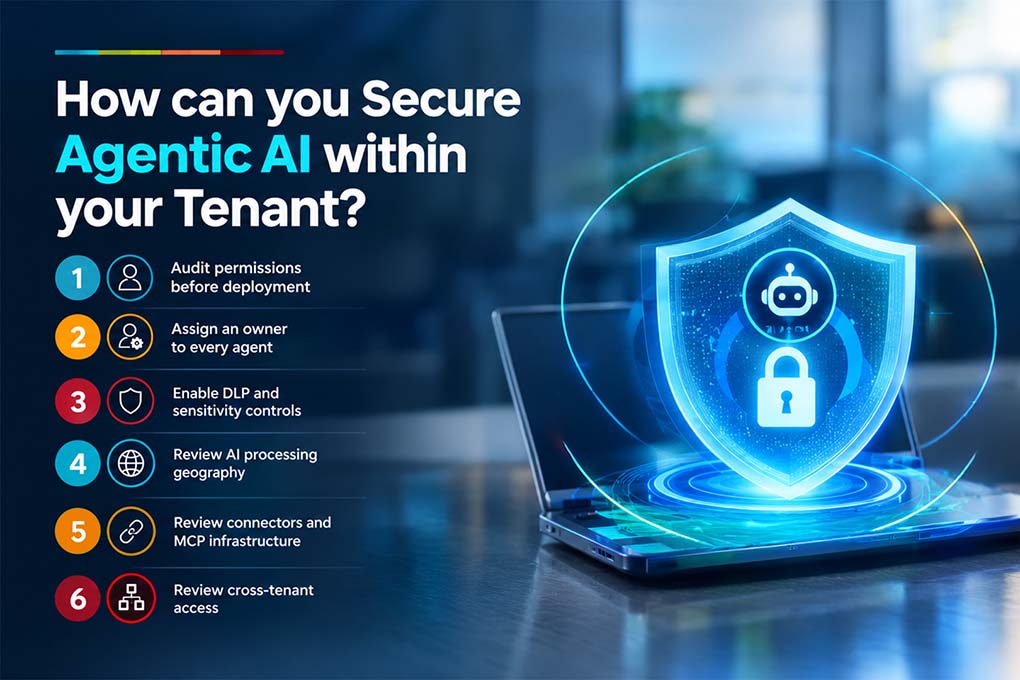
Follow these steps before deploying autonomous agents:
1. Audit permissions before deployment
Review SharePoint, Teams, Business Central and other connected data sources for oversharing.
2. Assign an owner to every agent
Every production agent should have a clearly defined business and technical owner.
3. Enable DLP and sensitivity controls
Use Microsoft Purview and existing information-protection policies to establish appropriate controls before rollout.
4. Review AI processing geography
Confirm where the selected Microsoft Copilot capability or Azure AI Foundry deployment processes prompts and responses.
5. Review connectors and MCP infrastructure
Allow only approved tools, connectors and MCP servers to interact with enterprise systems.
6. Review cross-tenant access
Explicitly validate guest accounts, external connections and cross-tenant configurations.
| Pro tip: This is exactly the audit our Microsoft consulting team runs before any Copilot or agent rollout. Permissions first, AI second. Skip this step, and most businesses end up doing it anyway usually after something’s already gone wrong. |
Don't wait for an AI data incident to expose your permission gaps
Mercurius can review your Microsoft environment, identify oversharing and governance risks, and help establish the controls needed before agents go live.
Bottom Line
Agentic AI security is not only about the AI model.
It is about who can access the data, what the agent can do, which systems it can connect to, where AI processing takes place, and which governance controls are applied.
For organisations using Microsoft technologies, Microsoft Copilot and Azure AI Foundry provide enterprise capabilities for building and governing AI workloads. But those capabilities still need to be configured against your organisation’s security, privacy and data-residency requirements.
Mercurius IT helps businesses build Microsoft environments where governance is considered from the start from permissions and identity to AI processing, connectors and deployment controls.
Start with your data, permissions and processing requirements before you deploy your first agent.
Planning agentic AI? Start with your data, not your agent
Get a one-to-one assessment of your Microsoft environment to identify permission, identity and governance gaps before deployment.
Frequently Asked Questions
Does Copilot train on my company data?
No. Microsoft does not use tenant prompts, responses, or Microsoft Graph data to train the shared foundation models used for other customers.
Can Copilot or agents see data from another tenant?
No. Tenant isolation is enforced through Microsoft Entra ID and role-based access control. Cross-tenant access requires explicit configuration, such as B2B guest accounts. It is never automatic.
What's the difference between the tenant boundary and the Microsoft 365 service boundary?
The tenant boundary separates your organisation’s data from all other Microsoft customers. The service boundary specifies the region and compliance zone where Microsoft is contractually allowed to process your data.
Is a Copilot Studio agent as protected as Microsoft 365 Copilot itself?
Only if it is configured correctly. Custom agents inherit the builder’s permissions and require the same governance, including Entra Agent ID, Purview coverage, and allowlisted connectors, as any other identity in your tenant.
What's the biggest cause of AI data leaks in Microsoft 365?
The primary cause is pre-existing oversharing in SharePoint and Teams permissions, not the AI tool itself. Agents and Copilot only reveal access that was already too broad.
Sources
- Microsoft Work Trend Index 2026 — agent activity growth across the Microsoft 365 ecosystem
- IBM Cost of a Data Breach Report 2025 — ibm.com/think/x-force/2025-cost-of-a-data-breach-navigating-ai (20% shadow-AI-linked breaches, $670K added cost, $4.44M global average, 247 vs. 241-day detection, 65% PII / 40% IP exposure)
- Microsoft Learn — Examine how Microsoft 365 Copilot protects sensitive business data
- Microsoft Learn — Enterprise Data Protection
- Microsoft Learn — Least privilege for AI agents with Microsoft Entra Agent ID
- Microsoft Security Blog — Securing AI agents: when AI tools move from reading to acting
- Microsoft Security Blog — Secure agentic AI for your Frontier Transformation
- Microsoft Learn — Govern and secure AI agents — Cloud Adoption Framework