
Quick Summary
The choice between Dynamics 365 Customer Service and Dynamics 365 Contact Centre depends on whether your organisation values structured case management or AI-driven, high-volume customer engagement. This comparison guides business leaders in selecting the platform that best enhances customer experience, operational efficiency, and service scalability.
Key Takeaways
- Dynamics 365 Customer Service is ideal for case management, SLAs, and structured support operations.
- Dynamics 365 Contact Centre is built for AI-driven, high-volume omnichannel customer engagement.
- Copilot and AI agents are transforming service delivery within Dynamics 365.
- Deploying both solutions together enhances end-to-end customer experiences.
- Selecting the appropriate platform depends on specific operational needs and customer relationship management (CRM) requirements.
With increasing complexity in customer expectations, organisations require more sophisticated and flexible approaches to deliver high-quality support. Microsoft provides two robust solutions tailored to distinct service requirements: Dynamics 365 Customer Service and Dynamics 365 Contact Centre.
Although both platforms are designed to enhance customer experiences, they address different operational needs. This article analyses their distinctions to help organisations select the most appropriate solution.
Dynamics 365 Contact Centre addresses these challenges by introducing a Copilot-first approach. It replaces inflexible phone trees with conversational Voice AI that interprets customer intent in real time, provides natural guidance, and routes interactions intelligently without requiring users to navigate extensive menu options. This blog provides you all the essential information about D365 contact centre.
Dynamics 365 Contact Centre vs Dynamics 365 Customer Service Comparison at-a-Glance
| Feature | Dynamics 365 Customer Service (Enterprise/Premium) | Dynamics 365 Contact Centre (Standalone) |
|---|---|---|
| Primary Focus | Case Management, Ticketing, SLAs | Omnichannel, Voice, High-Volume Interaction |
| Core Object | The Case (Ticket) | The Conversation |
| AI (Copilot) | Case summaries, email drafting, agent guidance | Real-time transcription, sentiment analysis, voice bots |
| Telephony |
Requires Add-on (Voice Channel) |
Native (Azure Communication Services/Teams) |
| Integration | Deeply integrated into MS ecosystem (CRM/Sales) | Flexible: Works with other CRMs (Salesforce, Zendesk) |
| Best For | Structured, relationship-based support | Fast-paced, high-volume, multi-channel support |
Understanding D365 Contact Centre vs Customer Service
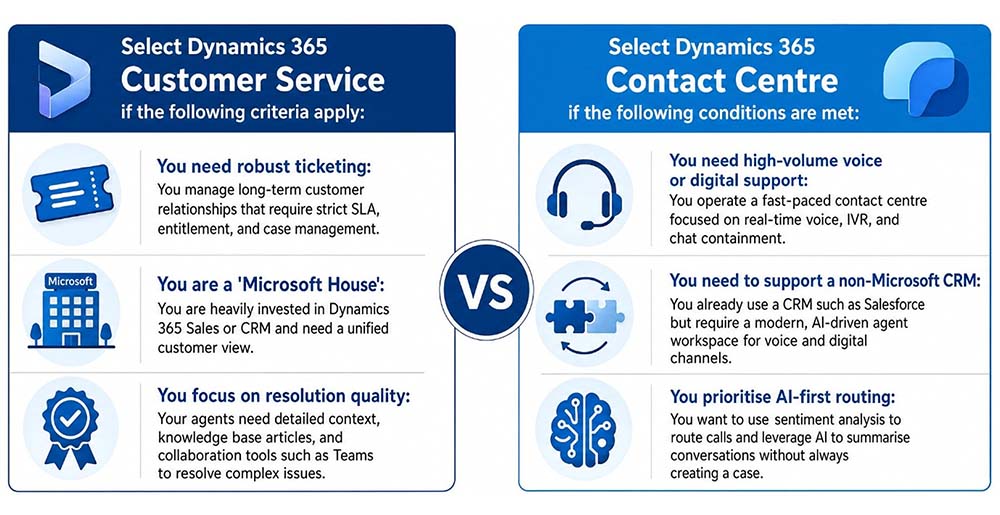
Dynamics 365 Customer Service supports teams managing structured, case-based interactions. It integrates with the Microsoft Dynamics 365 ecosystem and is ideal for organisations already using Microsoft’s CRM platform.
Recommended use cases of D365 Customer Service include:
- Businesses that currently use Microsoft Dynamics CRM.
- Support teams responsible for managing tickets, service level agreements (SLAs), and escalations.
- Organisations seeking to enhance their CRM capabilities with AI and multichannel communication tools.
Dynamics 365 Contact Centre is a standalone Contact Centre as a Service (CCaaS) platform is optimised for high-volume, multichannel customer engagement. It delivers enterprise-grade voice, chat, and intelligent routing, independent of the CRM platform in use.
Recommended use cases of D365 Contact Centre include:
- Large or rapidly expanding contact centres.
- Organisations utilising third-party CRM platforms such as Salesforce, Zoho CRM, and others.
- Teams requiring advanced voice features, automation, and flexible deployment options.
Still unsure which solution fits your operating model?
Get a tailored assessment aligned to your service goals, cost structure, and growth plans.
Case Management
Dynamics 365 Customer Service provides built-in tools for creating, tracking, and resolving service cases. It offers workflows, SLAs, queues, and escalation rules, making it well-suited for organisations that require structured ticket handling.
Case management is not available in D365 Contact Centre. The Contact Centre is designed for handling interactions such as voice, chat, and digital channels, rather than managing cases or tickets. Case tracking should be managed through an integrated CRM.
Customer Relationship Management (CRM) Integration
CRM integration is fully embedded within Microsoft Dynamics 365 Customer Service, providing comprehensive access to customer history, contact records, and business processes such as sales, field service, and marketing.
The Contact Centre platform is CRM-agnostic and can operate as a standalone solution or be integrated with Microsoft Dynamics, Salesforce, Zoho, or custom CRM systems through application programming interfaces (APIs). It is designed to provide flexibility in multivendor environments.
AI Copilot Capabilities
Dynamics 365 Customer Service uses Microsoft Copilot to draft emails, summarize case histories, and recommend knowledge articles. Artificial intelligence enhances these CRM processes, increasing agent productivity and consistency.
Copilot provides real-time transcription, summarisation, emotion and sentiment detection, and intelligent routing. Dynamics 365 Contact Centre focuses on conversational AI, including virtual agents and self-service bots.
Voice and Chat Support
Voice & chat support is accessible with the Premium license through the Omnichannel for Customer Service add-on. D365 customer service offers chat, voice, SMS, and social messaging, featuring agent routing and session management.
Included as a native feature in D365 Contact Centre. It provides enterprise-grade voice, chat, and messaging capabilities, including intelligent routing, transcription, and sentiment detection. Also, optimised for real-time, high-volume engagement.
Self-Service Capabilities
D365 support service offers portals, knowledge base integration, and chatbot options through Power Virtual Agents. These tools primarily resolve known issues and frequently asked questions.
The capabilities of D365 contact centre also encompass voice bots and chatbots equipped with natural language understanding, enabling them to manage complete interactions autonomously. Integration with Azure AI enables advanced scenarios.
Want to quantify the ROI of Dynamics 365 for your organisation?
See how AI, automation, and omnichannel can reduce cost-to-serve and improve CSAT.
Routing and Queuing
D365 Customer Service uses skills-based routing that considers case type, communication channel, and agent capacity. The system integrates seamlessly with existing case workflows and team queues.
Contact Centre offers intelligent routing based on language, intent, sentiment, and agent skills. It supports advanced voice IVRs, automatic callbacks, and overflow scenarios, ensuring efficient case handling.
Real-Time Monitoring and Analytics
Customer service emphasizes customer satisfaction, service level agreement (SLA) performance, and case resolution metrics. The platform provides dashboards for key performance indicators (KPIs) and historical reporting.
The contact centre provides real-time dashboards displaying call volumes, queue status, agent availability, and customer sentiment. It has built-in analytics support for operational performance, customer experience, and channel efficiency assessment.
Agent Workspace
Dynamics 365 Customer Service offers a unified, configurable workspace where AI agents can manage cases, access customer data, and consult knowledge articles. Customer service has integrated productivity tools and AI to support faster case resolution.
Dynamics 365 Contact Centre is built for rapid interaction management, with a streamlined user interface that enables efficient routing and resolution of conversations across multiple channels. The platform is focused on operational efficiency.
Dynamics 365 Contact Centre vs Customer Service: Licensing Implications
Dynamics 365 Customer Service is licensed on a per-user basis across the Standard and Premium tiers available. Omnichannel capabilities are included, while AI features require the Premium license.
Dynamics 365 Contact Centre is licensed per user, with additional capacity-based consumption for resources such as minutes and messages. This model provides greater flexibility for organisations not exclusively using Dynamics 365 Customer Relationship Management (CRM).
Deployment Model
Dynamics 365 Customer Service is hosted within the Dynamics 365 platform. It is most suitable for organisations already utilising Microsoft business applications.
Dynamics 365 Contact Centre is deployed as a standalone Azure-based solution. This approach offers flexibility for greenfield implementations or mixed-platform environments, making it ideal for standalone deployments or integration with existing ecosystems.
Selecting the Appropriate Dynamics 365 Solution
By early 2026, these solutions will become increasingly complementary. Customer Service Premium, estimated at $195 per user per month, integrates both platforms. Even, Microsoft is providing a 40% discount on Contact Centre until June 30, 2026.
Choosing between Customer Service and Contact Centre shouldn’t be guesswork.
Get expert guidance tailored to your industry, systems, and customer expectations.
Key Updates and Emerging Trends for 2026
In 2026, there is a significant transition from traditional service tools to AI-driven service operations within Dynamics 365 Customer Service and Dynamics 365 Contact Centre.
- AI-First Experience: The renaming of the platform to Copilot Service workspace and Copilot Service admin centre indicates Microsoft’s strategic focus on AI-centric service design rather than traditional workflow-based approaches.
- Agentic AI Maturity: The deployment of AI agents across case management, intent detection, quality evaluation, and knowledge management enables organisations to progress from assisted support toward more autonomous operations.
- Unified Licensing Model: Customer Service Premium now integrates both platforms, combining capabilities with Copilot credits to support a comprehensive, end-to-end service ecosystem.
Conclusion
Choosing between Dynamics 365 Customer Service and Dynamics 365 Contact Centre is a strategic decision that shapes how your organisation engages, supports, and retains customers.
Customer Service offers a structured foundation for case management and long-term relationships, while Contact Centre delivers the speed, intelligence, and scalability needed for high-volume, real-time engagement. Many organisations now design integrated service ecosystems that leverage the strengths of both solutions. This is where execution becomes critical.
At Mercurius IT, organisations gain more than implementation support. With deep expertise across Microsoft technologies and industry-specific service models, we help you implement Microsoft Dynamics 365 solutions specific to your business case. Whether you are modernising legacy support systems, scaling a contact centre, or building a unified customer experience platform, Mercurius IT ensures:
- Right-fit solution architecture aligned to your operational model
- Seamless integration across CRM, telephony, and AI capabilities
- Industry-specific accelerators tailored to your sector
- Faster time-to-value with proven deployment frameworks
If your current support model is slowing growth, increasing cost-to-serve, or limiting visibility, this is the moment to act. Because in 2026, customer experience is no longer a support function; it’s your primary competitive advantage.
Frequently Asked Questions
Can I migrate from Customer Service to Contact Centre in Dynamics 365?
While a transition is possible, it does not constitute a direct migration in the traditional sense. Dynamics 365 Contact Centre does not replace case management; rather, it complements existing CRM systems. Organisations typically integrate Contact Centre with Dynamics 365 Customer Service or other CRM platforms to facilitate seamless data flow between conversations and cases. A structured integration strategy is essential to maintain continuity of customer data and workflows.
What’s the difference between Dynamics 365 Customer Service and Dynamics 365 Contact Centre?
The core difference between Dynamics 365 Customer Service and Dynamics 365 Contact Centre lies in their purpose:
- Customer Service is designed for case management, service level agreements (SLAs), and structured support processes.
- The Contact Centre is intended for real-time, high-volume interactions across voice and digital channels, utilising artificial intelligence-driven routing and automation.
In summary, Customer Service manages customer issues, whereas Contact Centre manages customer interactions.
How can Mercurius IT help in selecting the right Dynamics 365 solution?
Mercurius IT employs a consultative approach, assessing current systems, service maturity, customer engagement models, and growth plans. Based on this evaluation, the firm recommends Customer Service, Contact Centre, or a combined architecture, ensuring alignment with organisational objectives rather than focusing solely on technical features.
Does Mercurius IT provide implementation support across multiple industries?
Yes. Mercurius IT possesses cross-industry expertise across manufacturing, retail, distribution, professional services, and other sectors. The firm customises implementations according to industry-specific workflows, compliance requirements, and customer engagement patterns.
Can Mercurius IT integrate Contact Centre with non-Microsoft CRMs?
Yes. A key strength of Dynamics 365 Contact Centre is its CRM-agnostic design. Mercurius IT has experience integrating the solution with platforms like Salesforce, Zoho CRM, and custom-built systems using application programming interfaces (APIs), thereby ensuring a unified experience without necessitating a CRM transition.
What is the typical timeline for implementation?
Implementation timelines vary according to project complexity:
- Customer Service deployments typically require 6 to 12 weeks.
- Contact Centre implementations generally take 8 to 16 weeks, depending on voice, artificial intelligence, and integration requirements.
Mercurius IT expedites delivery by utilising pre-built frameworks and industry accelerators, thereby reducing time-to-value.