
Quick Summary
AI projects rarely fail because of the technology. They fail due to poor planning, weak governance, unclean data and low adoption. Fix the deployment process, and you fix the failure rate.
Key Takeaways
- Most AI deployment failures result from organisational and governance issues rather than technology.
- Start with a pilot to validate AI use cases before scaling.
- Clean data and strong governance are essential for reliable AI outcomes.
- Business ownership and change management drive successful AI adoption.
- Define ROI metrics before deployment to measure business value.
- A structured implementation approach significantly improves AI project success.
More than 80% of enterprise AI projects fail to deliver the business value they promised. That’s twice the failure rate of ordinary IT project.
You are not fighting the odds when you deploy Microsoft 365 Copilot or an AI agent. You are actually fighting worse odds than a normal software rollout.
But here’s the uncomfortable part: it’s rarely the AI’s fault.
Every failed deployment we have reviewed traces back to decisions made before the tool went live. Not the model, the vendor or the plan.
This post breaks down the mistakes that lead to Copilot and AI agent projects and what a deployment that actually works looks like instead.
Why So Many Copilot and AI Agent Deployments Underdeliver
When we talk about the project failures, there are two failure buckets. Almost every failed project either falls into one, or both.
- Technical failures — messy data, no integration plan, no security guardrails.
- Organisational failures — no one owns adoption, no one defined success, no one trained the team.
In fact, Gartner predicts over 40% of agentic AI projects will be cancelled by the end of 2027 due to escalating costs, unclear business value or inadequate risk controls.
Did you notice what’s missing from that list?
“The AI didn’t work” is not even on the list!
Here’s the maths that makes this real. For example,
|
“Say you invest £150,000 rolling out Copilot and an AI agent across 200 employees. Industry data says roughly 80% of AI projects fail to deliver measurable value. That is almost £120,000 of your budget producing nothing you can point to at renewal time.” |
MIT’s Project NANDA reported similar findings. Of 300 enterprise AI deployments, 95% showed no measurable profit-and-loss impact. Only 5% did, not due to superior AI, but because of effective deployment.
It’s not about whether your initial rollout encounters issues, but whether you identify them during the pilot phase or after scaling company-wide.
Don't Let Your AI Investment Become Another Failed Project
Most AI deployments fail long before go-live. Discover the hidden risks in your data, governance and adoption strategy before they become expensive mistakes.
9 Mistakes Businesses Make When Deploying Copilot and AI Agents
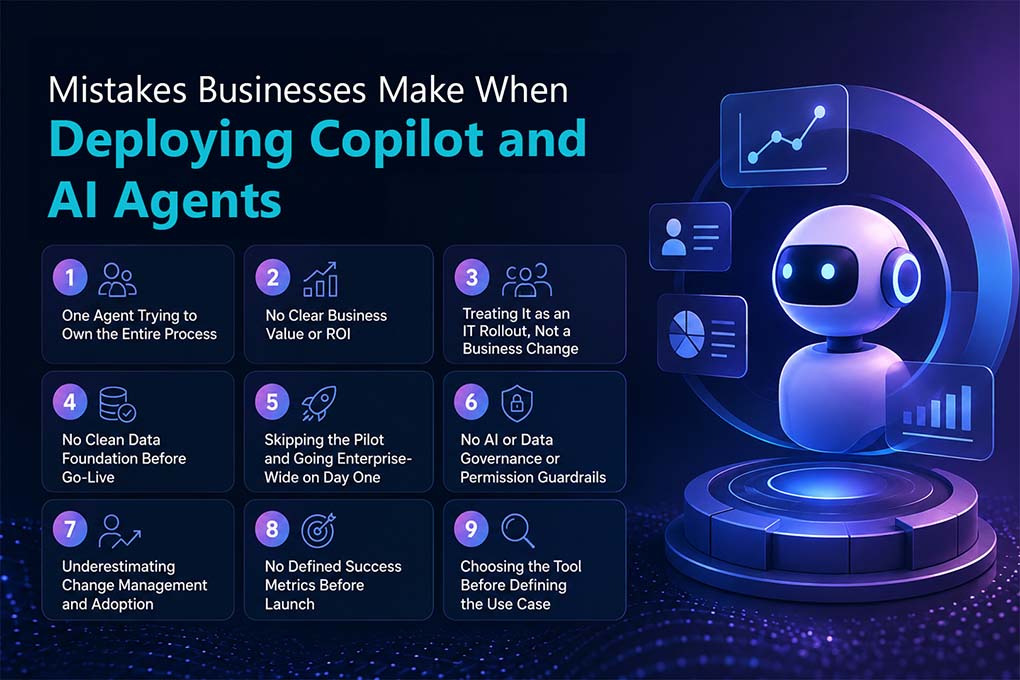
When deploying AI agents or Microsoft Copilot, businesses commonly make the following mistakes.
1. One Agent Trying to Own the Entire Process
Most organisations want one agent to run an entire end-to-end process. Sounds efficient. But that rarely works.
Think it like, a single “order agent” is expected to validate the customer, run credit checks, allocate inventory, and handle approvals, all at once. The moment one step needs a rule change; the whole agent needs rebuilding.
An effective agent has one job and a clear boundary. Not five.
So, instead of one agent doing everything:
- Sales Order Agent
- Customer Validation Agent
- Credit Check Agent
- Inventory Allocation Agent
- Approval Agent
Each one does its job. Each one is easier to test, govern, and fix when something breaks.
How to Fix?
Break the process apart before you build. Specialised agents with narrow scope beat one agent trying to be everything.
2. No Clear Business Value or ROI
Automating a task is not the same as creating value. Most implementations skip that distinction entirely.
An agent goes live, it does save time, but nobody asked what happens to that time afterwards. So, before you build anything, answer four questions:
- How many hours will the agent actually save?
- What does it cost to implement and maintain?
- What will employees do with the time it frees up?
- Does that time go toward revenue, service, or strategic work or nowhere?
If the saved time isn’t redirected somewhere that matters, there’s no ROI to defend. Just a tool that’s technically working and financially unjustifiable.
Fix: Answer all four questions before build starts not after the agent is already live and someone’s asking what it delivered.
3. Treating It as an IT Rollout, Not a Business Change
IT switches on the licences. And no business-process owner is named. The tool goes live but nobody redesigns the workflow around it.
Copilot gets enabled for the sales team, but nobody sits down with sales managers to work out where it actually fits into how deals get worked. Reps open it once, don’t see an obvious win, and go back to doing things the old way. This often results in that usage quietly dies within weeks, and nobody outside IT team notices it.
| “McKinsey’s State of AI survey found 88% of organisations now use AI in at least one business function, but only 39% report any EBIT impact from it at the enterprise level.” |
Copilot doesn’t fail because it can’t draft an email or summarise a case. It fails because the process it was meant to sit inside never changed to use it.
How to fix?
Name a business-process owner before go-live, someone whose job is redesigning the workflow, not just switching on the licence.
4. No Clean Data Foundation Before Go-Live
Copilot and AI agents inherit whatever is already sitting in your CRM, ERP, SharePoint or Dataverse. This may also include duplicate records, outdated fields and even the inconsistent permissions.
So, what this looks like? A Copilot-generated case summary references the wrong contact because two duplicate customer records exist. An agent recommends a next action based on a field nobody’s updated in 18 months.
Garbage in & unreliable output out. Sometimes even unsafe output out. If an agent can see data, it shouldn’t, so can the answer it gives someone.
Data readiness is the single biggest lever for whether your deployment lands in the 5% or the 95%.
How to fix?
Run a data audit before configuration, not after the first bad output.
5. Skipping the Pilot and Going Enterprise-Wide on Day One
No phased rollout means every failure point surfaces at full scale, not inside a controlled group of 20 users. It is expensive to unwind. And even worse, it kills internal trust in AI for the next project too.
How to fix it?
Set a defined success gate like adoption rate, error rate, and time saved that the pilot has to clear before you scale past it.
6. No AI or Data Governance or Permission Guardrails
Who can the agent talk to? What data can it touch? What’s logged?
If those questions get answered after an incident, you are already too late.
This one matter even more with Copilot inside Dynamics 365 or Power Platform, where agents inherit Dataverse permissions by default. Get that wrong, and an agent can surface information to someone who was never meant to see it.
| Pro Tip: Design access controls and data boundaries before you configure the agent, not as a patch afterwards. It’s the difference between a governance framework and a governance apology. |
How to fix it?
Map what each agent can see, say, and do, and who’s accountable for it before configuration starts, not during the post-incident review.
7. Underestimating Change Management and Adoption
You bought the licences bought. Even switched on the tools. But no training given, no workflow redesign and not even the adoption guidance is provided.
So, what could you expect out of it? Well, adoption flatlines fast. And once employees decide that a tool “doesn’t work,” getting them back is harder than the first rollout ever was.
| People don’t resist AI. They resist AI that was dropped on them with no context. |
How to fix?
Build onboarding around real workflows, do not just share the features but share the way it changes their workflows.
8. No Defined Success Metrics Before Launch
“We’ll know it’s working when it feels faster” is not just a KPI.
Without a baseline key metrics like cases resolved, time saved, deal velocity, whatever’s relevant to your business, leadership team can’t defend the budget at the next review. And they won’t.
How to fix?
Set the metric and the baseline in week one, before anyone’s opinion of the tool has had a chance to bias the number.
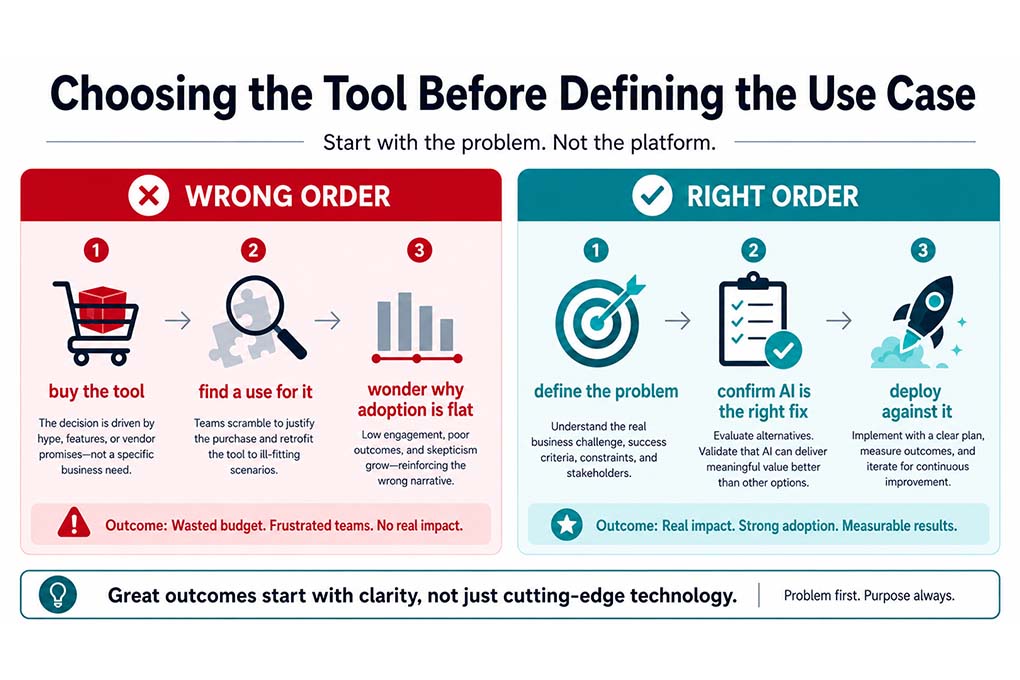
9. Choosing the Tool Before Defining the Use Case
Buying AI agents or Copilot licences because competitors have them, then reverse-engineering a use case afterwards.
This is the single most common root cause we see every time!
How to fix it?
Write the business problem down first. If AI isn’t the obvious answer to it, don’t buy the licence yet.
Don't Wait Until Renewal to Discover AI Isn't Delivering
Measure success from day one with a deployment strategy designed around business outcomes.
What Successful Deployments Do Differently
Flip every mistake above, and you get the pattern that actually works.
- Business-led sponsorship, with IT as the enabler, not the owner
- Data audit and cleanup before configuration starts
- A phased pilot with a defined success gate before scaling further
- Governance and access controls built in from day one
- Structured onboarding tied to real workflows and not just a one-off demo
- ROI metrics agreed before go-live, not invented afterwards to justify the spend
Simple, right? Well, it’s not complicated. It’s just disciplined. And discipline is the part most rollouts skip because it feels slower than “just turning it on.” That is where Mercurius IT helps you right.
Yes, you heard that right!
Mercurius IT could be the complete one stop destination for you. Whether you are planning to integrate Microsoft Copilot into your existing workflows or want to design a custom AI agent to help your teams, Mercurius IT can help right away!
How Mercurius IT Helps You Get This Right
This is the exact sequence we run on every Copilot, Dynamics 365 and Power Platform deployment.
- Consulting and readiness assessment- We audit your data, prioritise use cases, and design governance before a single licence is purchased.
- Phased implementation- Copilot and AI agents across Dynamics 365 CRM/ERP, Power Platform and Azure piloted first, with a success gate before we scale it wider.
- Managed support after launch- Adoption tracking, workflow refinement, and ongoing governance, so usage doesn’t decay the way it does in most rollouts by month two.
We are a leading and reliable Microsoft solutions partner delivering ERP, CRM and AI solutions for businesses across Europe, North America, Africa, Asia and Australia. We have seen this failure pattern enough times to know exactly where it starts and how to stop it before it does.
Your Next Move -> Don’t wait for a failed pilot to fix this. Fix it before you sign a licence.
Frequently Asked Questions
How long does a Copilot or AI agent deployment typically take?
A focused pilot usually runs 4–8 weeks, covering data readiness, configuration and a small user group. Businesses that skip the pilot and go straight to enterprise-wide deployment often take longer overall, since problems get fixed mid-rollout instead of caught early.
What does it cost to implement Copilot or AI agents in a business?
The cost of implementing AI agents or Copilot varies based on the licensing tier, user count, use-case complexity, and how much data cleanup is needed first. A readiness assessment upfront usually lowers total spend by avoiding rework later.
What's the difference between a Copilot pilot and a full rollout?
A pilot tests the deployment with a small and defined user group and a clear success gate before scaling. A full rollout applies the same configuration company-wide, so skipping the pilot means failure points surface at full scale instead of in a controlled group.
Do we need clean data before deploying Copilot or AI agents?
Yes. Copilot and AI agents draw on your existing CRM, ERP, SharePoint or Dataverse records. Inconsistent or duplicate data produces unreliable, sometimes unsafe outputs, regardless of how capable the model is.
How do we measure ROI on a Copilot or AI agent deployment?
Define and monitor the metric before launch including time saved, case resolution speed, or deal velocity. Without a baseline defined upfront, there’s nothing to measure against after go-live.