

Overview
This blog explains why migrating from Xero to Microsoft Dynamics 365 Business Central in 2025 is a smart move for growing businesses. It covers the main differences, migration steps, benefits, and how to ensure a smooth transition.
What You’ll Learn
- Key differences between Xero and Business Central
- Why 2025 is the right time to migrate
- Step-by-step migration plan
- Data protection and security tips
- Reporting and analytics improvements
- Multi-entity growth support
- Common risks and how to avoid them
What is Business Central?
If your organisation has outgrown entry-level accounting and needs a unified, cloud-based platform for finance, supply chain, projects and analytics, migrating from Xero to Microsoft Dynamics 365 Business Central in 2025 is a smart move.
Business Central is a comprehensive ERP designed for small and midsized businesses that want stronger financial control, better visibility across operations and the ability to scale to multiple companies and countries without a patchwork of add-ons.
Business Central connects natively with Microsoft 365, Power Platform and Power BI. Teams can work inside Outlook and Teams, automate approvals with Power Automate, and view real-time dashboards embedded in Business Central.
Microsoft continues to invest in AI, Copilot and agent capabilities that reduce manual effort in finance and operations. For growing businesses that need structure as well as agility, the platform brings an all-in-one solution that streamlines processes and speeds decision making.
Quick comparison: Xero vs Dynamics 365 Business Central
This table highlights decision-critical differences for a growing UK business planning a move from accounting to ERP. Xero refers to typical capabilities of entry-level cloud accounting. Business Central refers to standard online capabilities.
Capability |
Xero |
Dynamics 365 Business Central |
| Product scope | SME accounting with basic invoicing, bank feeds and simple reporting | Comprehensive ERP for finance, sales, purchasing, inventory, projects, service and warehouse management |
| Multicompany and group view | Separate organisations, limited cross-organisation visibility | Company Hub for cross company work, native consolidation across different charts, fiscal years and currencies |
| Multicurrency and FX | Core multicurrency in transactions | Multicurrency across customers, vendors, bank accounts, exchange rate services and additional reporting currency for analysis |
| Financial reporting depth | Standard P&L and balance sheet | Flexible financial reports, dimensions for slicing by department, project or customer group, budget vs actual, Power BI analytics embedded |
| Inventory and warehouse | Basic stock control | Warehouse configurations from simple picks to directed pick and putaway, bins, FEFO, and scalable workflows as complexity grows |
| Projects and jobs | Basic project tracking via thirdparty apps | Native job costing, budgets, WIP, resource allocation and profitability dashboards |
| Security and compliance | Cloud security model suited to accounting | Microsoft Entra ID authentication, rolebased access, tenant isolation, encryption at rest and in transit, data classification tools |
| Integration and automation | Marketplace addons, varied quality | Firstparty integration with Microsoft 365, Power Platform connector, APIs and OData, automation via Power Automate and rapid setup through Automation APIs |
| Reporting platform | Inapp reports and exports | Embedded Power BI, API and OData access, online connector reads from a readonly replica to protect performance |
| International and scale | Good for single entity SMEs | Localisations, hub and spoke rollouts, multisite, multientity and consolidation for midmarket growth |
Why the move makes sense in 2025

- One platform and unified data: Business Central consolidates finance, sales, purchasing, inventory and projects in a single data model. That removes reconciliation headaches between separate tools and reduces manual processes. Dimensions let you analyse performance by department, region or project without creating an unwieldy chart of accounts.
- Future ready operations: When your warehouse grows or you open new locations, Business Central can progress from basic goods handling to structured bins and directed pick and put away. You do not need to re-platform to get more sophisticated control of inventory movements and capacity.
- Real time visibility: Embedded Power BI reports surface KPIs directly on role centres. The online connector reads analytics from a read-only database replica, which means finance teams can run dashboards while operations keep posting, with minimal impact on performance.
- Mult entity growth: Company Hub gives a cross-company landing page for users who work across several entities. Consolidation brings group results together even when entities use different charts, currencies or fiscal calendars. Master data synchronisation reduces time spent setting up new subsidiaries.
- Security you can trust: Authentication is handled by Microsoft Entra ID with conditional access options. Data lives in an isolated tenant database with encryption in transit and at rest. Administrators can classify sensitive fields to support governance and audit.
Outgrown Xero? Time to Level Up
Move to Business Central for stronger reporting, controls, and growth.
A practical migration plan from Xero to Business Central
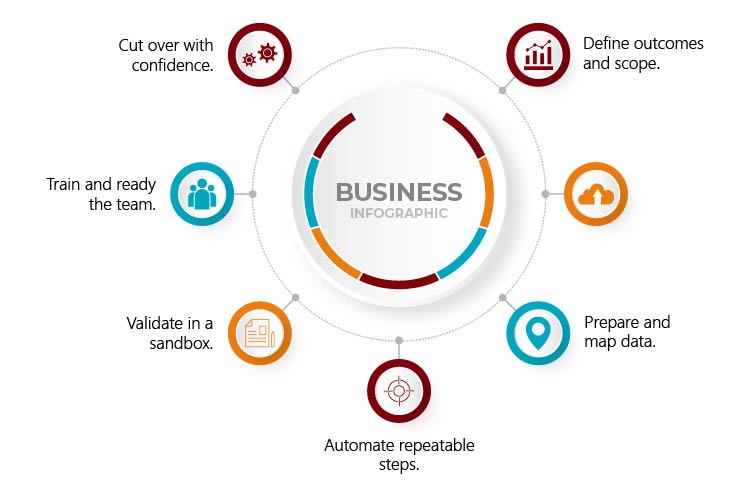
1) Define outcomes and scope.
Start with business requirements. Capture the reporting you need across finance, operations and projects. Decide which historical periods you will bring across. Use the assisted setup guides, configuration templates and questionnaires to frame a target design. Doing this up front keeps your migration focused on the business requirements, not only on a technical cutover.
2) Shape your data model.
Agree your chart of accounts, dimensions and posting groups. Decide the dimension strategy you will use for analysis, for example department, cost centre, region or project. This is the foundation for financial reporting, so invest the time to get it right.
3) Prepare and map data.
Export master data and balances from Xero. Typical scope includes chart of accounts, customers, vendors, items, bank accounts and opening balances, plus chosen historical transactions where needed. Use Business Central’s import templates to align data structure. Configuration packages allow you to map fields, validate table relationships and stage the data before applying it to the live company.
4) Automate repeatable steps.
If you are migrating multiple companies, use Business Central Automation APIs to script tenant hydration. The APIs can create companies, upload and apply RapidStart packages, and ensure permission sets and extensions are consistent. Automation reduces human error and makes reruns easy if you need to iterate.
5) Validate in a sandbox.
Spin up a sandbox and load your master data and balances first. Reconcile subledgers to the general ledger, validate VAT posting and test bank reconciliations. Run mock day in the life scenarios with finance and operations, for example purchase to pay, order to cash, stock adjustments, project postings and month end tasks. Fix issues, rerun packages and document your cutover checklist.
6) Train and ready the team.
Use role centres, cues and task pages to create a familiar cockpit for each role. Lean on the Microsoft 365 integration so users can work from Outlook or Teams. Build short, process-based training sessions rather than generic system tours. Focus on daily tasks and period end.
7) Cut over with confidence.
Freeze transactions, extract final balances and open documents, and import into production. Use your scripted steps to reduce downtime. Keep a short hyper care period with daily standups. Track issues and small enhancements in a backlog for a fast follow release.
Protecting data accuracy and integrity
Controlled loading through configuration packages.
Configuration packages let you import to specific tables with field level mapping; relationship checks and validation. You can export the package to Excel, correct issues and reimport repeatedly until the data is clean. This protects against duplicates, broken references and common data quality problems.
Security and governance by design.
Business Central online uses tenant isolation and encryption by default. Role based permissions allow you to restrict access at table and record level. Conditional access policies in Entra ID can enforce MFA or device compliance for sensitive roles. Data classification tooling helps administrators label sensitive fields and respond to subject access requests more efficiently.
Real time reporting and financial performance

Embedded analytics where people work
Power BI parts are available on role centres and list pages, so budget holders can see KPIs without opening a separate reporting tool. Teams can drill down from a KPI to underlying transactions, filter by dimension values and pin their preferred reports.
Flexible connectivity for BI teams
Business Central exposes data through APIs and OData. The online connector reads from a read only database replica, which protects transactional performance while keeping analytics timely. Finance can start with out of the box content, then extend with custom measures, visuals and multicompany reporting.
Planning for multientity growth
Work across companies in one place
The Company Hub role provides a single landing page with key information across companies and quick links into each entity. It is ideal for group finance teams, shared service centres and external accountants.
Consolidate with confidence
Group finance can consolidate results across multiple companies, even with different charts, currencies and fiscal calendars. Pre consolidation tests flag mapping differences before you run the process, which reduces surprises at period end.
Synchronise master data
Master Data Management setup allows subsidiaries to pull master data, for example customers, vendors and items, from a designated source company. Job queues update coupled records so changes flow to all subsidiaries. This reduces manual effort and keeps codes consistent across the group.
Extend with Power Platform and integrated tools
Automations that save time
The Business Central connector in Power Automate supports automated flows for approvals, notifications and background jobs, as well as instant flows users can trigger from the Automate menu inside Business Central. Typical wins include vendor onboarding approvals, purchase order thresholds, credit limit changes and customer statement distribution.
Lowcode apps for the frontline
Power Apps can create lightweight apps for tasks such as stock counts, site inspections or project timesheets. These apps use Business Central data and security, so you maintain a single source of truth.
Environment governance
Linking your Business Central environment to a Power Platform environment simplifies integration targeting and shared governance settings across services. It streamlines setup while maintaining admin control.
Risks to plan for and how to mitigate them
- Incomplete or inconsistent master data
Mitigation: Use configuration packages with mapping and validation, iterate in a sandbox and reconcile subledgers to the general ledger before go-live.
- Security gaps after cutover
Mitigation: Enforce Entra ID sign in and MFA, apply conditional access for privileged roles, review permission sets and audit telemetry.
- Low user adoption
Mitigation: Build role centred pages, start with essential processes, provide short scenario based training and keep a hyper care backlog for quick wins.
Ready to move from Xero to Business Central?
A well-planned migration delivers a smooth transition and unlocks faster decision making through unified data, strong financial controls, advanced inventory and embedded analytics.
With Business Central you can start simple, then layer on multi-entity consolidation, advanced warehouse processes and low code automation as your needs grow.
If you want a partner to plan the migration, move your data, embed Power BI and provide continuous support, Mercurius IT can help you deliver a system that works from day one.
Why partner with Mercurius IT
Mercurius IT specialises in planning and delivering migrations to Business Central for growing UK organisations. Our team aligns your business requirements with a best-practice solution design, manages data preparation and configuration packages, and uses automation to keep cutover fast and low risk.
We set you up for success with role-based training, embedded Power BI dashboards and post-go-live hypercare, then provide continuous support to keep your system secure, up to date and performing at its best.
If you want a partner that understands both finance and operations, and can tailor Business Central, Power Platform and Microsoft 365 to your business needs, get in touch with Mercurius IT to start your migration with confidence.
Frequently Asked Questions
Why should I move from Xero to Business Central?
Business Central offers more features, better control, and supports business growth.
How long does migration take?
It depends on your data and requirements. With planning, it can be quick and smooth.
Will my data be safe during migration?
Yes. Business Central uses secure methods and validation to protect your data.
Can I automate processes after migration?
Yes. Business Central integrates with Power Automate and Power Apps for automation.
What support is available after migration?
Mercurius IT offers training, dashboards, and ongoing support to keep your system running well.
Move from Xero to Business Central – Smoothly!