
Quick Summary
A leadership checklist to assess strategy, data, security, and adoption readiness so Microsoft Copilot can deliver measurable value, not just impressive demos.
Key Takeaways
- Copilot success starts with clear business goals, not licenses.
- Clean, secure, well-governed data determines AI quality.
- Pilot first, measure impact, then scale with confidence.
- Adoption fails without training, ownership, and change leadership.
- Continuous monitoring turns AI use into a lasting advantage.
AI adoption is no longer an experiment. It is becoming operational infrastructure. With Microsoft Copilot embedded across everyday productivity tools, leaders are under pressure to move quickly. Yet speed without preparation creates a familiar outcome: impressive demonstrations, limited scale, and licences that fail to translate into measurable value.
The question is not whether you will deploy Microsoft Copilot. The real question is: Is your organisation ready for AI to operate inside your workflows, decisions, and data estate?
This checklist helps leadership teams evaluate readiness across strategy, information quality, governance, security, and adoption, the foundations that determine whether AI becomes transformational or underutilised.
Well, if you are also looking for clarity on this, we have prepared a checklist to help you optimise your workflow.
What Is Microsoft Copilot and How Does It Work?
Microsoft Copilot is a generative AI assistant built into Microsoft 365 and Dynamics 365 apps. It uses large language models that work with your organisation’s data through Microsoft Graph.
Copilot gathers information from emails, meetings, documents, chats, and calendars, but only within the limits set by Microsoft Entra ID permissions. It runs fully within your organisation’s environment and follows your existing identity, access, and compliance rules.
Copilot does not create new risks of data exposure. It only shows insights from information that users are already allowed to access. If permissions are too broad, Copilot may highlight this by making it more noticeable. The quality of Copilot’s results depends on how well your data is organised, managed, and protected.
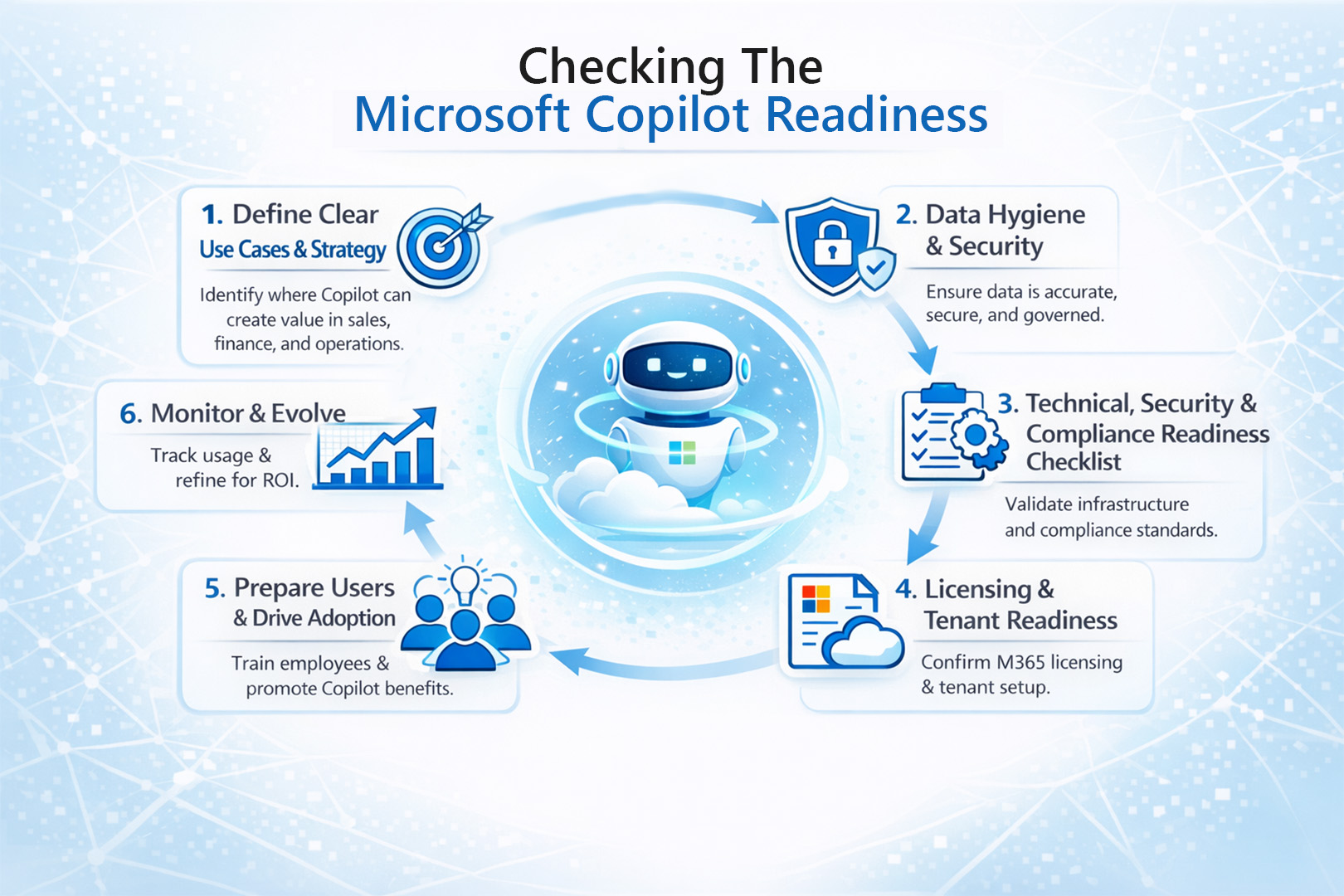
Checking the Microsoft Copilot Readiness
Top performers do not start with features. They start with value pools. They identify where time, cost, risk, or customer friction sits and deploy AI precisely there.
Because Copilot does not fix broken processes. It scales the environment it is given. If priorities are unclear, AI accelerates confusion. If data is strong, AI accelerates performance. Below are some of the essentials that businesses need to take care of before adopting Microsoft Copilot Studio in their business workflows.
1. Define Clear Use Cases and Strategy
In the rush to adopt artificial intelligence, many leaders make the same mistake. They often begin with the tools instead of the business problem. No matter how powerful the platform, technology alone cannot fix unclear priorities. However, to drive the real impact from AI-enabled workflows, strategy must come first. Here is how you can do that.
Identify the real pain points – You can think of the tasks like drafting emails, summarising meetings, or creating reports. Select 3 to 5 high-impact use cases and then begin the Microsoft Copilot adoption.
Start with a pilot project – First learn what works best for you and your business & then expand gradually.
And most importantly, the most expensive mistake in AI adoption is licensing before alignment. Before any rollout, executives should demand clarity on four issues.
Use the following checklist to assess whether your business is truly Copilot-ready:
- Do We Know Which KPIs AI Should Improve?
- Which Workflows Impact Revenue, Cost, or Customer Satisfaction Most?
- Have We Defined Success in Financial Terms?
- Is There an Accountable Executive Owner?
Still unsure where Microsoft Copilot fits in your workflows?
Explore how businesses are improving efficiency with Microsoft 365 Copilot to discover practical use cases and success stories.
2. The Data Hygiene and Security
Review and update your current Data Loss Prevention (DLP) and sensitivity labelling policies in Microsoft 365. Since Copilot uses these compliance controls, making sure your labels and DLP rules are set up correctly will help keep AI-generated content in line with your governance standards.
AI results depend on the quality of the information architecture that supports them. So, to ensure the data readiness for the AI-enabled workflows, ensure the following-
- Clean up your data by deleting outdated, duplicate, or unnecessary files from SharePoint and OneDrive. This helps Copilot avoid showing old or irrelevant information.
- Review and update permissions to make sure only the right people have access to files. Since Copilot can share insights from any file a user can access, remove any links that allow access to everyone.
- Use Microsoft Purview to add sensitivity labels to documents and emails. This helps prevent confidential information from being shared by mistake.
- Strengthen your Microsoft 365 Data Loss Prevention (DLP) policies to protect sensitive information. Copilot uses the same compliance, classification, and DLP controls already set up in Microsoft 365. It does not have its own separate enforcement system. When DLP is properly configured, those protections will also cover AI-generated responses.
3. Technical, Security & Compliance Readiness Checklist
Copilot relies on Large Language Models that use Microsoft Graph data and follow Microsoft Entra ID permission rules. It does not access external systems or override security controls. All information is retrieved and summarized only from your tenant, following your current identity, access, and compliance policies.
Copilot does not give users access to new data. It simply brings out insights from information they already have. This can make any gaps in data governance more obvious. For example, if files are shared too widely or labelled the wrong way, Copilot might point out content that should have been restricted. So, AI tends to reveal existing permission issues instead of causing them.
So, the senior executives should validate the following:
1. Information is organised and trustworthy
- Remove outdated, duplicate, or abandoned files across SharePoint and OneDrive.
- Confirm ownership of critical content.
- Reduce broad or “everyone” access where it is unnecessary.
2. Identity boundaries are strong
- Enforce multi-factor authentication.
- Apply conditional access based on risk, device, and location.
- Ensure users only reach what their roles require.
3. Devices meet security standards
- Operating systems are current.
- Endpoint protection is active.
- Compliance policies are applied consistently.
4. Sensitive data is actively protected
- Use classification and sensitivity labels.
- Strengthen Data Loss Prevention policies to prevent confidential material from appearing in AI responses.
5. Regulatory and internal obligations are clear
- Validate that AI usage aligns with industry requirements.
- Reinforce that existing governance policies still apply.
6. Employees understand responsible use
- Provide guidance on what should not be summarised, shared, or generated.
- Position Copilot as an assistant operating within policy, not outside it.
4. Licensing & Tenant Readiness
Copilot products differ from each other, so it’s important to be clear about what each one includes. This helps avoid confusion when planning your budget and deployment.
Microsoft 365 Copilot
You need a base copilot licence like Microsoft 365 E3, E5, or Business Premium, along with the Microsoft 365 Copilot add-on. Your tenant also has to be set up correctly and be in a supported region.
Dynamics 365 Copilot
This Copilot is built into certain Dynamics 365 apps and is licensed based on the specific Dynamics workload you use.
Copilot Studio
Copilot Studio lets you create custom AI copilots and conversational tools. Its licensing differs from Microsoft 365 Copilot and depends on your capacity and usage needs.
Security Copilot
Security Copilot is a specialized AI tool for security operations. It has its own licence and is designed for SOC environments.
Licensing without readiness, especially without data governance and identity controls, often leads to underutilisation. Executives should align licence decisions with measurable business use cases.
5. Prepare Users & Drive Adoption
Even if the technology works perfectly, Microsoft Copilot won’t succeed unless people actually use it. This is a common reason why many rollouts don’t work out.
- Begin communication early: Send announcements that explain Copilot is a work assistant, not a surveillance tool. Share your timeline and aim to build excitement instead of worry.
- Provide thorough training: Hold hands-on workshops with real examples, like showing marketers how to draft campaigns in Word or teaching salespeople to summarize meeting notes in Teams. Emphasise how to write good prompts and improve results.
- Start with pilot programs: Choose early adopters to try Copilot and become advocates. Their success stories are more convincing than any official memo.
- Make Copilot part of your team’s routine: Encourage team leaders to ask in meetings, “Did anyone use Copilot for this project?” Normalize talking about both successes and challenges with AI.
- Continue to track progress: Review usage reports and send out short surveys. Update your training based on what people say.
Encourage people to use Copilot carefully, making sure they don’t rely on it for everything or ignore it altogether.
6. Monitor & Evolve
Now that Copilot is up and running, the real work begins.
- Track how things are going. Use Microsoft’s usage dashboards to see who is using Copilot and who is not. Go beyond the numbers and try to understand why the data looks the way it does.
- Check your progress against your goals. For example, if you aimed to save five hours per week as mentioned in step 1, see if you are meeting that target.
- Gather success stories. If someone finds a great way to use Copilot, make sure to record it. Share these real examples during meetings and training sessions. For instance, you might say, “Marketing cut proposal time in half.”
- Keep up with updates. Microsoft is always making Copilot better. Set up a routine to review new updates and see if you need to adjust your policies.
- Make sure someone is responsible for tracking metrics and planning improvements. This way, monitoring will not be overlooked.
The goal is not just to get people to use Copilot, but to make it a natural part of how your organisation works.
A Quick Microsoft Copilot Readiness Checklist for Business Leaders
This quick comparison provides a quick snapshot that highlights the key differences between manual and automated CRM. This can make it easier for the business leaders to see where automation delivers real value.
| Area | Leadership Action Item |
|---|---|
| Data | Are our SharePoint and OneDrive environments structured, current, and free from redundant or outdated content that could affect AI outputs? |
| Security | Have we enforced multi-factor authentication and conditional access, so Copilot operates within verified identity boundaries? |
| Compliance | Are sensitivity labels and data classification policies actively protecting confidential and regulated information? |
| Licensing | Do we have the right Microsoft 365 subscriptions in place, and have we budgeted for Copilot add-ons where value is proven? |
| Policy | Do employees have clear guidance on how AI can and should be used, including accountability for AI-assisted work? |
| Adoption | Have we identified a pilot group with measurable goals, executive sponsorship, and a path to scale if outcomes are positive? |
Worried Copilot will become another underused licence?
See how leaders tie AI to measurable workflows, ownership, and ROI before deployment.
Conclusion
It’s easy to activate Microsoft Copilot licences. Turning them into measurable operational value is much harder.
The organisations making a real impact aren’t just those with the most licences. They have clear priorities, reliable data, strong governance, and employees who know how AI fits into their daily work. For them, Copilot is built into their operations, not just a feature they turn on quickly.
Being ready is what turns experimentation into real transformation.
For leadership teams, the task is clear: align your strategy, secure your information, get your people ready, and keep measuring your results. If you do this well, Copilot can boost productivity, improve decisions, and enhance customer experience.
This is where Mercurius IT can help. As a Microsoft solutions partner, Mercurius IT helps organisations move from curiosity to confident action. This includes finding valuable use cases, building strong data foundations, enabling secure deployment, and helping users adopt AI at scale. The goal is simple: deliver AI that works in real situations, for real teams, with real accountability.
Frequently Asked Questions
Is Copilot considered an AI tool?
Yes. Microsoft Copilot is a generative AI assistant embedded across Microsoft 365 and Dynamics 365. It uses organisational data and large language models to draft content, surface insights, and automate everyday work within existing security boundaries.
Can you use Copilot to create workflows?
Yes, but as an enabler rather than a replacement for automation platforms. Microsoft Copilot helps generate actions, summaries, and drafts that accelerate processes, and it can assist users in building flows alongside tools like Microsoft Power Automate.
How do you use Copilot as an AI tool?
Teams use Microsoft Copilot to retrieve knowledge, create first drafts, analyse data, and prepare for decisions in minutes instead of hours. The real value comes when it becomes part of daily work routines, not an occasional experiment.
What is required to enable Copilot in your organisation?
Enabling Microsoft Copilot typically requires eligible licences, organised and accessible data, strong identity and security controls, and a clear adoption plan. Without these foundations, scaling AI beyond pilots becomes difficult.
Plan Your Microsoft Copilot Adoption Strategy