
Quick Summary
Achieve a faster, more predictable D365 Customer Service implementation with fixed timelines, transparent pricing, AI-driven features, and a structured delivery model that reduces risk and accelerates transformation.Key Takeaways
- D365 implementations are time-bound when scoped right, with most projects going live within 8–12 weeks.
- Implementation timelines depend on channels, SLAs, and integrations, not just team size or scale.
- Built-in AI Copilot in D365 Customer Service enhances agent productivity from day one by reducing manual effort and response time.
- Licensing is predictable, but the total cost depends on integrations, customisation, and the scope of data migration.
- A unified platform eliminates fragmented tools, improving efficiency, visibility, and service consistency.
- Choosing a partner who commits to scope, cost, and timeline is critical to avoid delivery risks.
UK customer satisfaction hit 77.3 out of 100 in July 2025, which is the highest level in over 2 years. Yet 26% of customers still had to contact a business through multiple channels just to resolve a single issue.
That gap is costing you, customers. And it’s exactly the gap D365 Customer Service is built to close.
Dynamics 365 Customer Service is Microsoft’s cloud-based platform combining AI Copilot, omnichannel case management, intelligent routing, and embedded Teams collaboration into one connected workspace. It uses generative AI across the service journey to help teams deliver fast, personalised, and consistent support at scale.
Before you commit, you need straight answers to three questions: How long will implementation take? What’s included? And what will it cost? This blog clearly addresses all the answers aptly. Let us begin.
Core Capabilities of Dynamics 365 Customer Service
Many businesses approach a D365 evaluation by asking, “What can it do?” A more effective question is, “What problem does each capability solve for my team?” Below is a summary of the core features included.
Case & SLA Management
Each customer issue is recorded as a structured case, tracked from initial contact to resolution. Built-in SLA tracking and entitlements help ensure service delivery meets contractual obligations and internal policies, eliminating the need for manual deadline management.
Omnichannel Engagement
Agents manage cases from email, phone, live chat, SMS, WhatsApp, and social media within a single workspace. This approach reduces context switching and ensures consistent service across all channels.
AI Copilot
Copilot AI is included with eligible licences at no additional software cost. It manages case summarisation, email drafting, knowledge article suggestions, sentiment detection, and conversation summaries, allowing agents to focus more on customer support and less on administrative tasks.
Intelligent Routing & Work Assignment
Cases are automatically assigned to the appropriate agent based on skills, workload, and priority. This increases first-contact resolution rates and removes the need for manual triage.
Knowledge Management
Relevant help articles appear directly within the case record as agents work, providing consistent answers, faster resolutions, and reducing the need for escalation.
Microsoft 365 & Teams Integration
Agents collaborate on complex cases within Microsoft Teams without leaving D365. Outlook calendar, email, and contacts sync automatically, integrating your existing tools into the service workflow.
Analytics & Reporting
Supervisors have access to embedded dashboards and Power BI-ready reports, providing real-time visibility into case volumes, SLA performance, agent productivity, and customer sentiment.
How can Dynamics 365 Customer Service Help You Maximise Your Sales?
Dynamics 365 Customer Service is an all-in-one solution that delivers exceptional support through personalised and efficient experiences. It improves customer management, optimises operations to foster loyalty, and streamlines agent workflows with an AI assistant. The platform supports multiple customer channels and provides a 360-degree view, ensuring full visibility.
Flawlessly Manages Agent’s Work
D365 Customer Service uses AI to help agents work productively by delivering timely information. It offers customised desktops, case management, intelligent routing, and other support functions.
Integrated Huge Knowledge Base
Virtual chatbots or AI agents access a large knowledge base to answer general questions and some complex issues. When conversations become more complex or involve exceptional questions, they are transferred directly to the concerned consultant.
Offers Personalised Experience
D365 Customer Service records and tracks the entire customer history to quickly recognise and connect with them through personalised interactions. With detailed customer journey analytics and a 360-degree view, you can provide the exact solution your customer needs. In simple terms, D365 CS helps you earn loyal customers for life.
Equipped with Intelligent Automation
Dynamics 365 CS includes virtual agents that resolve most general queries using knowledge base portals. For complex queries, customers are routed directly to an available expert.
In-built Business Intelligence
Dynamics 365 Customer Service manages data in real time to support actionable decisions that can boost the sales cycle and uncover cross-sell and upsell opportunities.
Optimises Core Operations
You can always improve operations. By implementing Dynamics 365 Customer Service, you optimise operations using data analytics and extensive reporting, reducing costs while maximising revenue. The platform delivers customer and channel analytics, robotic process automation, a unified platform, and conversational analytics.
24/7 Availability to Customers
When you implement D365 CS, your customers can connect using their preferred channel or platform and experience a consistent user journey. The solution delivers voice channels, real-time transcription, digital engagement, and sentiment-based routing.
Flexible with Integrations
Customisation and integration make your solution adaptable to changing business needs driven by market and customer demand. D365 Customer Service lets you enable unique customisations tailored to specific operations, allowing you to focus more on growth and scalability rather than core operations.
Avoid delays that derail your customer service transformation
Partner with experts who commit to firm timelines rather than estimates.
The 4 Stages of a D365 Customer Service Implementation in the UK
Whether you work with a Microsoft partner or manage the project internally, every effective D365 Customer Service implementation follows a consistent four-stage process. The approach is transparent, with defined timelines.
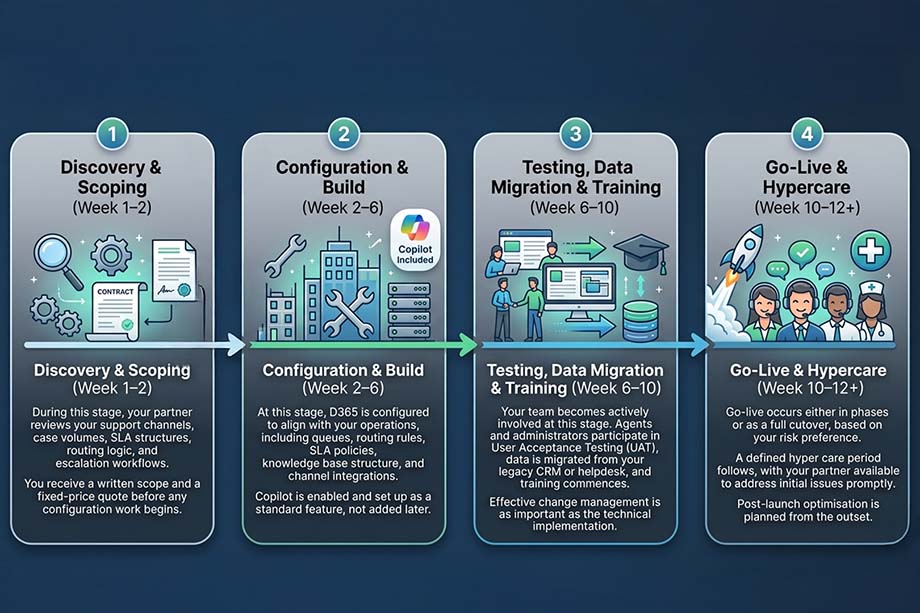
“A D365 Customer Service implementation is not a big-bang project. Done right, it’s a structured 8–12 week process with a committed go-live date, not an estimate.”
Most implementations go live within 8 to 12 weeks. The exact timeline depends on channel complexity, SLA configuration, and data migration scope. A reliable partner will commit to a go-live date at the outset. If not, consider other options.
How Long Does D365 Customer Service Take to Implement in the UK?
The majority of D365 Customer Service implementations are completed within 8 to 12 weeks. The precise timeline is influenced by factors such as the number of channels configured, the complexity of service level agreements (SLAs) and routing rules, and the volume of data requiring migration.
Here’s a quick breakdown:
|
Business Type |
Users |
Typical Timeline |
|
SME / Starter |
<20 |
4–6 weeks |
|
Mid-Market |
20–100 |
8–12 weeks |
|
Enterprise |
100+ |
12–20+ weeks |
Smaller teams with straightforward case management requirements may achieve go-live within four weeks. Mid-market organisations implementing omnichannel capabilities and enterprise resource planning (ERP) integration generally require 8 to 12 weeks. Larger, multi-site deployments involving complex data migration typically necessitate a longer implementation period.
One thing to be clear on is that the timeline is not the same as effort. A well-scoped engagement with a fixed go-live date removes the ambiguity that causes most implementations to overrun. A reputable UK partner commits to a go-live date during the initial scoping process, not as an estimate but as a commitment.
If a prospective implementation partner cannot provide a definitive go-live date prior to project initiation, this issue should be resolved before entering into any contractual agreement.
Stop guessing your implementation timeline
Secure a fixed go-live date, cost, and defined scope before making any commitments.
D365 Customer Service Pricing in the UK
D365 Customer Service operates on a straightforward per-user, per-month subscription model. There are no significant upfront costs or perpetual licences. Organisations pay only for required services and can scale subscriptions as their teams expand.
Licence Options
Microsoft provides three distinct licensing tiers.
- The Professional tier costs approximately £41 per user per month. It is designed for teams with standard case management requirements.
- The Enterprise tier is approximately £78 per user per month. It is intended for organisations requiring omnichannel support, advanced routing, and integrated AI Copilot functionality.
- The Premium tier costs approximately £155 per user per month, which includes all Enterprise features and adds a fully integrated contact centre solution.
If your team only needs read access or light use, the Team Member licence costs £6.20/user/month.
It is important to note that Professional and Enterprise licences cannot operate within the same environment; therefore, organisations must select their tier prior to deployment. Additionally, for those already utilising another Dynamics 365 application, Customer Service can be added for as little as £15.40 per user per month, representing a cost-saving opportunity that is often overlooked.
Implementation Cost
In addition to licensing costs, a one-time implementation fee is required. For smaller teams of 5 to 20 users, this fee typically ranges from £5,000 to £50,000, with higher costs associated with increased channels, integrations, and data migration complexity.
Know exactly what your D365 implementation will cost
Receive a transparent cost breakdown with no hidden fees or unexpected charges.
Choosing a UK Partner: 5 Questions to Ask Before You Sign
Picking the right implementation partner matters as much as picking the right platform. Before you commit, ask these five questions:
1. Are you a Microsoft Solutions Partner for Business Applications?
It confirms the partner has been assessed and accredited by Microsoft, rather than self-certified.
2. Do you provide a fixed price and a committed go-live date upfront?
Request a specific number and date, both provided in writing before work begins.
3. Do you have experience in our sector?
Financial services, manufacturing, and professional services each have distinct SLA structures and compliance requirements. Sector experience streamlines implementation and reduces risk.
4. Is Copilot configuration included or charged separately?
A credible partner includes Copilot configuration and enablement in every implementation, not as an optional extra. If it is offered as an add-on, request clarification.
5. What does post-go-live support look like?
Hypercare, ongoing optimisation, and a named support contact should be defined beforeyou sign, not determined after go-live.
Another important indicator is Microsoft’s Inner Circle distinction, awarded to partners who consistently excel in delivering digital transformation with Dynamics 365. Fewer than 1% of Microsoft partners globally achieve this recognition, making it a valuable quality marker when shortlisting UK providers.
Ready to Plan Your D365 Customer Service Implementation?
You now understand the stages, timeline, inclusions, and costs. The remaining decision is your implementation partner.
Mercurius IT is a 4X award-winning Microsoft Solutions Partner in the UK, specialising in Dynamics 365 Customer Service implementations. Every implementation comes with a fixed price, a committed go-live date, and Copilot configured as standard; all agreed before any work begins.
Let us scope your D365 Customer Service implementation for free.
Get a written scope, a fixed price, and a committed go-live date within 24 hours with no obligations.
Frequently Asked Questions
How long does it take to implement Dynamics 365 Customer Service?
Most Dynamics 365 Customer Service implementations take between 8 and 12 weeks. The timeline depends on factors such as the number of users, integrations, channels, SLA requirements, and data migration complexity.
What is included in a Dynamics 365 Customer Service implementation?
A typical implementation includes system configuration, case management setup, omnichannel channel configuration, SLA and routing rules, data migration, user training, testing, and go-live support.
Does Dynamics 365 Customer Service include AI Copilot?
Yes. Dynamics 365 Customer Service includes AI Copilot capabilities with eligible licences, helping agents with case summaries, response suggestions, knowledge recommendations, and productivity improvements.
How much does Dynamics 365 Customer Service cost in the UK?
Licensing starts at approximately £41 per user per month for the Professional plan. Total costs depend on licensing, implementation services, integrations, customisations, and data migration requirements.
Can Dynamics 365 Customer Service integrate with existing business systems?
Yes. Dynamics 365 Customer Service integrates with Microsoft 365, Teams, Outlook, ERP systems, Power Platform, and various third-party applications to create a connected customer service environment.
Is Dynamics 365 Customer Service suitable for small and mid-sized businesses?
Yes. Dynamics 365 Customer Service is scalable and supports organisations of all sizes, from small support teams to enterprise contact centres, with flexible licensing and deployment options.