

Overview
Manual accounting slows finance teams and increases risk. Learn how automating seven key tasks with Dynamics 365 Finance drives accuracy, efficiency, and better decisions.
Key Takeaways
- Manual accounting tasks quietly slow growth and increase financial risk
- Dynamics 365 Finance replaces spreadsheets with automated, connected processes
- D365 Finance automates routine tasks without disrupting business continuity
- Automation improves accuracy, cash flow visibility, and compliance readiness
- AI-powered forecasting strengthens financial resilience & help finance leaders plan, forecast, and adapt faster.
Almost 80% of organisations using automation report a clear ROI within the first year. That is simply because repetitive tasks are handed off to intelligent systems instead of humans. Well, it is not just an efficiency talk. It is the reality that is changing the finance functions across industries.
For finance leaders, manual accounting processes like data entry, reconciliations, and approvals remain time-consuming, error-prone, and costly. But with automation capabilities in Microsoft Dynamics 365 Finance, organisations are turning those pain points into performance gains, while freeing up their finance teams to focus on insights, strategy, and growth. This blog highlights the seven manual accounting tasks you should be automating now and why it matters for your business.
What is Dynamics 365 for Finance?
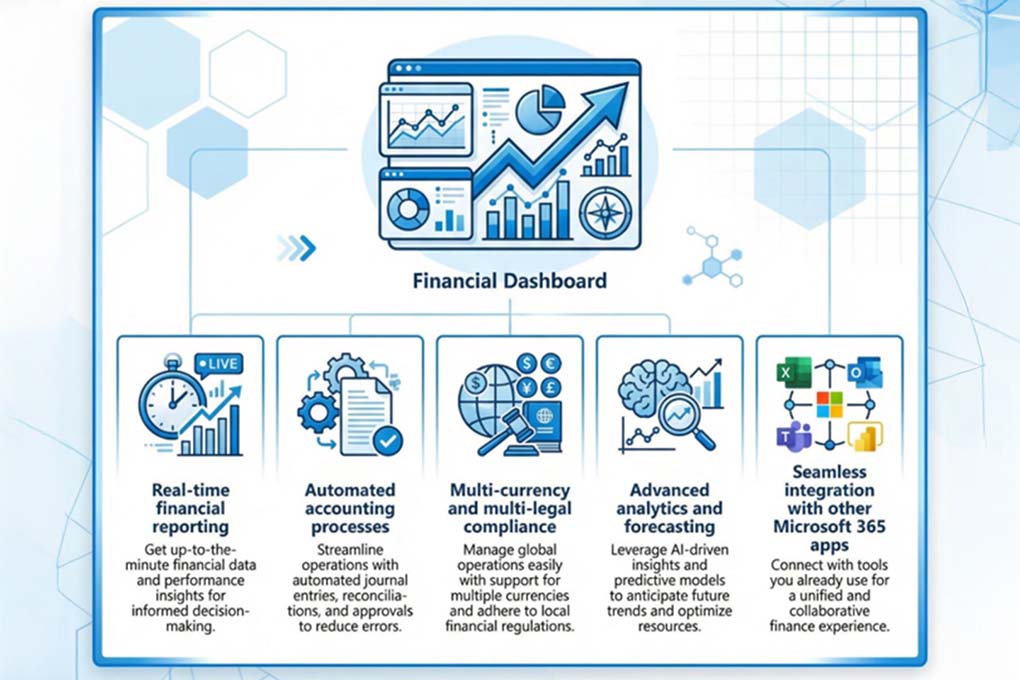
Microsoft Dynamics 365 Finance is a modern, cloud-native enterprise finance solution designed to help organisations streamline and unify critical financial processes. Rather than relying on fragmented systems and disconnected spreadsheets, D365 Finance gives you a unified platform for general ledger, payables, receivables, reporting, budgeting, and compliance.
It combines real-time data, automation, and intelligent insights to drive faster, more accurate decision-making across the finance function. With built-in workflows, audit trails, and AI-driven forecasting, D365 Finance enhances control, reduces operational risk and frees your team to focus on value-added activities like analysis, planning and growth initiatives.
7 Accounting Tasks to be Automated with Microsoft Dynamics 365 Finance

Automating manual accounting tasks within D365 Finance can significantly reduce human error and free up your team for higher-value analysis. By leveraging built-in AI, machine learning, and Power Automate integration, businesses can streamline several core processes.
Task 1: General Ledger Data Entry & Journals
If your finance team is still manually entering and posting general ledger journals, this is the first area you should automate. Manual journal entries are one of the biggest contributors to errors, inconsistencies, and delayed month-end closes.
With Dynamics 365 Finance, you can remove this risk by automating journal creation and posting altogether. The platform allows you to set validation rules, approval workflows and recurring journals, ensuring entries are accurate, compliant, and consistently applied. Routine postings such as accruals, depreciation, and allocations run automatically, while built-in controls prevent incorrect or incomplete journals from ever reaching the ledger.
Task 2: Accounts Payable Invoice Processing
If your finance team still handles invoices the old-school way, like digging through paper, keying in data manually, and chasing approvals via email, this is a strong signal that you must get your accounts payable invoice processing automated. Manual processing comes with delays, mistakes, and frustration.
With built-in OCR-enabled invoice capture, Dynamics 365 Finance can automatically extract key information from supplier bills like dates, amounts, and vendor details, without any manual efforts for data entry. Once captured, the system uses intelligent matching and approval workflows to validate invoices against purchase orders and route them to the right approvers, all without interrupting your team’s day. This accelerates the process, reduces manual errors, and cuts down on costly payment exceptions.
In fact, the organisations that adopt automated AP processes typically see invoice processing costs drop by 60–80%, significantly reducing labour and error-related expenses compared with manual handling.
Finance transformation doesn’t start with technology; it starts with clarity.
Get expert guidance on how to modernise your finance operations using Dynamics 365 Finance, without disrupting business continuity.
Task 3: Accounts Receivable & Collections
If your finance team is still issuing invoices manually and chasing payments by phone or email, you’ll know how quickly that eats into your working capital. Manual invoicing and follow-ups slow down cash inflows and leave you with limited visibility into who owes what and when.
This is where D365 Finance automates accounts receivable (AR) and collections.
Dynamics 365 Finance lets you generate and send invoices automatically as soon as a sale is recorded, ensuring there’s no delay in the payment cycle. It also supports automated payment reminders and structured follow-ups, so customers get timely prompts without your team having to chase them manually.
In fact, companies that embrace automated accounts receivable systems report significantly improved cash flow, with many seeing faster payment cycles and reduced days sales outstanding. For example, firms using electronic AR tools often experience around a 20% faster payment rate compared with manual processes.
Task 4: Bank Reconciliations
Bank reconciliation is one of those tasks that often feels like busy work. Matching bank statements to your ledger manually can take hours or even days, especially when you’re dealing with multiple accounts or high transaction volumes. So, if you are also handling it the same way, this is what should be automated.
Automating bank reconciliations with D365 Finance can connect directly to your bank feeds and apply intelligent matching rules, automatically comparing your internal records with bank transactions as soon as they’re available. Rather than your team manually hunting down matches line by line, the system processes the bulk of transactions, highlights exceptions, and only flags the items that truly need attention.
Finance teams using automated reconciliation tools commonly report up to an 80% reduction in reconciliation time, because manual matching, data entry and repetitive checks simply no longer consume hours of staff effort.
Task 5: Expense Management & Employee Claims
Manual expense claims often bring piles of paper receipts, back-and-forth emails, and lengthy approval cycles. It all slows down reimbursements and drains team productivity. If your business is dealing with the same, it’s time to automate your expense management and employee claims with D365 Finance.
With digital expense capture, your people can snap a photo of a receipt on their phone and submit it in seconds. D365 Finance intelligently reads and categorises the data, applies your company policy rules, and routes claims through defined approval workflows, all without the usual manual bottlenecks.
Task 6: Financial Reporting & Compliance
The traditional style of financial reporting simply can’t keep up these days. When your team is manually gathering data, stitching together spreadsheets, and chasing approvals for statutory and management reports, the result is certainly an outdated insight.
So, the next task that should be automated is financial reporting and compliance with D365 Finance.
With automated reporting, you no longer wait for month-end closes to get a view of your organisation’s performance. D365 Finance offers customisable dashboards and automated reporting templates that pull data from across your ERP in real time, consolidates it automatically, and applies consistent business logic and controls. With D365, detailed audit trails, and regulatory support are built into the system, so every figure can be traced back to its source without manual digging.
Task 7: Budgeting, Forecasting & Planning
If your budgeting and forecasting still rely on spreadsheets, your business is taking on unnecessary risk. So, the next task that should be automated with D365 Finance is budgeting, forecasting, and planning.
Dynamics 365 Finance replaces disconnected spreadsheets with integrated budgets, rolling forecasts, and scenario planning built directly into your finance system. So, instead of manually updating models, your team works with real-time financial data. This allows businesses to test different scenarios and adjust plans as market conditions shift. Also, AI-driven forecasting further strengthens this by identifying trends early and improving the reliability of projections.
Even a McKinsey study indicates that AI-based forecasting improves accuracy by 20%, which translates to revenue increases of 2–3 percent.
Not sure where automation will deliver the fastest win?
Get a quick, expert-led view of which accounting tasks are holding your finance team back, and how Dynamics 365 Finance can fix them.
Bottom Line

Manual accounting processes don’t just slow finance teams down. Across all seven tasks, from journals to forecasting, one pattern is clear: manual finance processes restrict visibility and speed. Automating these tasks with Dynamics 365 Finance allows your organisation to work faster, smarter, and with far greater control.
However, to make automation deliver real value, the right partner matters. Mercurius IT is a trusted Microsoft Solutions Partner, helping global organisations implement and optimise Dynamics 365 Finance in a way that’s practical, scalable, and aligned to business goals.
If you’re ready to reduce manual effort and gain real-time financial clarity, now is the time to act. Start automating what matters and let Mercurius IT guide the journey.
Frequently Asked Questions
Will automating finance operations with Dynamics 365 Finance disrupt day-to-day business?
No. When implemented correctly, automation does not disrupt finance operations. In fact, it stabilises them. Dynamics 365 Finance is designed to automate tasks gradually while keeping core processes running. Most organisations start by automating high-volume, low-risk tasks such as invoice processing, reconciliations, or reporting. This phased approach ensures business continuity while teams adapt to new workflows.
How long does it take to implement Dynamics 365 Finance?
The implementation timeline depends on business size, complexity, and scope. For mid-sized organisations, a standard Dynamics 365 Finance implementation typically takes 3 to 6 months. More complex, multi-entity or global deployments may take longer.
How much does Dynamics 365 Finance cost?
The cost of Dynamics 365 Finance varies based on licensing, users, and implementation scope. Microsoft licenses Dynamics 365 Finance on a per-user, per-month basis, while implementation costs depend on configuration, integrations, and data migration needs.
Is Dynamics 365 Finance suitable for growing and complex organisations?
Yes. Dynamics 365 Finance is built for scale. The platform supports multi-entity operations, multiple currencies, regulatory compliance, and growing transaction volumes. As your business evolves, you can expand automation, add new entities, or introduce advanced forecasting and analytics, without replacing your finance system.
Plan Your Dynamics 365 Finance Automation Strategy