
Quick Summary
Dynamics 365 and AI help businesses automate repetitive workflows to improve efficiency, reduce errors, and accelerate operational decision-making.Key Takeaways
- Manual processes slow operations and create unnecessary operational friction.
- Dynamics 365 and AI enable organisations to automate workflows across departments.
- Automating routine tasks improves accuracy, speed, and operational visibility.
- The biggest automation gains come from repetitive, high-volume business processes.
- Intelligent automation allows teams to focus on strategic work instead of manual tasks.
Manual work is often overlooked as a barrier to running operations efficiently.
Even though many organisations use ERP and CRM platforms, teams still spend much of their day on repetitive tasks in these systems. These activities help keep things running but rarely support strategic goals.
This is a significant issue. In fact, research shows that more than 40% of employees spend at least a quarter of their workweek on repetitive manual tasks and data entry in ERP. On average, a knowledge worker performs over 1,000 copy-paste actions per week, totalling more than 52,000 per year due to manual workflows. All this extra work slows down decisions, causes mistakes, and takes time away from more valuable tasks.
Because of this, many organisations are now using platforms like Microsoft Dynamics 365 combined with AI and automation tools. These solutions help eliminate repetitive tasks and set up smart workflows that run autonomously.
In this article, we’ll explore 10 manual processes you can automate with Dynamics 365 and AI to improve efficiency, accuracy, and operational speed.
10 Manual Processes You Can Automate with Dynamics 365 and AI
By combining Microsoft Dynamics 365 with AI and automation tools, businesses can eliminate repetitive operational tasks and create automated workflows. Below are some common manual processes that organisations can automate to improve productivity and operational performance.
1. Manual Customer Data Entry
Sales teams often spend time manually copying customer information from emails, forms, or spreadsheets into CRM systems. With Dynamics 365, AI Builder, and Power Automate, organisations can automatically collect customer information from web forms, emails, or documents and update CRM records in real time. Data also stays in sync across all connected systems.
2. Invoice Processing and Accounts Payable
Finance teams often spend a lot of time reviewing invoices, checking vendor information, and matching invoices to purchase orders before making payments. With Dynamics 365 with AI-powered document processing, invoices are captured and handled automatically.
The AI pulls out invoice details, matches them to purchase orders in the system, and flags any issues for review. In fact, studies show that automation can cut processing costs by up to 81% compared to doing it by hand.
3. Lead Qualification and Routing
Dynamics 365 AI can automate lead management. The system can analyse engagement signals, customer data, and behavioural patterns to score leads and automatically route them to the most appropriate sales representative.
Automating lead qualification lets sales teams respond more quickly, focus on the best opportunities, and boost conversion rates.
4. Customer Support Ticket Classification
Dynamics 365 AI can automatically analyse incoming customer support requests. The AI can figure out what the customer needs, sort the issue, and send the ticket to the right team or agent.
This automated ticket classification helps teams respond faster, reduces manual work, and makes customer service more efficient. With AI-driven automation, up to 70% of customer questions can be solved without human help.
5. Approval Workflows
Power Automate and Dynamics 365 help organisations set up automated approval workflows. These automated workflows send requests to the right people, notify them, and escalate any approvals that take too long. Automated approvals help decisions get made faster, clarify the process, and reduce unnecessary follow-up.
How Much Time Are Manual Processes Costing Your Business?
Most organisations underestimate the hours lost to repetitive work. Discover where automation can deliver immediate impact.
6. Sales Follow-Ups and Task Management
Sales reps usually use reminders, notes, or spreadsheets to keep track of follow-ups and next steps. Dynamics 365 AI can suggest next steps based on deal activity, send automatic follow-up reminders, and create draft emails for sales outreach.
Automation cuts down on admin work and lets sales teams focus more on connecting with prospects. It can also save workers 3 to 4 hours each week on routine tasks.
7. Reporting and Business Intelligence
Managers often spend a lot of time collecting and combining data from different systems to create operational or performance reports. With Dynamics 365 dashboards and AI-driven analytics, data can be automatically consolidated to generate real-time dashboards and provide predictive insights for better planning.
Automated reporting improves data visibility and enables faster decision-making. Even studies suggest AI analytics can reduce decision-making time by about 25%.
8. Customer Onboarding Processes
Onboarding often involves collecting documents, verifying information, setting up accounts, and coordinating follow-ups across teams. When handled manually, this process can be slow and difficult to track.
Using Dynamics 365 and AI-powered workflows, you can automate onboarding tasks like collecting documents, checking information, and sending welcome emails or starting onboarding steps automatically. Companies that use automation often notice happier customers and faster onboarding times.
9. Supplier and Procurement Tracking
Procurement teams often rely on manual tracking methods to monitor supplier performance, delivery schedules, and purchase order status, which can lead to delays and limited visibility.
Using Dynamics 365 and AI analytics, organisations can automatically track supplier performance, identify potential delivery risks, and receive alerts when issues arise.
With D365, businesses see their supply chain more clearly and make fewer mistakes. Some studies show that automation can cut operational errors by as much as 40%.
10. Document and Contract Processing
With AI-powered document intelligence in Dynamics 365, systems can automatically extract important information, route documents for approval, and flag missing or incorrect data.
This automating document processing makes handling documents faster, cuts down on manual work, and helps prevent errors. AI solutions can speed up document workflows by as much as 80%.
Strategic Benefits of Automation for Leadership
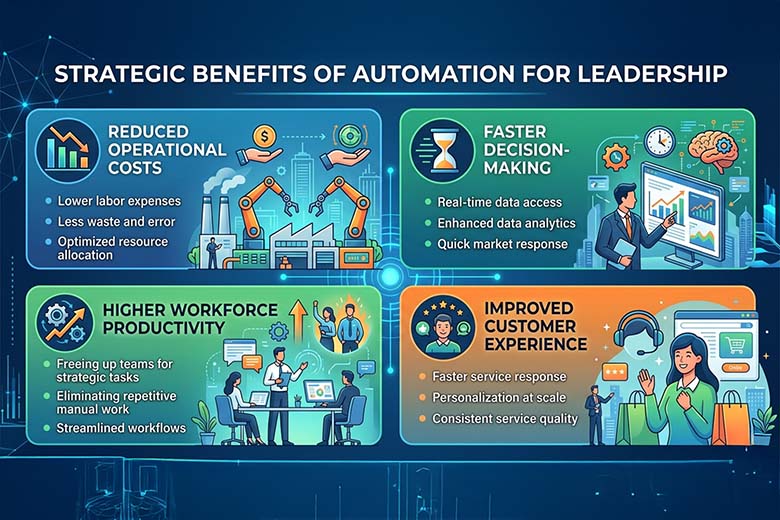
Using Dynamics 365 and AI for automation does more than just improve efficiency. It helps leadership teams build more agile, data-driven organisations by cutting down on manual work and making it easier to make quick, informed decisions. With routine tasks handled automatically, teams have more time to focus on strategy, innovation, and engaging with customers instead of getting stuck in administrative tasks.
For business leaders, automation brings clear benefits in operations, productivity, and growth.
- Reduced operational costs – Automation minimises manual effort and process inefficiencies.
- Faster decision-making – Real-time data and automated insights support quicker business decisions.
- Higher workforce productivity – Teams spend less time on repetitive tasks and more on high-value work.
- Improved customer experience – Faster processes lead to quicker responses and better service delivery.
Studies show that 74% of organisations see higher productivity among knowledge workers when they use automation. Companies that adopt intelligent automation can also cut costs by up to 22% and grow revenue by 11% over three years.
Take the First Step Toward Smarter Operations
Collaborate with Mercurius IT to see how Dynamics 365 and AI can help eliminate manual work and improve efficiency.
Conclusion
Manual processes can keep things moving, but they often slow down productivity and decision-making. Automating routine tasks with Dynamics 365 and AI helps organisations work more efficiently, cut down on mistakes, and get more done.
For business leaders, this leads to faster processes, clearer insights, and teams that can spend more time on important projects instead of routine paperwork.
As a trusted Microsoft solutions partner, Mercurius IT helps organisations find the best ways to automate and implement Dynamics 365 solutions that deliver real business results. This helps businesses become more efficient and ready for the future.
Frequently Asked Questions
What types of business processes can be automated with Dynamics 365 and AI?
With Dynamics 365 and AI, businesses can automate tasks like managing leads, processing invoices, handling approvals, generating reports, supporting customers, and onboarding new employees.
How does automation with Dynamics 365 improve operational efficiency?
Automation takes care of repetitive tasks, cuts down on mistakes, speeds up work, and makes it easier to see how your business is running.
How do AI and automation work together in Dynamics 365?
AI makes automation smarter by adding features like predictions, automatic data handling, helpful suggestions, and support for making decisions in your workflows.
What are the first processes businesses should automate?
Organisations should start with repetitive, high-volume tasks like data entry, approvals, report generation, document processing, and customer communication workflows.
Can small and mid-sized businesses benefit from Dynamics 365 automation?
Yes, automation helps small and mid-sized businesses run more smoothly, get more done, and grow without making things more complicated or needing more staff.
How long does it take to implement automation in Dynamics 365?
Implementation timelines depend on process complexity, but many automation workflows can be implemented within weeks using tools like Power Automate and AI capabilities within Dynamics 365.