
Quick Summary
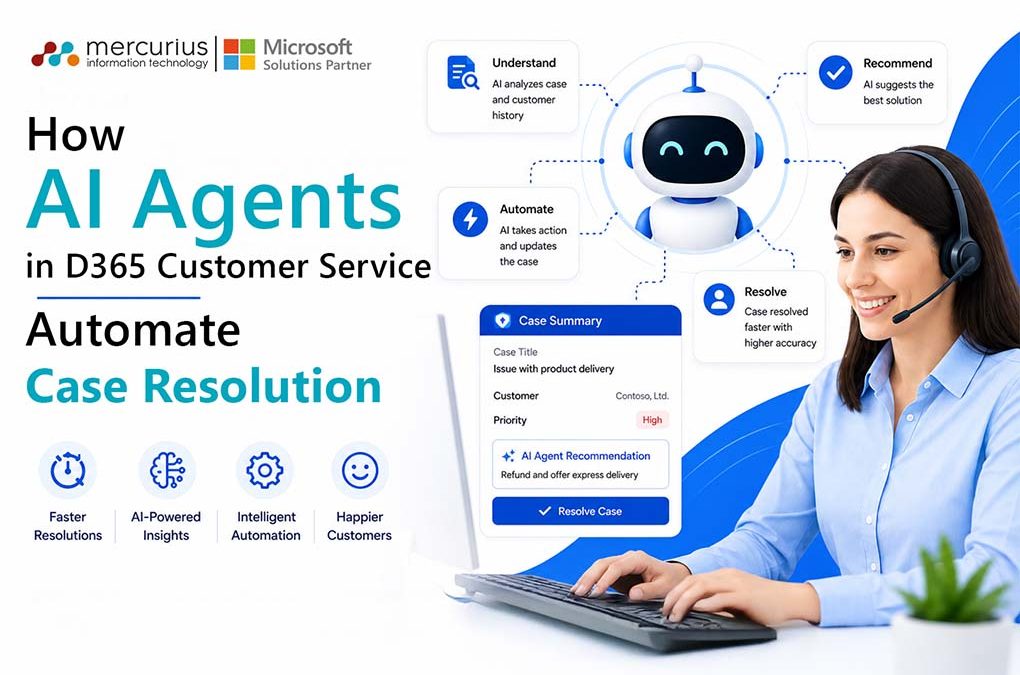
AI agents in D365 Customer Service automate case resolution, reduce handling time, and improve agent productivity by combining intelligent routing, real-time insights, and seamless workflow automation.
Key Takeaways
- AI agents eliminate manual case handling, reducing resolution time and operational costs significantly.
- Intelligent automation enables faster, more accurate case routing and resolution.
- Copilot-driven insights improve agent productivity and decision-making in real time.
- Unified data and AI reduce customer frustration caused by repeated interactions.
- Measurable ROI that comes from targeted AI deployment, not blanket implementation.
Your customer service team is working hard, but the cracks are showing. Support queues are growing faster than your team can clear them. Agents are toggling between four systems just to answer a single query. A customer who called yesterday is calling again today, repeating the same information to a different person. And somewhere in your leadership dashboard, your CSAT score is quietly trending in the wrong direction.
This challenge does not stem from staffing shortages. Rather, it is a systemic issue that incurs greater costs for UK businesses than many leaders recognize.
The operational pressure continues to intensify. 75% of customer experience (CX) leaders anticipate that 80% of customer interactions will be resolved without human agents within the next few years. This projection is not a distant possibility but rather the current competitive standard established by organisations that have already implemented intelligent automation.
For UK business leaders, the central question is no longer whether AI should be integrated into customer service operations. Instead, the focus is on whether AI is being deployed effectively to resolve cases, reduce handling times, and enable skilled personnel to focus on tasks that require human expertise.
Microsoft’s AI agents in Dynamics 365 Customer Service are specifically designed to facilitate this transition. This blog provides a detailed analysis of their functionality, automation capabilities, and realistic outcomes based on empirical data rather than vendor claims.
Why Traditional Case Management Is Costing UK Businesses More Than They Realise
Most UK customer service operations are running on a fundamentally broken model, and the cost is hiding in plain sight.
When a customer contacts your support team, what actually happens? An agent logs into one system to pull up the account, switches to another to check order history, pastes notes into a third, and manually assigns the case to whoever seems available. By the time they actually speak to the customer, two to three minutes have already been lost to administration, before the problem is even understood.
Now multiply that across hundreds of daily interactions, and you begin to see the true cost.
The data makes it harder to ignore:
- Customers are 2.4x more likely to remain loyal to a brand when their issue is resolved quickly, yet most support teams still rely on manual triage and disconnected systems that slow down every interaction.
- 31% of customers say their biggest frustration is having to repeatedly explain their issue, which is a direct consequence of agents working without a unified context.
- Traditional human-handled interactions cost businesses between £2.50 and £5.00 per contact. AI-assisted interactions bring that down to approximately £0.25–£0.45, an 85–90% reduction in cost per interaction.
Consider a realistic scenario familiar to many UK retail or financial services leaders. A customer calls about a delayed refund. The agent has no single view of the customer’s transaction history, previous case notes, or communication trail. They spend the first four minutes gathering information the business already has, then escalate because they cannot locate the resolution policy quickly enough. The customer hangs up dissatisfied. The case stays open. A follow-up is logged manually and then the cycle repeats.
Reduce Case Resolution Time with AI
Replace manual case handling with AI-powered automation that improves response times, reduces costs, and increases agent productivity.
What AI Agents in D365 Customer Service Actually Do for Case Resolution Automation

In Dynamics 365 Customer Service, AI agents are purpose-built business tools. Each one is designed to handle a specific, high-friction part of your support operation, without requiring your team to become technology experts to use them.
There are three core agents working together behind the scenes. Here is what each one does, in plain terms.
1. The Case Management Agent
Think of this as the agent that never forgets, never skips a step, and never leaves a case sitting idle.
From the moment a customer interaction begins, whether via email, live chat, or digital messaging, the Case Management Agent automatically creates the case, populates the relevant fields, and keeps every detail updated in real time as the conversation progresses. It monitors for items that need attention, sends follow-up messages at the right moment, and when the customer’s issue is fully resolved, closes the case autonomously.
2. The Customer Intent Agent
Most chatbots are static. Someone builds a decision tree, and it gets outdated within months, requiring a developer to manually update it. The Customer Intent Agent works fundamentally differently.
Using generative AI, it continuously analyses historical interactions like call recordings, chat logs, case notes, email threads, and builds a living intent library that evolves on its own. It learns what your customers are actually asking, how they phrase it, and what resolutions have worked before.
3. The Customer Knowledge Management Agent
Here is a challenge every scaling support operation faces: your knowledge base becomes outdated faster than anyone can maintain it. Policies change, products evolve, and articles that were accurate six months ago are quietly misleading agents today.
The Customer Knowledge Management Agent solves this by automatically building and maintaining your knowledge, drawing from case notes, resolved tickets, playbooks, and workflows to keep articles accurate, relevant, and ready to surface at the exact moment an agent or customer needs them. It does not wait to be told what to update. In fact, it identifies gaps and inconsistencies proactively.
Essential to note !
None of these agents are designed to replace your customer service team. They are designed to remove the work that prevents your team from being effective.
The Automation Workflow, From Ticket to Resolution
Understanding what these agents do individually is one thing. Seeing how they work together is where the real business value becomes clear.
Here is what an end-to-end automated case resolution looks like in practice, no technical jargon, just the sequence your customers and agents actually experience.
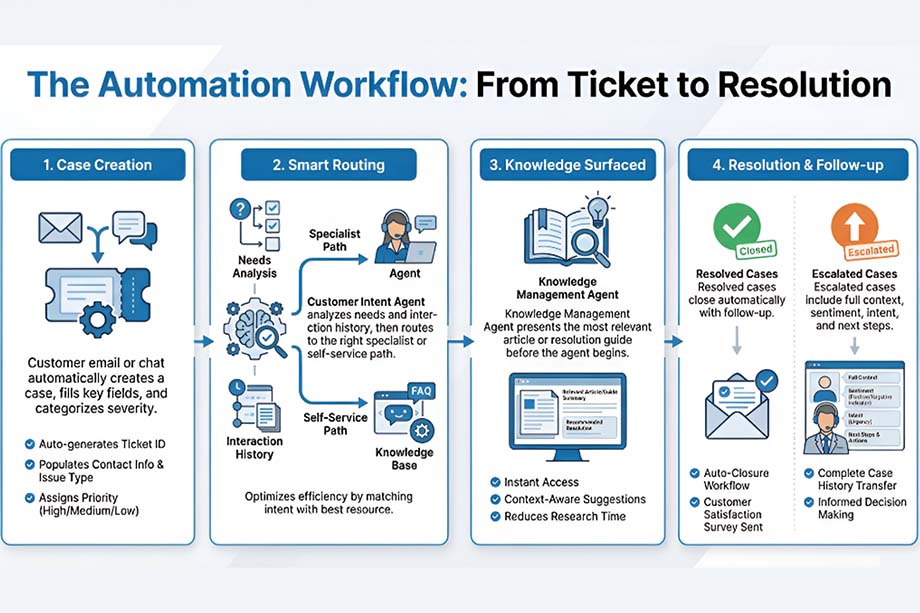
The implementation of Copilot within D365 Customer Service has resulted in significantly faster service delivery. Organisations report resolving cases 25% more quickly, cut call transfers by up to 60%, improved customer satisfaction by 10%, and agent onboarding time has been reduced by 50% in organisations piloting these tools.
For UK business leaders, this represents an immediately deployable workflow rather than a future-state vision.
Here’s What UK Leaders Can Expect in Returns
Scepticism is healthy. Every technology vendor promises transformation. Instead of promises, here are numbers from organisations that have already invested. You use them as benchmarks to test against your own operation.
A Forrester Total Economic Impact study commissioned by Microsoft found that a composite organisation deploying D365 Customer Service achieved a 315% ROI over three years, with a net present value of £11.16 million and a payback period of under six months.
In the same study, agents saved an average of 468 hours per year, previously spent on manual data entry, system switching, and information searching. This recovered capacity is significant for teams of any size.
Results from organisations already using these solutions include:
- Lenovo reduced average handling time by 20% after deploying Copilot within D365 Customer Service, across a global support operation of significant scale and complexity.
- Hype achieved a 90% first call resolution rate through AI-assisted, personalised customer interactions, a metric considered best-in-class by most UK contact centres.
These outcomes were not achieved by simply implementing AI. They resulted from deploying AI in targeted, high-volume use cases with clear measurement baselines.
Where to Begin: A Practical Guide for Business Leaders
90% of customer experience (CX) leaders report positive return on investment (ROI) from artificial intelligence (AI) in customer service, but only when it is implemented for clearly defined use cases. Here is how you must begin with it:
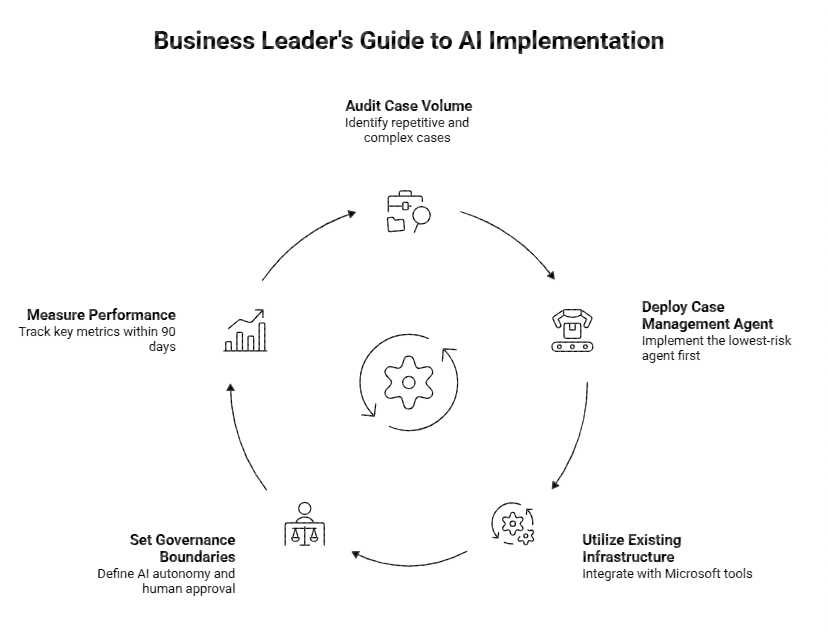
Organisations achieving the strongest returns are not those that implemented the most AI, but those that deployed it with the greatest precision.
Stop Losing Customers to Slow Case Resolution
Your competitors are already using AI agents in D365 Customer Service to resolve cases faster and reduce costs. How far behind are you?
Addressing Common Concerns from UK Leaders
These questions often arise when discussing artificial intelligence in customer service and require clear, direct answers.
- Will this technology replace our agents?
No. The technology automates administrative tasks that limit agents’ effectiveness, such as logging, searching, updating, and tracking. This allows staff to focus on decision-making and delivering proactive, value-added support. - Is our data secure?
Yes. Dynamics 365 operates within Microsoft’s enterprise compliance framework, which aligns with UK GDPR requirements. Customer data is always maintained in a governed and auditable environment. - How quickly will we see a return on investment?
Return on investment usually occurs sooner than expected. According to the Forrester Total Economic Impact (TEI) study commissioned by Microsoft, most organisations achieve payback in under six months.
Bottom Line
AI agents in D365 Customer Service not only accelerate case resolution but also transform how support teams operate at scale. These agents shift personnel away from administrative tasks and toward customer interactions that foster loyalty, enhance retention, and drive revenue.
For UK business leaders, the primary competitive consideration is no longer whether to integrate AI into customer service operations. The focus is now on the speed and precision of deployment to prevent widening the gap with competitors.
Organisations achieving the most significant results are not necessarily the largest or most technically advanced. Success is driven by establishing clear use cases, defined baselines, and selecting an appropriate implementation partner.
At Mercurius IT, we have supported UK businesses in deploying Dynamics 365 solutions that deliver measurable outcomes rather than merely implementing technology. We recognise the operational realities faced by UK leaders, including compliance requirements, legacy system constraints, and team readiness, and we address these factors directly.
Frequently Asked Questions
What role do AI agents play in customer service automation?
AI agents play a central role in customer service automation by handling routine interactions, understanding customer intent, and delivering instant, accurate responses. Using technologies like natural language processing and machine learning, they can resolve common queries, route complex cases to the right agents, and continuously improve using data. This reduces response times, ensures consistent service quality, and allows human agents to focus on more complex, high-value customer interactions.
How to use AI to automate customer service?
AI automates customer service by integrating tools like virtual agents, predictive analytics, and automated workflows into existing support systems. Businesses deploy AI chatbots to manage first-line queries, while backend systems categorise tickets, prioritise requests, and suggest relevant solutions. Connected to a unified CRM platform, AI enables seamless data flow, helping organisations deliver faster, more personalised, and cost-efficient support.
How does AI-powered routing benefit customer service in Microsoft Dynamics 365?
AI-powered routing in Microsoft Dynamics 365 improves customer service by automatically analysing incoming cases and assigning them to the most appropriate agent. It considers factors such as issue type, urgency, customer sentiment, and agent expertise to make accurate routing decisions in real time. This leads to faster resolution, reduces manual intervention, and ensures customers are connected with the right resource from the start, ultimately enhancing both efficiency and customer satisfaction.
How to enhance agent productivity with AI in customer service?
AI enhances agent productivity by reducing manual effort and providing real-time support during customer interactions. It automatically summarises cases, recommends relevant knowledge articles, and suggests the next best action based on context and historical data. By eliminating repetitive tasks and guiding agents with intelligent insights, AI helps teams handle more cases in less time while maintaining high service quality and consistency.
How to automate case assignment and resolution tracking in Microsoft Dynamics 365 using AI?
Automating case assignment and resolution tracking in Microsoft Dynamics 365 uses AI to manage workflows from start to finish. Incoming cases are automatically classified and routed based on criteria like priority, customer type, and agent skills. AI continuously monitors case progress against service level agreements, triggering alerts or escalations when needed. This ensures greater visibility, consistent handling, and improved compliance with service standards while reducing manual oversight.