
Quick Summary
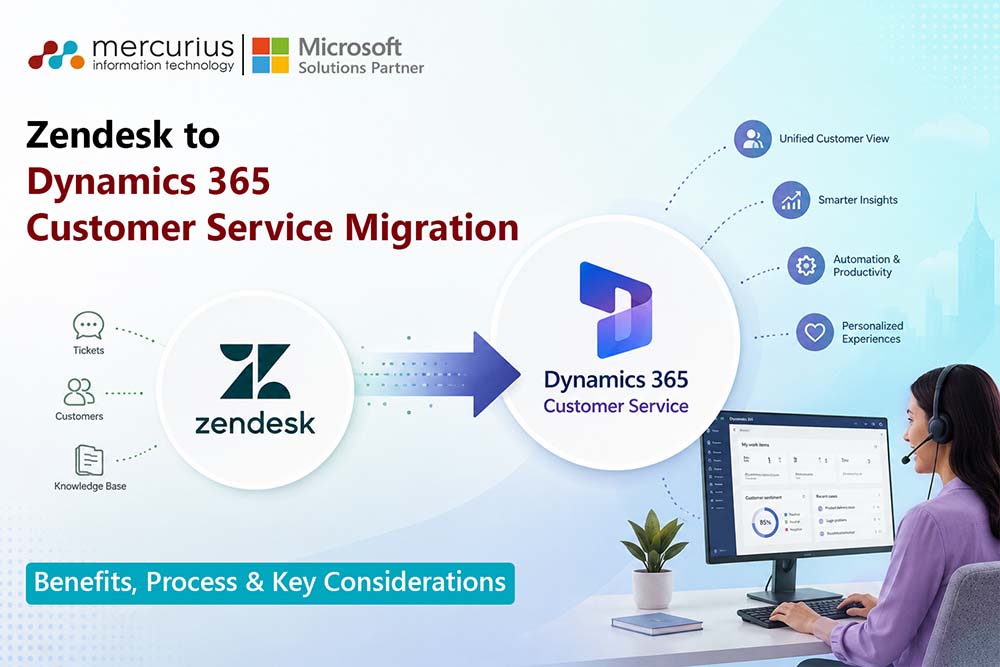
Unify customer data, streamline service operations, leverage AI-powered support, and reduce operational silos with a structured Zendesk to Dynamics 365 Customer Service migration strategy.
Key Takeaways
- Dynamics 365 Customer Service provides a unified customer view by connecting service, sales, and business data within a single platform.
- Migrating from Zendesk can improve agent productivity through workflow automation, AI-powered assistance, and streamlined case management.
- Successful migrations depend on strong data quality, integration planning, user adoption, and comprehensive testing.
- Migration timelines vary based on data volume, customisations, integrations, and organisational complexity, ranging from weeks to several months.
- Partnering with an experienced Dynamics 365 migration specialist helps reduce risk, accelerate implementation, and maximise long-term business value.
According to PwC’s 2025 Customer Experience Survey, nearly nine in ten executives have already implemented AI in customer-facing functions, reflecting a major shift toward intelligent and connected service operations. Yet many organisations still struggle with fragmented customer data, disconnected support systems, and limited visibility across the customer journey.
As customer service operations become more complex, businesses using Zendesk often find these challenges more pronounced. While Zendesk is a capable support platform, organisations seeking a unified customer view, enhanced automation, advanced analytics, and AI-driven service are increasingly considering Dynamics 365 Customer Service as a strategic next step.
Dynamics 365 Customer Service offers more than a help desk replacement. It connects customer service with sales, operations, collaboration tools, and AI-driven insights in one ecosystem. This integration enhances agent productivity, enables more personalised customer experiences, and supports long-term business growth.
This guide explores the key benefits of migrating from Zendesk to Dynamics 365 Customer Service, outlines the migration process, and highlights the critical considerations organisations should evaluate to ensure a successful transition.
Why Businesses are Migrating from Zendesk to Dynamics 365 Customer Service?
As customer service increasingly drives retention and growth, many organisations are evaluating whether their current support platforms meet evolving needs. Although Zendesk is widely used, growing organisations often face challenges with scalability, visibility, and operational efficiency.
Common Challenges with Zendesk at Scale
| Challenge | Business Impact |
|---|---|
| Fragmented customer data across multiple systems | Agents lack a complete view of customer interactions, leading to inconsistent service experiences |
| Dependence on third-party integrations | Increased complexity, maintenance effort, and integration costs |
| Rising spend on add-ons and extensions | Higher total cost of ownership as service operations expand |
| Limited cross-functional visibility |
Difficult to align service, sales, and operational teams around customer needs |
| Complex service processes become harder to manage | Reduced efficiency and slower issue resolution |
Why Businesses Are Moving to Dynamics 365 Customer Service?
D365 Customer Service addresses these challenges by offering:
- A unified customer engagement platform that connects service, sales, and customer data
- Native integration with the Microsoft ecosystem, including Microsoft 365, Teams, Power Platform, and ERP applications
- Enterprise-grade automation to streamline case management and service workflows
- Advanced reporting and analytics for data-driven decision-making
- AI-powered customer service capabilities that improve agent productivity and customer experiences
- Scalability to support evolving business and customer service requirements
Reduce Migration Risk and Accelerate Time-to-Value
Work with Dynamics 365 specialists to assess your current Zendesk environment and create a roadmap tailored to your business goals.
Zendesk vs Dynamics 365 Customer Service: Key Differences
Both platforms support customer service operations but serve different purposes. Zendesk focuses on ticket management and support, while Dynamics 365 Customer Service enables enterprise-wide customer engagement.
| Capability | Zendesk | Dynamics 365 Customer Service |
|---|---|---|
| Customer Data Management | Primarily ticket-centric, with customer information linked to support interactions | Customer-centric approach that creates a unified view of customer data across service, sales, and business applications |
| Customer View | Service-focused visibility | Single source of truth for all customer interactions and history |
| Omnichannel Service | Supports email, chat, voice, and social channels through various configurations and add-ons | Native omnichannel engagement across email, chat, voice, social channels, and self-service portals |
| Workflow Automation |
Basic to advanced ticket automation and routing |
Enterprise-grade automation for case routing, SLA management, escalations, and business process workflows |
| Reporting & Analytics | Standard service dashboards and reporting | Advanced analytics with Power BI integration and cross-functional business insights |
| AI Capabilities | AI features focused on support operations | Microsoft Copilot-powered assistance, case summarisation, knowledge recommendations, and intelligent customer interactions |
| Integration Ecosystem | Extensive third-party marketplace integrations | Native integration with Microsoft 365, Teams, Power Platform, ERP systems, and broader Microsoft business applications |
| Scalability |
Well-suited for customer support teams | Designed for organisations seeking a connected, enterprise-wide customer engagement platform |
Benefits of Migrating from Zendesk to Dynamics 365 Customer Service
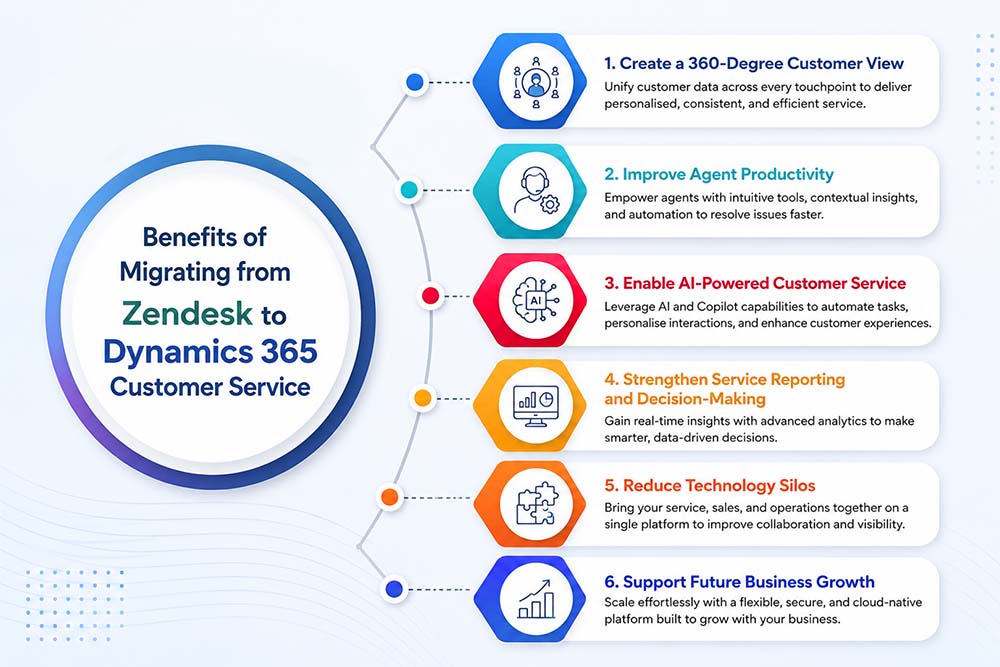
Migrating to Dynamics 365 Customer Service enables organisations to move beyond basic ticket management and establish a more integrated, intelligent, and scalable customer service operation.
Create a 360-Degree Customer View
Dynamics 365 brings together customer data from service, sales, marketing, and business systems into a single platform. This gives agents complete customer context, enabling more personalised interactions and faster issue resolution.
Improve Agent Productivity
Dynamics 365 automates routine tasks, case routing, and service workflows, reducing administrative work and enabling agents to resolve customer issues more efficiently.
Enable AI-Powered Customer Service
Microsoft Copilot can also help service teams draft customer responses, summarise lengthy case histories, surface relevant knowledge articles, and automate repetitive tasks. These capabilities reduce agent workload and improve consistency across customer interactions.
Strengthen Service Reporting and Decision-Making
Real-time dashboards and advanced analytics offer greater visibility into service performance, customer trends, and key KPIs, enabling leaders to make informed decisions.
Reduce Technology Silos
Dynamics 365 consolidates customer service operations within a unified ecosystem, reducing reliance on disconnected tools and improving data consistency and governance.
Support Future Business Growth
Dynamics 365 is designed for scalability, supporting growing service teams, global operations, and cross-functional collaboration to ensure customer service evolves with business needs.
What Data Can Be Migrated from Zendesk to Dynamics 365 Customer Service?
A well-planned migration can transfer most of your critical customer service data from Zendesk to Dynamics 365 Customer Service, helping preserve operational continuity and historical insights.
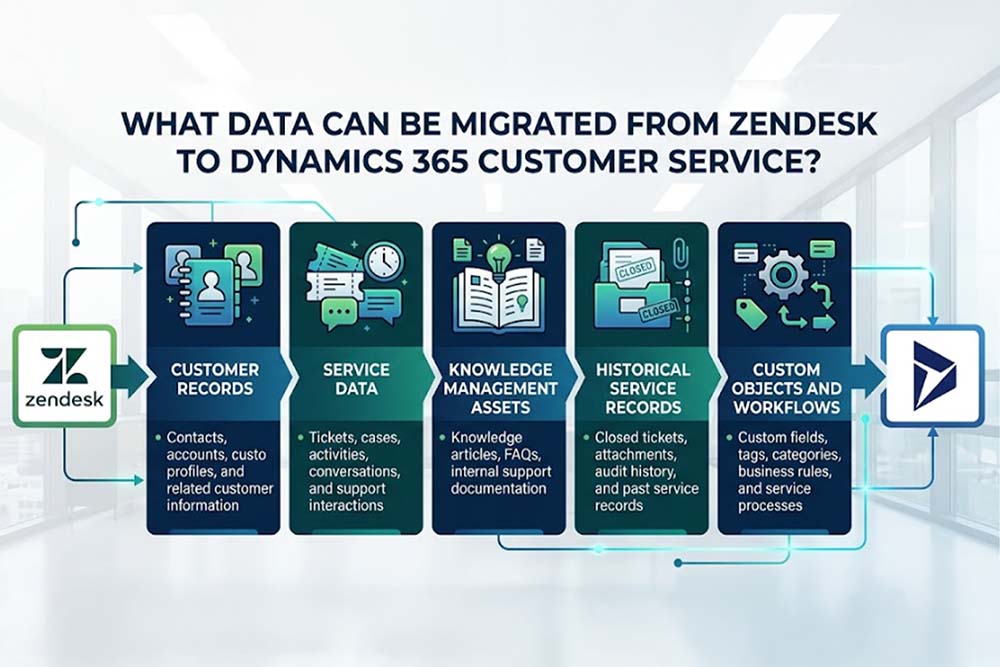
However, the exact migration scope depends on your Zendesk configuration, customisations, data quality, and business requirements. A detailed assessment helps identify what should be migrated, archived, or optimised before the transition.
Zendesk to Dynamics 365 Customer Service Migration Process
A successful Zendesk to Dynamics 365 Customer Service migration requires more than moving data between systems. It involves careful planning, data preparation, platform configuration, and user readiness to ensure a smooth transition with minimal business disruption.
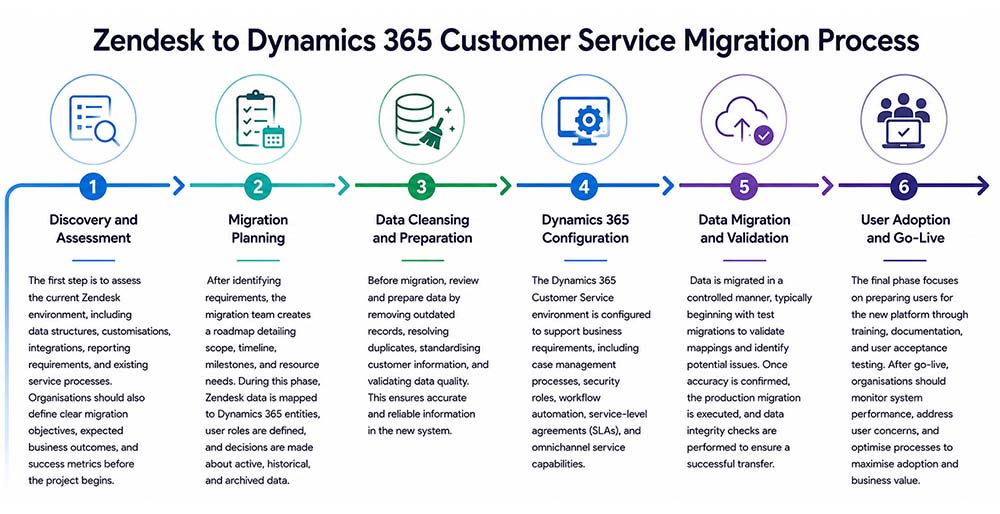
Discovery & Assessment
Assess the current Zendesk environment, including data, integrations, customisations, reporting needs, and service workflows. Establish migration goals, business objectives, and success criteria.
Migration Planning
Create a migration roadmap that defines scope, timelines, milestones, resources, and risk management. Map Zendesk data to Dynamics 365 and specify data retention requirements.
Data Cleansing & Preparation
Prepare data for migration by removing duplicates, archiving obsolete records, standardising information, and validating data quality for accuracy.
Dynamics 365 Configuration
Configure Dynamics 365 Customer Service to meet business needs, including workflows, security roles, case management, SLAs, and automation requirements.
Data Migration & Validation
Conduct test migrations to validate mappings and identify issues before transferring production data. Ensure data accuracy and integrity throughout the migration.
User Adoption & Go-Live
Support users with training, documentation, and user acceptance testing. After go-live, monitor performance, address feedback, and optimise processes for long-term success.
Is Your Customer Service Platform Ready for Growth?
Assess whether your current Zendesk environment can support your future customer service and business objectives.
Key Considerations Before Migrating from Zendesk to Dynamics 365
A successful migration involves more than moving data between platforms. Before starting, organisations should evaluate the following factors to minimise risk and maximise long-term value.
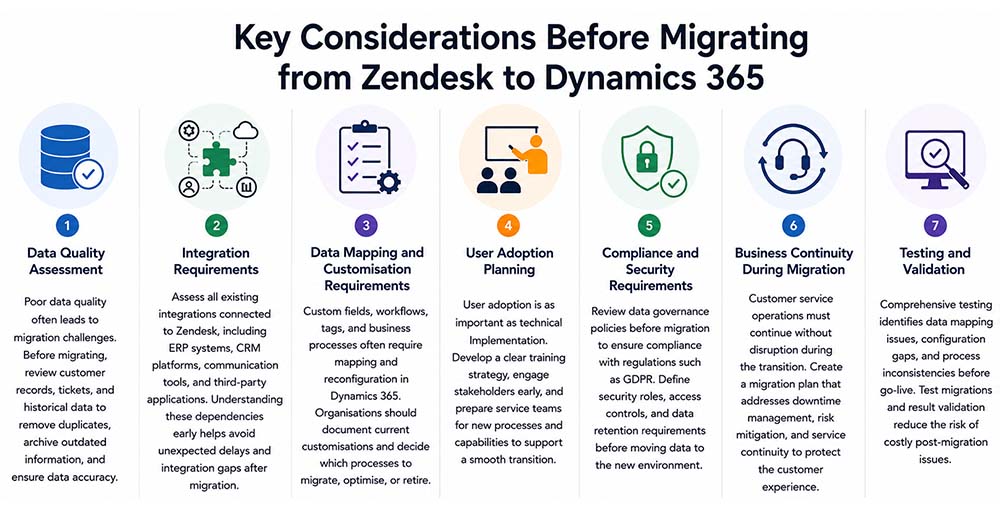
By addressing these considerations early, organisations can reduce migration risks, improve user adoption, and accelerate the return on their Dynamics 365 Customer Service investment.
How Long Does a Zendesk to Dynamics 365 Customer Service Migration Take?
The timeline for migrating from Zendesk to Dynamics 365 Customer Service depends on data volume, integrations, customisations, and organisational complexity.
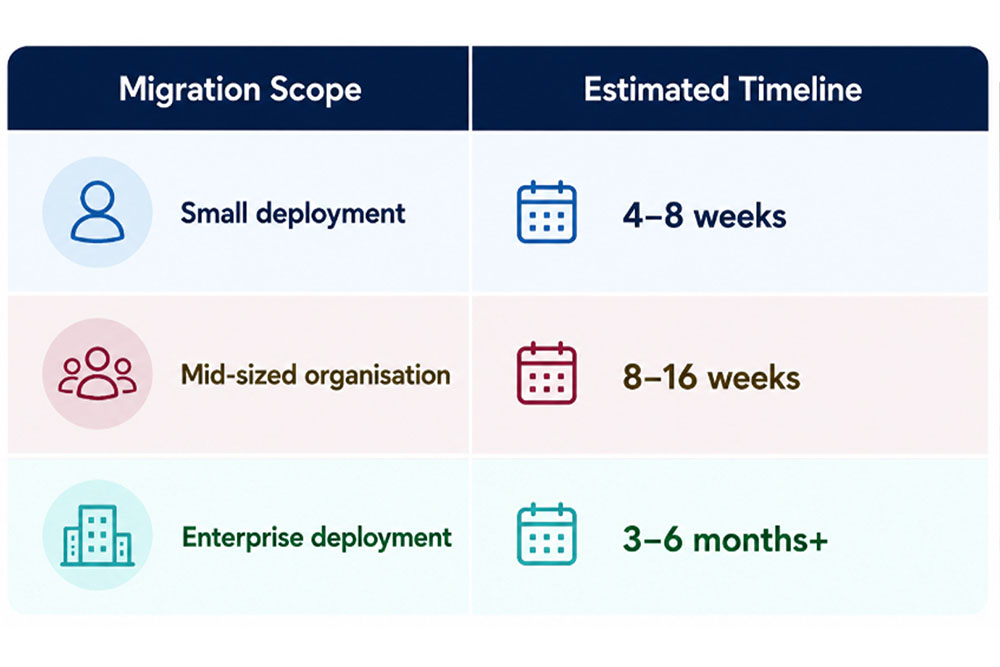
Several factors like data volume, customisations, integration complexity, user count and compliance requirements can influence the overall timeline.
How to Measure Migration Success
A successful migration should deliver measurable improvements in service performance, customer experience, and operational efficiency.
- First Contact Resolution (FCR): Measures how effectively service teams resolve customer issues during the initial interaction.
- Average Resolution Time: Tracks the speed at which customer cases are resolved after migration.
- Case Backlog: Indicates whether service teams are handling workloads more efficiently.
- Customer Satisfaction (CSAT): Evaluates customer perception of the support experience.
- Net Promoter Score (NPS): Measures customer loyalty and willingness to recommend your organisation.
- Customer Effort Score (CES): Assesses how easy it is for customers to get support and resolve issues.
- Agent Productivity: Helps determine whether automation and improved workflows are increasing operational efficiency.
- Service Costs: Measures the impact of the migration on overall support and operational expenses.
- Customer Retention: Evaluates whether improved service experiences contribute to stronger customer loyalty and retention.
Monitoring these metrics before and after migration offers clear insight into business impact and helps quantify the return on investment from Dynamics 365 Customer Service.
Why Partner Expertise Matters for a Successful Migration
A Zendesk to Dynamics 365 Customer Service migration requires strategic planning, process alignment, user adoption, and risk management. Working with an experienced Dynamics 365 partner can help organisations accelerate implementation, reduce migration risks, strengthen data governance, and maximise the long-term value of the platform.
When evaluating a migration partner, consider the following:
- Dynamics 365 Customer Service Expertise: Ensure the partner has proven experience designing and implementing customer service solutions on Dynamics 365.
- CRM Migration Experience: Look for a track record of successfully migrating data, workflows, integrations, and service processes from legacy platforms.
- Industry-Specific Knowledge: A partner with experience in your industry can better align the solution with your business and compliance requirements.
- Change Management Capabilities: Effective user training, stakeholder engagement, and adoption planning are essential for achieving long-term success.
The right partner can help ensure a smoother migration, faster time to value, and greater return on your Dynamics 365 investment.
Conclusion
Migrating from Zendesk to Dynamics 365 Customer Service is an opportunity to unify customer data, streamline service operations, leverage AI-powered capabilities, and create a scalable foundation for future growth. However, achieving these outcomes requires careful planning, high-quality data, and a strong focus on user adoption.
With the right migration strategy and implementation expertise, organisations can transform customer service into a more connected, intelligent, and efficient business function.
If you’re considering a Zendesk to Dynamics 365 Customer Service migration, Mercurius IT can help you assess your current environment, define a migration roadmap, and ensure a smooth transition that delivers long-term business value.
Ready to Modernise Your Customer Service Operations?
Gain a clear understanding of your current Zendesk environment, identify migration opportunities, and build a roadmap for a successful transition to Dynamics 365 Customer Service with guidance from experienced migration specialists.
Frequently Asked Questions
How much does Zendesk to Dynamics 365 migration cost?
The cost of migrating from Zendesk to Dynamics 365 Customer Service depends on several factors, including data volume, customisations, integrations, migration complexity, and user requirements. Smaller migrations with standard configurations typically cost less, while enterprise projects involving multiple integrations, complex workflows, and large historical datasets require a greater investment. Conducting a migration assessment helps organisations estimate costs accurately and identify opportunities to reduce implementation risks and timelines.
What considerations should be taken into account when planning a data migration in Dynamics 365 CE?
When planning a Dynamics 365 Customer Engagement (CE) data migration, organisations should focus on data quality, field mapping, customisations, integrations, security requirements, and user adoption. It is important to clean and validate data before migration, define how legacy data will map to Dynamics 365 entities, assess integration dependencies, and establish testing and validation procedures. A well-defined migration strategy helps minimise disruption, improve data accuracy, and accelerate user adoption after go-live.
Can Zendesk tickets be migrated to Dynamics 365?
Yes. Historical tickets, customer records, comments, attachments, and related service data can typically be migrated to Dynamics 365 Customer Service, depending on data quality and system configuration.
Can Zendesk and Dynamics 365 run in parallel?
Yes. Many organisations operate both platforms temporarily during transition to reduce business disruption and support user adoption.