

Quick Summary
When dispatching is disconnected, it can slow your growth and raise costs. Discover how Dynamics 365 Field Service and Power Apps can make scheduling easier, give you better visibility, and help turn your field operations into a real advantage.
Key Takeaways
- Disconnected dispatching increases costs and reduces productivity.
- D365 brings real-time visibility that improves SLA compliance and decision-making.
- Intelligent scheduling boosts technician utilisation and efficiency.
- Mobile-first tools improve first-time fix rates and cash flow.
- Dynamics 365 integrates CRM, ERP, and field operations into one platform.
Field operations have moved beyond being just back-office tasks; now, they set companies apart from the competition. Still, many organisations struggle with disconnected dispatching. Outdated workflows, fragmented systems, and manual handoffs can turn every customer request into a small crisis.
Nearly half of all field service appointments do not go as planned. According to Salesforce, 47% of jobs are delayed, mis-scheduled, or mishandled because of poor coordination and a lack of real-time information. These problems affect your entire operation, leading to wasted technician hours, higher travel costs, lost customer trust, and executives making decisions without the right information.
Disconnected dispatching hurts your revenue and damages customer loyalty. But there is a better solution to handle this. Microsoft Dynamics 365 Field Service handles it all efficiently. In this article, we will discover the real costs of disconnected dispatching, why traditional methods are no longer effective, and how Microsoft Dynamics 365 with Power Apps can help make your field service operations a competitive advantage. Let’s get started.
The Cost of Disconnected Dispatching
When field operations are managed through spreadsheets, paperwork orders, and disconnected systems, the impact directly affects productivity, profit, and customer loyalty. Business leaders often underestimate how these “small inefficiencies” accumulate into major financial and strategic setbacks.
Operational Inefficiency
Field service teams without real-time systems lose an average of 15 hours per week per dispatcher to inefficient scheduling and coordination. Even worse, technicians can waste 1–2 hours every workday chasing down job details, parts lists or customer history because their information arrives late or incomplete. That’s up to 20 hours a month of lost productive time per technician.
Lost Productivity
Without optimised routing and smart scheduling, technicians spend much of their workday driving. In field service operations that lack automation, poor route planning can increase travel time by 20 to 30 percent.
Poor Customer Experiences
Missed expectations quickly damage customer loyalty. Industry research shows that 47% of service appointments do not go as planned, often because of miscommunication and dispatching mistakes.
Increased Operational Costs
Disconnected dispatching not only reduces productivity, it also increases your costs. Companies without modern scheduling tools often face 25 to 30 percent higher operational expenses because of inefficient dispatching, extra vehicle mileage, and unplanned overtime.
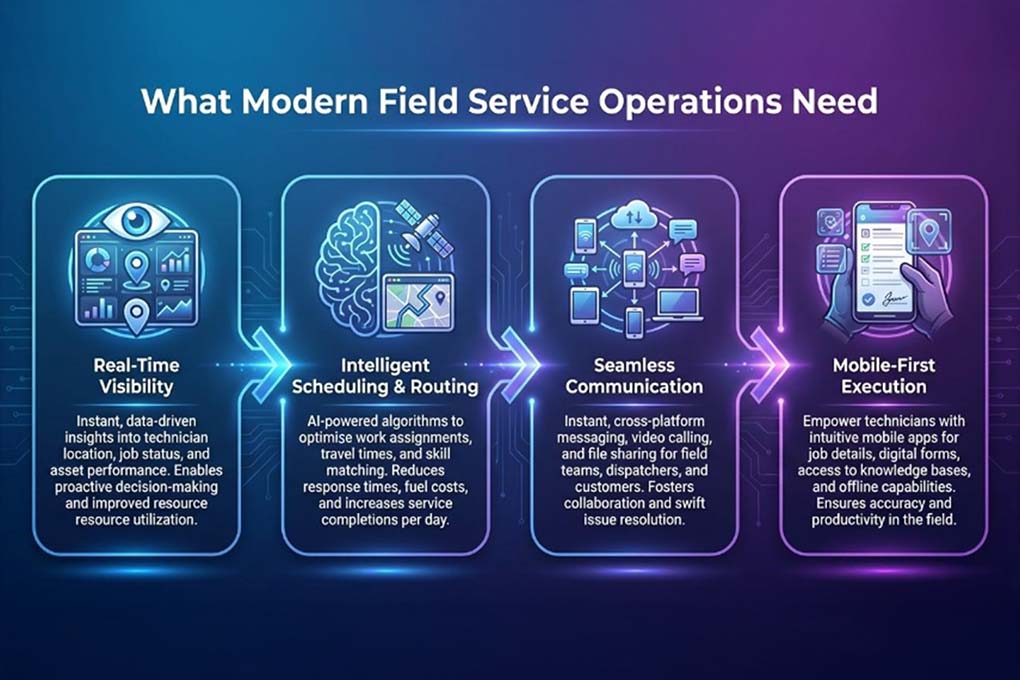
What Modern Field Service Operations Need
Modern field operations create clarity, control, and measurable performance. Here’s what business leaders should expect from a future-ready field model:
Why Microsoft Dynamics 365 Is Built for Modern Field Operations
If your business struggles with disconnected systems, Microsoft Dynamics 365 in field service can help bring everything together.
Dynamics 365 is a business platform that combines customer engagement and operations in one system. Rather than using separate tools for sales, service, finance, and operations, you can manage everything together on a single platform.
Here’s why it stands out, especially for growing service organisations:
- Unified CRM & ERP Capabilities- Dynamics 365 brings together customer data, service history, finance, inventory, and operations in one place. Dispatchers, field teams, finance staff, and leaders all work from the same information.
- Cloud-Native by Design- Because it runs on Microsoft’s secure cloud, you get real-time access from anywhere. Updates are automatic, your data is protected, and your teams stay connected whether they are in the office or out in the field.
- Scalable for Growing Operations- Whether you have 20 technicians or 2,000 across different regions, Dynamics 365 grows with your business. You can start with what you need now and add more as you grow, without having to rebuild your systems.
For field operations, this connected system makes a big difference. Next, we’ll explore how Dynamics 365 Field Service builds on this foundation to become a powerful tool for dispatching and service.
Don’t Let Operational Gaps Slow Your Growth in 2026.
The longer systems stay disconnected, the harder scaling becomes. Act now.
Differences Between Dynamics 365 Field Service and Standard Field Service
A standard field service system may help you assign jobs and track technicians. But if your field operations directly impact revenue, customer loyalty, and service-level commitments, you need intelligence, integration, and scalability.
Here’s a crisp comparison to help you assess the difference clearly.
| Capability Area | Standard Field Service | Dynamics 365 Field Service |
|---|---|---|
| Dispatch & Scheduling | Manual or rule-based scheduling | AI-driven scheduling with skill, availability, location, and priority optimisation |
| System Integration | Limited or siloed integrations | Deep integration across CRM, ERP, and the Microsoft ecosystem |
| Real-Time Visibility | Basic job status updates | Live dashboards with technician tracking, SLA monitoring, and performance insights |
| Mobile Capabilities | Basic mobile app functionality | Full-featured mobile app with offline capability and real-time sync |
| Asset & Inventory Management | Minimal tracking | Connected asset history, IoT integration, inventory and parts tracking |
| Automation & Intelligence | Reactive workflows | Predictive maintenance, automated work order creation, AI insights |
| Customisation | Limited flexibility | Highly customisable with Power Apps and Microsoft Power Platform |
| Scalability | Suitable for small teams | Enterprise-ready, scalable across geographies and complex operations |
| Customer Experience | Basic appointment tracking | Automated notifications, self-service portals, proactive service updates |
| Data & Analytics | Basic reporting | Advanced analytics and Power BI-driven insights |
Make Every Dispatch Decision Data-Driven.
Real-time insights empower faster responses, smarter scheduling, and stronger margins.
Benefits of Dynamics 365 for Field Service Operations
Dynamics 365 Field Service brings structure, visibility, and intelligence into the process, turning dispatching from a reactive task into a strategic function. Here’s how it makes the difference:

Connected Field Workers
Technicians can use their mobile devices to access work orders, service history, and updates even when offline. This helps them always stay in touch with the office and deliver exceptional services on-site.
Seamless Integration
You can connect Dynamics Field Service with other Microsoft products or services to add new features and work more efficiently.
Optimise Resource Scheduling
Schedule visits when it works best for your customers and match each job to the right technician. Keep your field service personnel updated on any schedule changes so they can adjust quickly.
Real-Time Insights
Give your field technicians real-time updates about customer issues, schedules, and routes. They can also keep customers informed about the status of their service calls. Built-in analytics and AI tools help you predict demand, use resources wisely, and improve service over time.
Work Orders
Quickly create and manage service work orders, usually at the customer’s location.
Schedule and Dispatch Tools
Streamline external frontline technician and equipment scheduling for service appointments, visually map on-site visits, and optimise schedules by aligning resources with required skills.
Communication Tools
Improve collaboration between customer service agents, dispatchers, field technicians, customers, and other stakeholders with features such as chat, email, and phone integration.
Billing
Create invoices for the products and services you provide to customers.
Time Tracking
See how your team spends their time, whether they are travelling, on a break, or working.
Analytics for Reporting
Create reports to track important performance indicators for work order management and customer interactions.
Power Apps: Customise Without Complexity
If Dynamics 365 is the foundation, then Power Apps adds the flexibility that helps make it ready for real business needs.
Power Apps is Microsoft’s low-code platform. It lets organisations build custom applications for their specific needs, without long development times or heavy reliance on IT.
How Power Apps Extends Dynamics 365
Power Apps integrates seamlessly with Microsoft Field Service. You can customise workflows, add new ways to capture data, or build apps for specific roles that fit right into your current system. Instead of replacing your platform, you are making it better.
Field operations are rarely “one size fits all”. Each industry has its own inspection checklists, compliance forms, asset tracking, or approval steps. Power Apps helps you adapt quickly without interrupting your main work. It helps:
- Create custom mobile apps for your field teams’ specific tasks.
- Connect Power Apps to your current systems, like finance, inventory, or legacy tools.
- Build solutions with low-code tools, so you do not have to depend on big IT projects.
- Make it easier for people to use new apps by keeping the design simple and clear.
How Much Is Disconnected Dispatching Really Costing You?
Every delayed job, idle technician, and missed SLA adds up. Let’s fix the root cause.
How to Set Up Dynamics 365 Field Service
Setting up Dynamics 365 Field Service is about making sure the technology fits your way of working. When you do this well, you add structure without interrupting your daily service.
Here’s a simple overview of how most businesses get started:
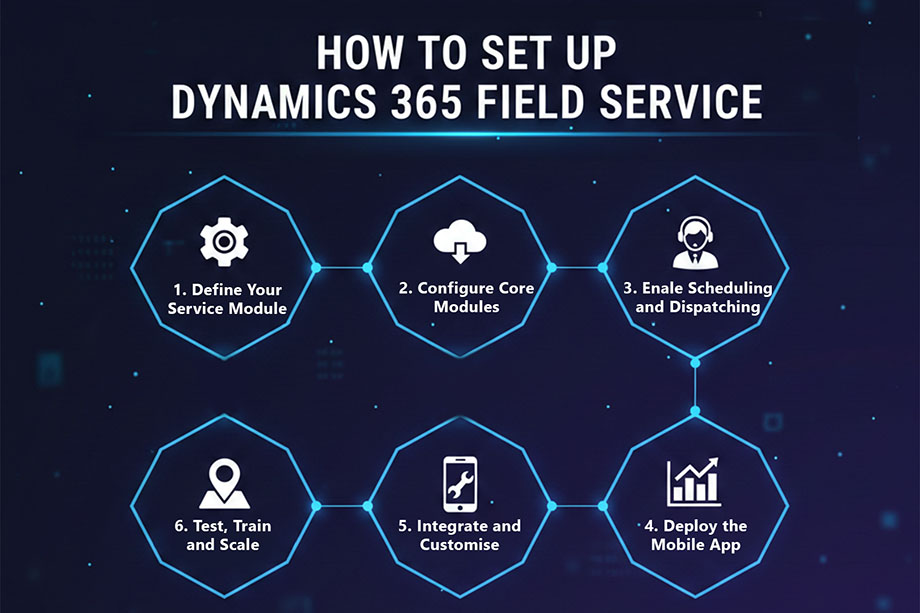
When you set up Dynamics 365 Field Service with a clear plan, your organisation can shift from reactive dispatching to a more organised, data-driven way of managing service, all without adding extra complexity.
Real-World Success: How Mercurius IT Improved Field Service Operations
Here’s an example of how Mercurius IT helped a global service provider in the energy and industrial sector improve its field service operations with a connected platform.
Before working with Mercurius IT, the company struggled with fragmented field service data and systems that didn’t work together. Their field service system and ERP were not integrated, which led to delays in scheduling, poor customer communication, and unreliable reports. These issues hurt both efficiency and customer satisfaction.
Mercurius IT implemented Dynamics 365 Field Service Management, prepared the data, and connected it with Microsoft Dynamics 365 Business Central. They also set up the mobile app for real-time job management. Their team trained field staff so everyone could start using the new system quickly and with confidence.
And the impact of the implementation was clear and measurable. Astonishingly, the company experienced:
- Better data quality improved scheduling and reporting accuracy.
- Smoother job execution and communication reduced delays and misunderstanding in the field.
- Better visibility and professionalism through improved job documentation enhanced customer service and trust.
Bottom Line
Field operations can stay a daily coordination challenge, or they can become a structured, data-driven engine for growth. The key is how well your systems, teams, and decisions work together.
When you use Dynamics 365 as your foundation and add the flexibility of Power Apps, dispatching gets smarter, field teams stay on the same page, and leaders get clear insight into performance, costs, and customer experience.
At Mercurius IT, we make sure your systems match your operational goals. As a trusted Microsoft Solutions Partner, we help businesses design, set up, and improve Microsoft cs Field Service so you see real results from day one.
If you want your field operations to be more organised, faster, and easier to manage, now is the time to move forward.
Frequently Asked Questions
What industries benefit from Microsoft Dynamics 365 Field Service?
Microsoft Dynamics 365 Field Service benefits industries that manage on-site technicians, service contracts, or asset maintenance. The key industries include manufacturing, utilities, facilities management, healthcare equipment services, telecommunications, HVAC, engineering services, and IT field support.
Any business that schedules field technicians, tracks service jobs, or manages SLAs can improve visibility, utilisation, and response times with this solution.
How long does it take to implement Dynamics 365 Field Service?
D365 Field Service typically takes 6 to 16 weeks to implement. The timeline depends on business size, process complexity, integrations, and data migration requirements. A phased or pilot rollout often speeds up adoption and reduces implementation risk.
Is Dynamics 365 suitable for mid-sized businesses?
Yes. Dynamics 365 is suitable for mid-sized businesses because it is modular, cloud-based, and scalable. Companies can start with core field service capabilities and expand as operations grow. The platform supports growth without requiring enterprise-level infrastructure from day one.
What is the difference between Field Service and Customer Service in Dynamics 365?
Field Service manages on-site service delivery, including technician scheduling, work orders, asset tracking, and dispatch optimisation. On the contrary, customer service manages remote support and case handling, such as contact centre operations, ticket resolution, and customer communications.
How long does the migration take?
The time needed for migration depends on how complex your current setup is and how much data you have. Most migrations take about three to six weeks. It may take longer if there are extra requirements or challenges to ensure a smooth transition.