
Quick Summary
As business complexity increases, organisations are migrating from Sage to Dynamics 365 Finance & Supply Chain for scalable operations, AI-driven insights, and end-to-end financial and supply chain visibility.
Key Takeaways
- Organisations move from Sage to Dynamics 365 to scale faster with fewer infrastructure limits.
- Dynamics 365 delivers real-time, AI-driven insights instead of static, historical reports.
- A unified finance and supply chain platform improves visibility, control, and decision speed.
- Cloud-first architecture reduces long-term costs while improving security and compliance.
- Successful migration depends on clean data, planning, and the right Dynamics partner.
More than 60% of medium sized businesses and enterprise organisations say their legacy ERP systems limit their ability to scale and adapt as business complexity increases. This challenge becomes more visible as organisations expand into new markets, manage multiple entities, or face volatile supply chain conditions.
For many of these organisations, Sage has served its purpose well as a transactional system. But as expectations shift from basic accounting to real-time visibility, predictive insight, and automation, its limitations become harder to ignore.
This is why many businesses are now moving from Sage to Dynamics 365 Finance & Supply Chain Management solutions. This blog walks you through the top reasons why businesses are embracing this change and how it has benefited them in various aspects. Let us begin.
Why Organisations Are Migrating from Sage to Dynamics 365 Finance & Supply Chain Management?
Organisations move from Sage to Dynamics 365 F&SCM for better scalability, cloud-native power, AI-driven automation, deeper Microsoft integration, and a unified platform that goes beyond Sage’s core accounting. Dynamics 365 is better at meeting the needs of modern businesses while overcoming Sage’s limitations in complex operations.
The decision to migrate is rarely driven by technology alone. It is based on the need to move faster, make better decisions, and operate with greater control.
Organisations typically make the move for five core reasons:
- Scalability without infrastructure complexity
- Cloud-first operations and predictable costs
- AI-driven automation and insights
- Seamless integration across systems
- A unified platform that connects finance and supply chain end-to-end
Still managing growth on an ERP that wasn’t built to scale?
See how Microsoft Dynamics 365 Finance & Supply Chain delivers predictable costs, real-time financial insight, and control across entities.
Sage to Dynamics 365 FSCM: A Strategic Shift for Growing Organisations

While Sage X3 is a reliable ERP system, but many businesses are choosing Dynamics 365 because it offers strong cloud features, easy integrations, and advanced tools. Dynamics 365 Finance & Supply Chain Management helps organisations operate more efficiently, scale confidently, and optimise costs. Here is a quick comparison for you to note the differences at a glance.
| Feature | Sage | Microsoft Dynamics 365 Finance & Supply Chain Management |
|---|---|---|
| Cloud Deployment | Limited cloud capabilities | Fully cloud-based with mobile access |
| Scalability | Limited scalability | Easily scales with business growth |
| Real-Time Reporting | Manual or basic reporting | Built-in Power BI and dashboards |
| Integration | Limited integrations | Seamless with Office 365, CRM, and Teams |
| Customisation | Requires manual development | Flexible and low-code customisation |
| User Interface | Outdated interface | Modern, intuitive UI |
| Automation | Mostly manual processes | AI-driven automation capabilities |
| Global Compliance | Region-specific limitations | Multi-currency, multi-country ready |
| Support | Regional support | Backed by Microsoft’s global network |
| Cost Efficiency | High infrastructure, licence, and migration costs | Subscription-based with reduced infrastructure costs |
Now that you have explored the quick differences, let us understand them in detail.
- Increased Scalability
As your business grows, ERP solutions must adapt to changes. Dynamics 365 Finance & Supply Chain Management enables organisations to scale users, entities, and operations in the cloud as the business grows. In contrast, Sage becomes increasingly complex and costly to scale.
For instance, if you have 20 employees and need to add more, the server requires additional infrastructure investment. Switching to Dynamics 365 saves your time and money as your organisation grows.
- Real-Time & Predictive Insights
One of the biggest shifts driving the move from Sage to Dynamics 365 Finance is the expectation placed on finance teams today. Leaders are no longer asking, “What happened last month?,” They want to know what’s likely to happen next.
Dynamics 365 Finance embeds analytics and AI directly into financial processes, enabling:
- Predictive cash flow forecasting
- Faster close cycles
- Real-time financial visibility across entities
McKinsey reports that organisations using AI-enabled decision systems improve forecasting accuracy by 20–30%, helping leadership teams make faster, more confident decisions.
Your supply chain decisions are only as good as your data.
Discover how organisations are replacing Sage with Dynamics 365 to gain real-time visibility, predictive planning, and operational resilience.
- AI-Powered Efficiency with Microsoft Copilot
Dynamics 365 now comes with Microsoft Copilot, so you can use AI in your everyday work. With Copilot, you can:
- Create financial insights and summaries just by typing what you need in natural language.
- Automate repetitive tasks like invoice creation and bank reconciliation.
- Receive helpful tips on queries like how much inventory to keep and when to follow up with customers.
- Make better decisions with helpful predictions and suggestions.
- Save time and make fewer mistakes with AI helping you enter data and handle documents.
Not ending here, the new advancement in the form of AI Agents in Finance has taken things way too far. Agents are pre-configured, ready-to-use AI solutions that can be implemented with minimal changes and are integrated into enterprise applications, such as Microsoft Dynamics 365 Finance. These agents automate routine and complex workflows, like handling expense policies, classifying tax data, and reconciliation process. By processing massive amounts of data and performing ongoing policy checks, agents improve speed and accuracy while lowering operational expenses and human error.
- Cost Analysis of Licensing and Implementation
Businesses often think of numbers when bringing a huge change to their business. Whether it would be a financial investment or the ROI generated.
In fact, the way you pay for licences is different for each system. With Sage X3, costs can add up quickly because you need to pay for your own servers, upkeep, and equipment. In contrast, Dynamics 365 FSCM operates on a cloud-based subscription model, providing predictable costs and reduced infrastructure overheads.
When looking at the costs to implement these systems, do not just look at the initial expenses. Over time, things like training, making changes to fit your needs, and updates can cost more. But with Dynamics 365’s cloud system that can grow with you, you can avoid surprise costs and get more for your money as your business grows. In short, it leads to lower ongoing costs while reporting limitations of the traditional systems.
5. A Connected, Cloud-First ERP Built for Faster Decisions
For CFOs and COOs, ERP value is measured by speed, visibility, and control. Microsoft Dynamics 365 Finance & Supply Chain Management delivers this through a single, cloud-first platform that connects finance, supply chain, and operations on one data model.
Unlike Sage, where reporting, integrations, and operational data often sit in separate systems, Dynamics 365 FSCM provides real-time access to consistent data across the organisation. This eliminates delays caused by reconciliations, improves project management, and enhances workflows in the financial and operational systems.
With real-time dashboards and AI-driven insights, leadership teams gain earlier visibility into reports, risks associated with inventory management, supplier performance, and operational bottlenecks.
As a fully cloud-based platform, Dynamics 365 removes the burden of on-premises infrastructure. Automatic updates, built-in security, and cloud connectivity ensure teams always work on the latest version of the system, without disruption.
- Enhanced Security Features
Microsoft spends over a billion dollars each year to make sure its Dynamics 365 products are protected from new security risks and ready for changes in the market. Microsoft also often releases updates and security enhancements for Dynamics 365 that fix issues and add new features, so you can keep your system safe and up to date. While Sage users have to look for updates themselves and start them manually.
- Customisability and Flexibility
Every business is unique, and so your ERP should also be unique to fit your specific business needs. Though Sage X3 offers decent customisation, Dynamics 365 takes it to the next level. With it, you can customise workflows, processes, and even reports without requiring a large team of developers. This flexibility of Dynamics 365 is one of its standout features. So, whether you’re in retail or manufacturing, it quickly adapts to your changing needs.
- Ease of Integration
Modern organisations rely on multiple systems working together. Dynamics 365 integrates seamlessly with Microsoft tools such as Power BI, Teams, Excel, Power Automate, and Azure, enabling real-time collaboration and shared insight.
Forrester reports that organisations with integrated ERP and advanced analytics platforms experience 20–30% faster decision cycles, driven by improved data accessibility and collaboration. Such integration capabilities are significantly harder to achieve in Sage environments without additional effort and third-party tools.
Sage to Dynamics 365 Migration: What Organisations Should Take Care Off
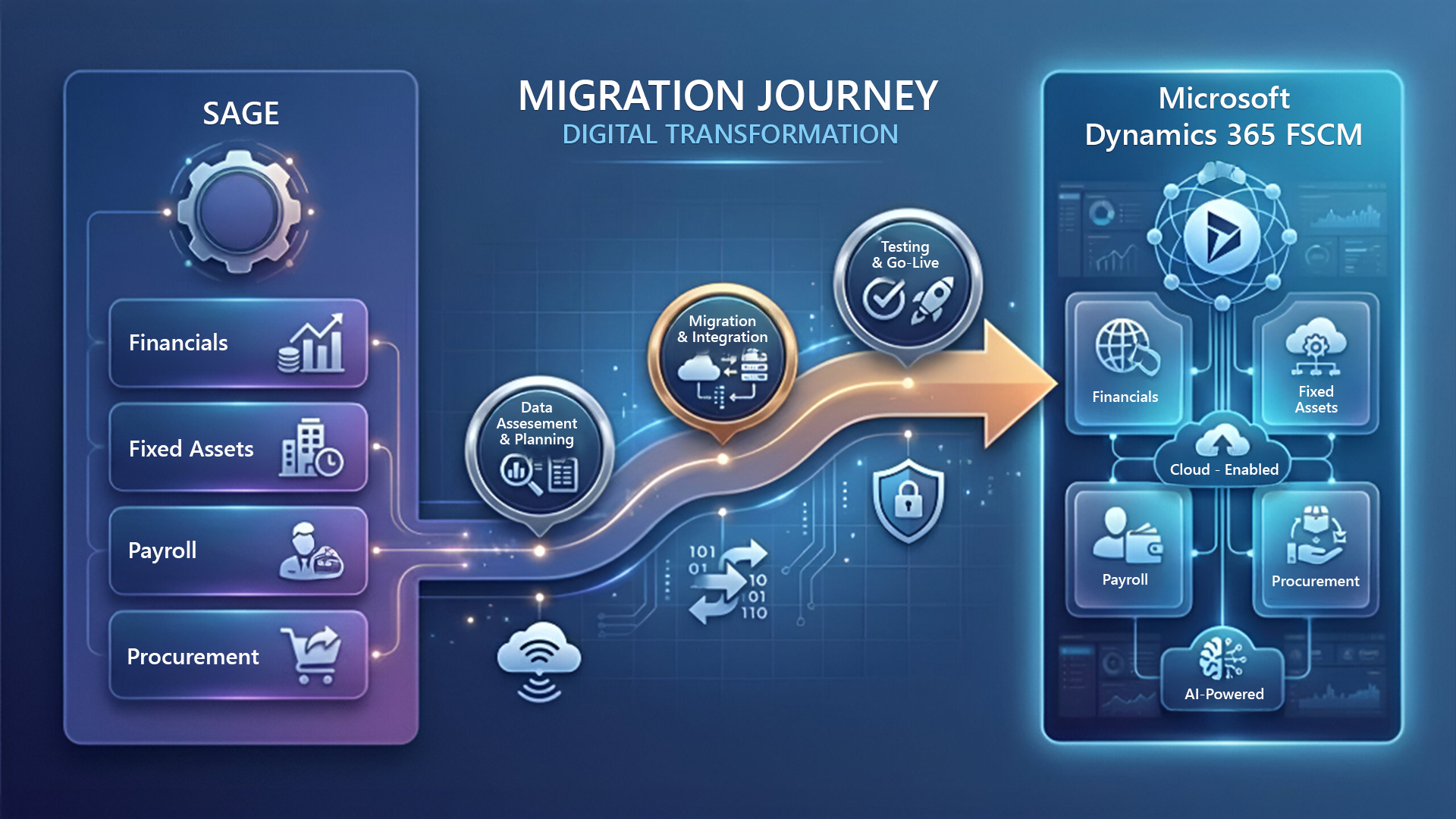
Migrating from Sage to Dynamics 365 might seem overwhelming at first, but with good planning and the right help, the process can be straightforward and rewarding. Here’s how it works:
Data Migration and Clean-Up
Before starting the migration journey, it’s important to review and clean your existing data. A detailed assessment and clean data can help ensure accuracy and make the move to Dynamics 365 go smoothly. A certified migration partner can help your business transfer data efficiently.
Customisation and Configuration
Dynamics 365 adapts to your industry, workflows, and ambitions. Tailor workflows to your operations, add new features as you grow, and create custom reports. With a partner’s expertise, your system will be set up to support your business goals at every step.
Support and Partner Network
Microsoft’s extensive network of certified partners, like Mercurius IT, brings deep expertise to Microsoft Dynamics 365 migrations. These specialists handle every detail, from planning to troubleshooting, and offer support wherever you need it. For businesses without in-house IT or those seeking extra guidance, partnering with these experts ensures a smooth and successful transition.
Benefits of Migrating to Microsoft Dynamics 365
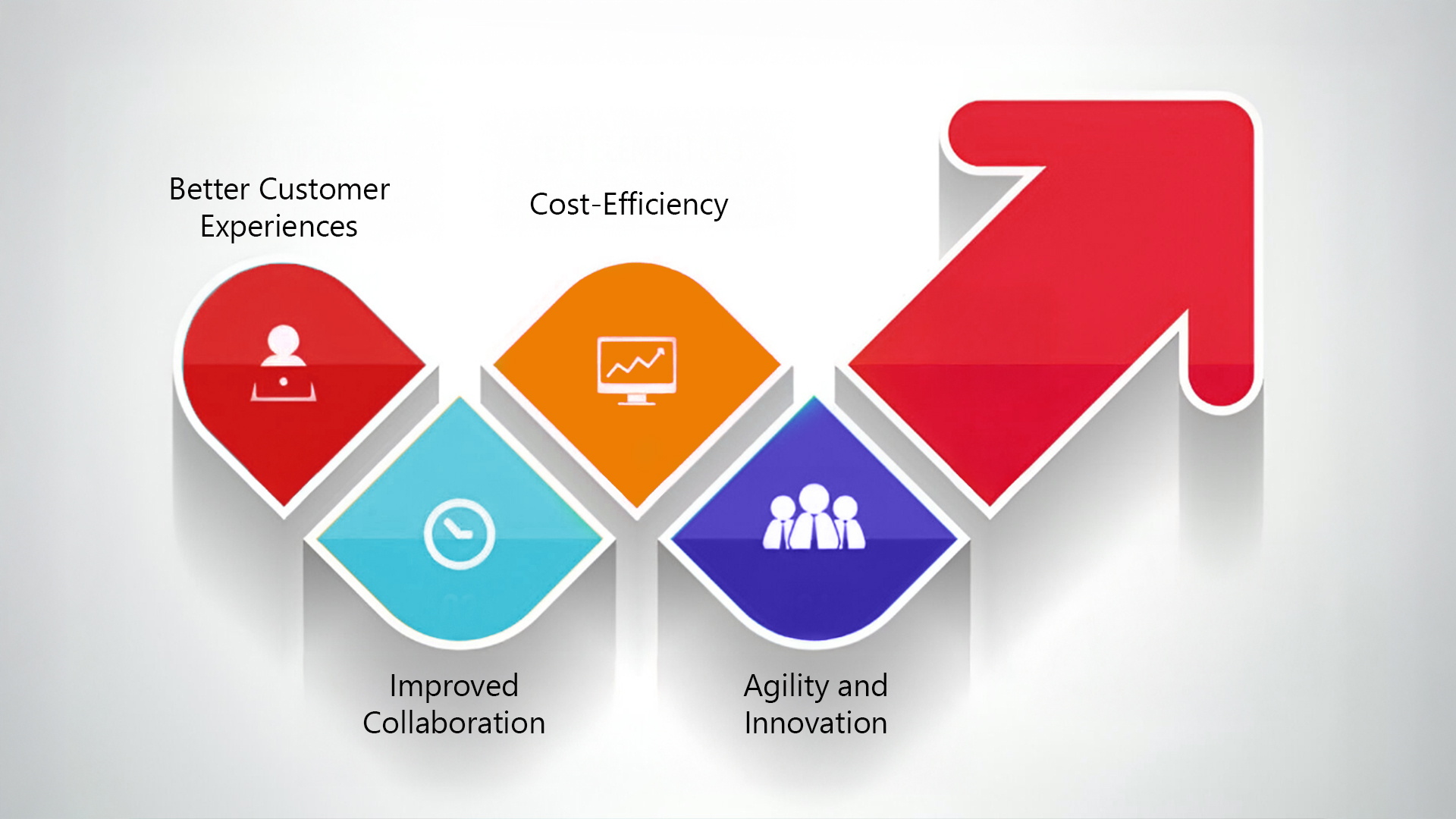
A Sage-to-Dynamics 365 migration can provide significant advantages for businesses planning to expand, enhance operational efficiency, and adapt quickly to changing business requirements. Here are some key benefits that companies often gain by migration.
- Better Customer Experiences: One of the top advantages of migrating to Microsoft Dynamics 365 is the intuitive customer experience it provides. It offers personalised interactions, quick problem-solving, and more customer satisfaction by using a 360-degree view of client data across departments.
- Cost-Efficiency: The Dynamics cloud-based subscription model reduces long-term IT expenses. It eliminates the need for expensive updates and physical servers.
- Improved Collaboration: Dynamic’s cloud-based solution facilitates real-time collaboration from any place and allows employees to access data remotely, which increases output and employee satisfaction.
- Agility and Innovation: With frequent upgrades and advanced automation features, Dynamics FSCM helps businesses stay competitive without major overhauls and quickly implement innovations.
Organisations using AI-enabled ERP platforms are twice as likely to outperform peers on operational efficiency.
How Mercurius IT Helps You Migrate from Sage to Dynamics 365 Finance & Supply Chain
Mercurius IT is a trusted Microsoft Dynamics 365 partner helping organisations move from Sage to Dynamics 365 Finance & Supply Chain with clarity, control, and minimal disruption.
Our approach focuses on structured planning, clean data migration, and risk mitigation. Every migration begins with a detailed assessment of your existing Sage environment, business processes, and growth goals. From data mapping and validation to testing and reconciliation, we ensure financial and supply chain data remains accurate, secure, and audit-ready throughout the migration process.
Beyond migration, Mercurius IT migration experts configure Dynamics 365 FSCM to match your operational realities, whether that means multi-entity finance, complex supply chains, or industry-specific workflows. We also support user enablement and change management to ensure teams adopt the platform confidently from day one.
Post-go-live, our experts continue to work alongside your business, helping you optimise performance, scale operations, and unlock advanced capabilities such as automation, analytics, and AI-driven insights as your needs evolve.
Conclusion
Dynamics 365 uses AI insights, better automation, and real-time data across finance and supply chain operations. This helps leaders make better decisions, react quickly to changes, and grow their business with confidence. For many organisations, switching from Sage to Dynamics 365 Finance & Supply Chain Management means moving from basic transaction systems to a smarter, more modern enterprise platform.
However, the successful migration from Sage to Dynamics 365 FSCM depends heavily on how the move is planned and executed. Working with an experienced Microsoft Dynamics 365 partner ensures the transition is aligned to your business goals, minimises disruption, and delivers value from day one.
As a trusted Microsoft partner, Mercurius IT helps organisations plan, migrate, and optimise accounting software using Dynamics 365. If your current ERP is starting to limit visibility, agility, or scalability, now is the right time to reassess!
Frequently Asked Questions
What is the difference between Dynamics 365 and Sage Intacct?
Dynamics 365 is an all-in-one ERP that supports many types of businesses, such as manufacturing, retail, and services. It works closely with Microsoft 365. Sage Intacct, on the other hand, is a flexible cloud financial management system that is great for complex accounting, multi-entity consolidation, and meeting regulations. It is especially useful for finance teams that need detailed financial insights.
Can Sage support automatic integration?
Yes, Sage supports automatic integration. You can connect it with many third-party apps, such as e-commerce platforms, CRM systems, and payment gateways. This lets you automate data entry, financial tasks like invoicing and inventory, and reporting. Sage offers built-in features and customizable APIs to help reduce manual work and errors.
What is Supply Chain Management in Dynamics 365?
Dynamics 365 Supply Chain Management (D365 SCM) is a cloud-based ERP that helps businesses manage everything from planning and buying to production, warehousing, and delivery. It uses AI, IoT, and real-time data to make supply chains more flexible, efficient, and reliable.
How does Dynamics 365 improve financial processes within a company?
Dynamics 365 helps companies with their financial processes by automating routine manual tasks, bringing all data together for real-time insights, using AI to improve planning, making reporting easier, and helping manage cash flow. This leads to more efficiency, accuracy, better decisions, and lower costs for the finance team.
How long does the migration take?
The time needed for migration depends on how complex your current setup is and how much data you have. Most migrations take about three to six weeks. It may take longer if there are extra requirements or challenges to ensure a smooth transition.