
Quick Summary
Delaying a Dynamics AX to Dynamics FSCM upgrade increases costs, compliance risks, and migration complexity. Early planning helps manufacturers reduce disruption, control budgets, and modernise confidently.Key Takeaways
- Delaying a Dynamics AX upgrade beyond 2026 can significantly increase migration costs due to technical debt, partner scarcity, and compliance pressures.
- Unsupported AX environments expose manufacturers to growing cybersecurity, operational, and regulatory risks.
- UK compliance requirements, including evolving tax and cybersecurity regulations, are accelerating ERP modernisation timelines.
- Dynamics 365 FSCM provides AI-driven automation, supply chain visibility, cloud scalability, and continuous innovation for manufacturers.
- Starting migration planning early gives organisations greater control over timelines, budgets, implementation resources, and business continuity.
Microsoft ended extended support for Dynamics AX 2012 R3 in January 2023. This means organisations still running the AX platform no longer receive security updates, hotfixes, or Microsoft support. For UK manufacturers, each month spent delaying an AX to FSCM upgrade increases exposure to cybersecurity risks, compliance challenges, integration limitations, and rising maintenance costs.
The principal issue extends beyond the risks associated with remaining on AX; it includes the escalating costs resulting from delayed upgrades. As an increasing number of manufacturers transition to Dynamics 365 Finance & Supply Chain Management, the market is experiencing a capacity shortage. Skilled upgrade partners are becoming scarce, legacy infrastructure costs are rising, and organisations that defer upgrades frequently encounter urgent, high-pressure migrations prompted by security incidents, audit findings, or operational failures.
For many manufacturers, postponing upgrades beyond 2026 may result in substantially higher costs. This blog examines the critical importance of upgrading to Dynamics FSCM in 2026 and outlines effective strategies for the manufacturing industry to achieve this transition.
Why Delaying an AX to FSCM Upgrade Beyond 2026 Can Triple Your Total Cost
Many manufacturers delay ERP modernisation in the hope of reducing short-term expenditure. In reality, delaying a Dynamics AX to Dynamics 365 FSCM migration often has the opposite effect. The longer organisations remain on unsupported legacy infrastructure, the more technical debt, security risk, integration complexity, and operational inefficiencies accumulate. Let us check out the impact of delaying the upgrades in the table below:
| Cost Driver | Upgrade During 2026 | Delay Beyond 2026 |
|---|---|---|
| Support & Security | Planned migration away from unsupported AX with controlled risk management | Greater exposure to security vulnerabilities, compliance risks, and expensive workaround solutions |
| Customisations | Existing customisations can be assessed and modernised strategically | Legacy code becomes harder to migrate, increasing redevelopment and testing costs |
| Integrations | Smooth alignment with modern Microsoft technologies, including Power Platform and Azure | Growing compatibility issues may require additional middleware, replacements, or integration redesign |
| Operational Efficiency | Faster access to automation, analytics, and process improvements | Continued productivity losses and higher operational costs from outdated systems |
| Resource Availability | Wider choice of implementation partners and project scheduling flexibility | Increased competition for skilled consultants, longer project queues, and higher service rates |
| Licensing & Commercial Opportunities | Ability to take advantage of available migration incentives and planned budgeting | Higher long-term licensing and project costs with fewer commercial advantages |
| Total Cost of Ownership | Predictable investment with measurable ROI and controlled implementation costs | Higher TCO driven by technical debt, emergency remediation, compliance risks, and business disruption |
The Cost Difference Between Upgrading Now and Delaying Beyond 2026
The “3× cost multiplier” is rarely caused by a single factor. It emerges from the combined impact of four compounding forces:
- Emergency Upgrade Premiums– Organisations undergoing urgent migrations often encounter compressed timelines, higher consulting fees, and increased implementation costs.
- Accumulating Technical Debt- Each year of delay adds complexity to data migration, customisation remediation, and integration modernisation.
- Business Disruption Costs- Reactive projects often require longer testing cycles, more production downtime, parallel system operations, and resource-intensive cutovers.
- Security and Compliance Exposure- Operating unsupported ERP software increases the risk of cyber incidents, audit findings, and regulatory penalties that can significantly increase the overall cost of modernisation.
The longer manufacturers wait, the more expensive the eventual migration becomes.
Know Your AX Upgrade Risks Before They Become Costs
Assess your current AX environment, identify migration challenges, and build a practical roadmap to Dynamics 365 FSCM.
Why 2026 Is a Critical Deadline for Dynamics AX Customers
The rising cost of delaying a Dynamics AX upgrade 2026 is driven by three converging pressures: increasing cybersecurity risk, limited migration capacity, and expanding regulatory obligations. These factors can turn a planned ERP upgrade into a costly business recovery effort.
Cyber Risk Is Increasing
Unsupported ERP environments are becoming a growing operational risk as cyber threats continue to target manufacturing organisations. UK organisations are under increasing scrutiny regarding cybersecurity resilience and data protection.
Proposed legislation, including the Cyber Security and Resilience Bill, indicates stricter requirements for incident reporting and risk management. UK GDPR also places significant responsibility on organisations to protect personal and operational data. For manufacturers using unsupported ERP software, each unpatched vulnerability heightens both security and compliance risks.
Migration Demand Is Accelerating
Thousands of AX customers are moving to Dynamics 365, creating growing demand for specialist migration expertise and implementation capacity. Those waiting until 2027 may encounter longer project queues, higher consulting fees, and delayed go-live dates.
Regulatory Timelines Are Closing In
UK manufacturers must prepare for evolving tax, cybersecurity, and data protection requirements that legacy ERP platforms struggle to support. UK regulations for tax reporting, cybersecurity, and data protection are becoming more stringent, while Dynamics AX remains unsupported and cannot adapt to new requirements. This includes:
With Making Tax Digital (MTD) for Income Tax underway, organisations must maintain digital records and enable compliant electronic submissions to HMRC. As enforcement phases in, businesses using legacy systems face growing pressure to ensure their ERP can efficiently and accurately meet future reporting requirements.
For UK manufacturers, compliance deadlines are now a primary driver for ERP modernisation. The key question is not whether Dynamics AX supports current operations, but whether it can meet future regulatory requirements without introducing unnecessary risk, cost, or disruption.
Benefits of Upgrading from Dynamics AX to Dynamics 365 FSCM
While much of the AX to Dynamics FSCM conversation focuses on risk mitigation, the bigger opportunity lies in what manufacturers gain after upgrading. Dynamics 365 Finance & Supply Chain Management is not just a newer ERP platform. It is Microsoft’s strategic foundation for AI-driven operations, supply chain resilience, and continuous innovation. Here are some features that Microsoft Dynamics 365 FSCM brings for the manufacturers.
Smarter Planning with AI and Automation
FSCM continues to expand its AI and Copilot capabilities, helping finance and operations teams automate routine processes, improve forecasting accuracy, and speed decision-making. For manufacturers, this means fewer planning bottlenecks, better demand visibility, and more time on strategic activities instead of manual administration.
A Platform Built for Continuous Innovation
Unlike on-premises AX deployments, FSCM benefits from Microsoft’s ongoing cloud investment, regular feature releases, and seamless integration with Azure, Power Platform, and Microsoft AI services. This inclusion of AI in manufacturing industry lets manufacturers continuously adopt new capabilities without another large-scale ERP replacement project in the future.
Stronger Supply Chain Visibility and Resilience
Modern manufacturers need real-time visibility across inventory, suppliers, warehouses, and production sites. FSCM offers integrated supply chain capabilities for multi-site and multi-entity operations, reducing the need for customisations and workarounds common in many AX environments today.
What Does a Successful AX to FSCM Upgrade Look Like?
A successful AX to FSCM upgrade is defined by how effectively risk, disruption, and complexity are managed throughout the transition. For most mid-sized and large manufacturers, a well-planned migration timeline typically takes 6 to 12 months, depending on the level of customisation, integration complexity, and data quality in the existing AX environment.
This makes timing critical. Organisations that begin planning today can modernise on a controlled timeline, while those delaying until late 2026 may find themselves carrying legacy-system risks well into 2027.
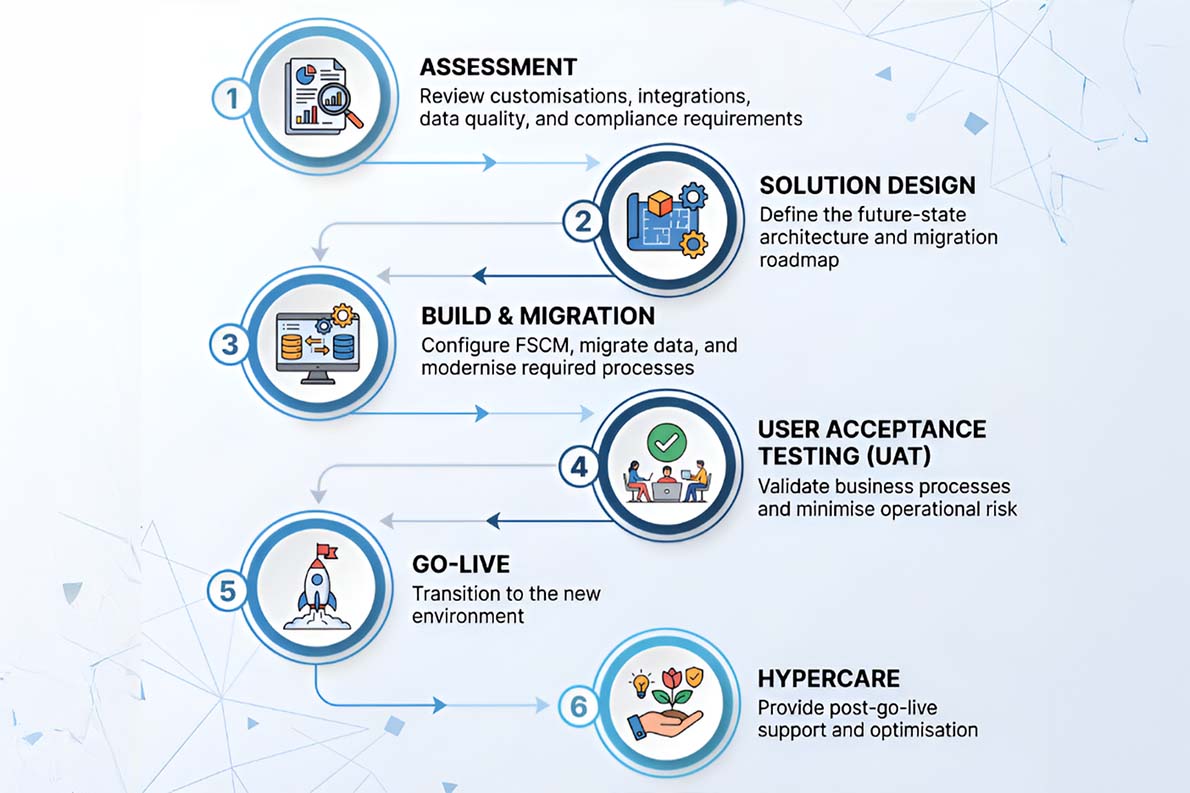
The most successful AX to FSCM migrations are proactive rather than reactive. Starting early provides greater flexibility in project planning, partner selection, and risk management, allowing manufacturers to modernise on their own terms instead of under deadline pressure.
Plan Your Upgrade Before Resources Become Scarce
Work with Microsoft ERP specialists to evaluate your AX environment and create a low-risk migration strategy.
AX to FSCM Upgrade Assessment: Key Questions Every UK Manufacturer Should Ask
By this stage, the question is no longer whether Dynamics AX will need to be replaced. The more important question is how much risk, cost, and complexity your organisation is willing to carry before acting.
For CFOs, COOs, CEOs, and IT leaders, this is not simply an IT decision. It is a business continuity, compliance, and operational resilience decision that happens to involve software.
Dynamics AX Migration Checklist for UK Manufacturing Leaders
Use the following questions as a high-level assessment of your organisation’s upgrade urgency:
- Which AX version are you running?
- Have you quantified the cost of a 48-hour ERP outage?
- Is your current AX environment MTD-compliant for 2026/27?
- When was the last time you conducted a security audit of your ERP infrastructure?
- Is your ERP environment prepared for current and upcoming UK compliance requirements?
Bottom Line
For UK manufacturers still using Dynamics AX, the question is not if an upgrade is needed, but whether you will complete it on your terms or under future pressure.
Delaying an AX to FSCM upgrade increases costs. As compliance requirements tighten, security risks grow, and migration specialists become less available, the financial and operational impact of waiting rises.
We understand that ERP migration is a significant decision. However, manufacturers that achieve the best outcomes are those that start planning early, minimise disruption, and move with a clear roadmap.
At Mercurius IT, we help manufacturers assess their AX environment, identify risks, and develop a migration strategy aligned with business goals.
Understand the Real Cost of Delaying Your AX Upgrade
Our experts will assess your current environment and provide a practical roadmap for moving from AX to Dynamics 365 FSCM with minimal disruption.
Frequently Asked Questions
What is the cost of migrating from Dynamics AX to Dynamics 365 FSCM?
The cost depends on factors such as user count, customisations, integrations, data migration requirements, and implementation scope. Most projects include licensing, migration services, testing, training, and change management.
Is Dynamics AX still supported by Microsoft?
No. Dynamics AX, including AX 2012 R3, is no longer supported by Microsoft. Organisations no longer receive security updates, bug fixes, or technical support, increasing operational and cybersecurity risks.
How long does a Dynamics AX to Dynamics 365 FSCM migration take?
Most migrations take between 6 and 12 months. Timelines vary based on customisations, integrations, data quality, and business process complexity.
Why should manufacturers upgrade from Dynamics AX to FSCM before 2026?
Delaying migration can increase costs due to growing technical debt, compliance pressures, partner scarcity, and higher implementation complexity. Early planning provides greater control over budgets, timelines, and resources.
What are the benefits of upgrading to Dynamics 365 Finance & Supply Chain Management?
Dynamics 365 FSCM provides AI-driven automation, improved supply chain visibility, cloud scalability, continuous Microsoft innovation, enhanced security, and stronger compliance capabilities.
Can existing Dynamics AX customisations be migrated to FSCM?
Yes, but each customisation should be assessed. Some can be modernised using standard FSCM functionality, Power Platform tools, or extensions, reducing long-term maintenance costs.